Anthropic Prompting Guide: What the Official Docs Say (2026)
A digest of Anthropic's official prompting guide for Claude: where each page lives, a worked example for every technique, and old advice that no longer applies.

On this page
- Where the Official Guide Lives
- The Core Techniques, Each With a Worked Example
- 1. Be clear and direct
- 2. Say why the rule exists
- 3. Show three to five examples
- 4. Separate the parts with XML tags
- 5. Give Claude a role
- 6. Long documents first, question last
- 7. Ask for the format you want
- 8. Ask for action when you want action
- 9. Let Claude check its own draft
- 10. Give it permission to say "I don't know"
- What Changed From Older Guides
- One Prompt Built From the Whole Guide
- Frequently Asked Questions
- Is there an Anthropic prompt engineering guide PDF?
- Is Anthropic's prompt engineering interactive course free?
- Does Anthropic have a tool that drafts prompts for you?
- Does the guide apply to claude.ai or only the API?
- Which page should I read first?
- Your Move
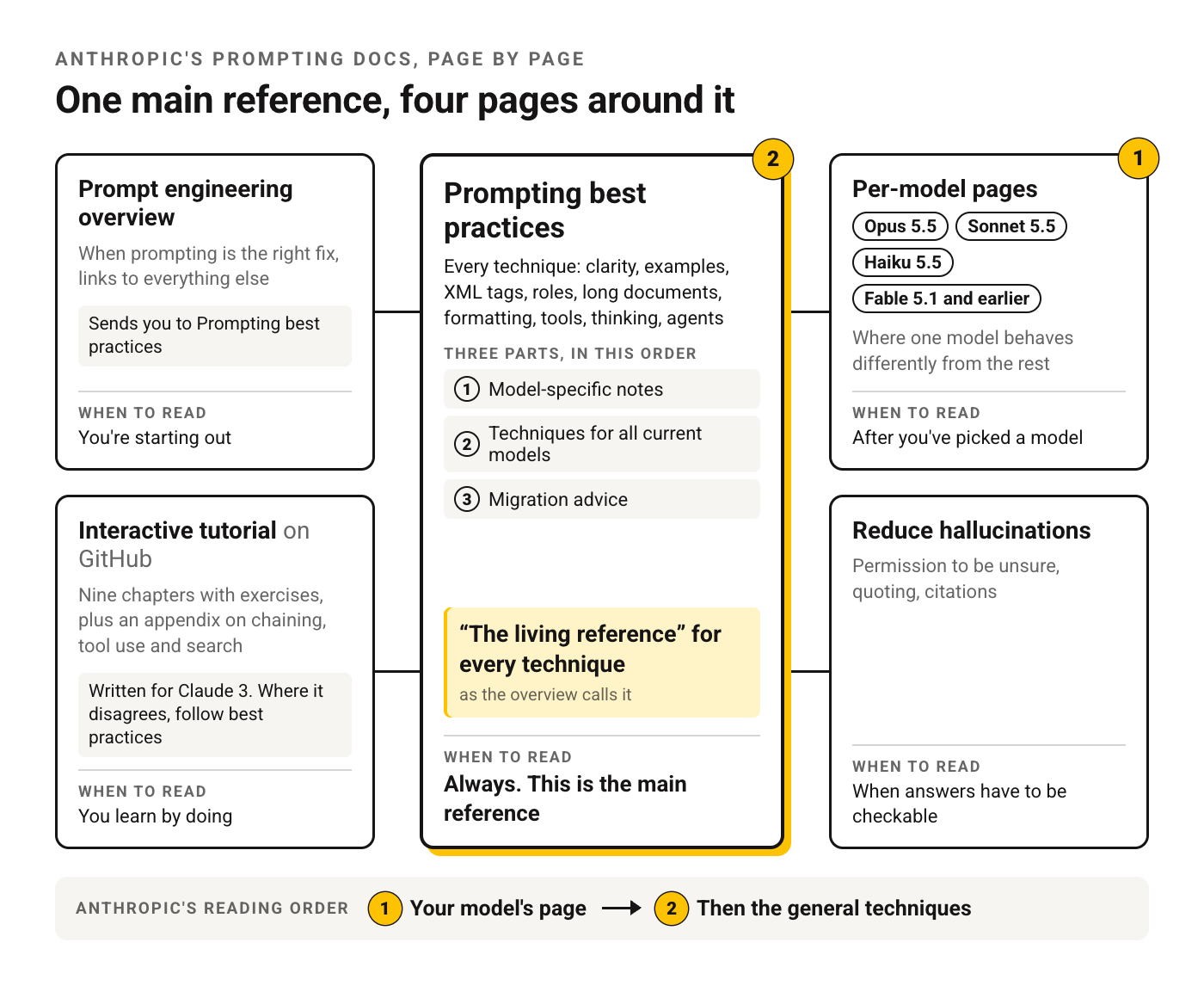
The Anthropic prompting guide isn't one document. It's a cluster of pages on the Claude Platform Docs, and the overview page sends you to one of them, Prompting best practices, calling it "the living reference" for every technique.
That page is long, and it mixes advice for chat users with advice for people building agents. So here's the digest. Where each part lives, what each technique says in plain words, and one worked example per technique. We wrote the examples ourselves, on different tasks than Anthropic's, so you see the idea twice. Everything attributed to Anthropic links to the page it came from, checked on November 2, 2026.
Where the Official Guide Lives
| Page | What's on it | Read it when |
|---|---|---|
| Prompt engineering overview | When prompting is the right fix, links to everything else | You're starting out |
| Prompting best practices | Every technique: clarity, examples, XML tags, roles, long documents, formatting, tools, thinking, agents | Always. This is the main reference |
| Per-model pages (Opus 5.5, Sonnet 5.5, Haiku 5.5, Fable 5.1 and earlier) | Where one model behaves differently from the rest | After you've picked a model |
| Reduce hallucinations | Permission to be unsure, quoting, citations | When answers have to be checkable |
| Interactive tutorial on GitHub | Nine chapters with exercises, plus an appendix on chaining, tool use and search | You learn by doing |
The best practices page is organized in three parts: model-specific notes first, then techniques for all current models, then migration advice. Its own instruction is to read your model's page first, then the general techniques.
Two things people search for that the docs handle differently than you'd expect. There's no official PDF that we could find. Every docs page we used also exists as Markdown at the same address with .md added, which prints cleanly or pastes into a chat. And the tutorial is older than the rest: the overview says it was written for Claude 3 models and tells you to follow the best practices page wherever the two disagree.
The overview also sets a precondition that's easy to skip. It assumes you already have a definition of success, a way to test against it, and a first draft. Without those you can't tell whether a change helped.
The Core Techniques, Each With a Worked Example
These follow the order of the best practices page. The claim is Anthropic's, the example is ours.
1. Be clear and direct
Anthropic's framing: treat Claude as "a brilliant but new employee" with no context on your norms. Their test is to hand the prompt to a colleague who knows nothing about the task. If they'd be confused, Claude will be too. And if you want more than the minimum, ask for it outright.
Before:
Write a product description for our water bottle.

After:
Write a product description for the product page of our online store.
Product: 750 ml insulated steel water bottle, [hours] hours cold, [hours] hours hot, fits car cup holders.
Reader: commuters comparing three or four bottles on their phone.
Length: 80 to 100 words, one paragraph, then three short bullet points with specs.
Tone: plain and confident. No exclamation marks.
2. Say why the rule exists
The docs say a reason behind an instruction lets Claude generalize from it. A bare rule only covers the case you named. Give the why, and Claude applies it to cases you didn't think of.
Before:
Don't use jargon.

After:
These replies go to small-business owners who've never used accounting software. Replace terms like "reconciliation" or "accrual" with a plain description of what actually happens to their money.
3. Show three to five examples
Examples are, in Anthropic's words, among the most reliable ways to steer format and tone. The page asks for examples that mirror your real use case, vary enough to cover edge cases, and sit inside <example> tags so Claude doesn't mistake them for instructions. It suggests three to five. If you want the background first, here's how few-shot prompting works.
Sort each support ticket into one category: billing, bug, feature_request, other.

<examples>
<example>Ticket: "I was charged twice this month." → billing</example>
<example>Ticket: "Export button does nothing on Safari." → bug</example>
<example>Ticket: "Could you add a dark mode?" → feature_request</example>
<example>Ticket: "Do you have an office in Berlin?" → other</example>
</examples>

Ticket: "[paste ticket]"
4. Separate the parts with XML tags
When one prompt holds your instructions plus pasted material and examples, tags keep them apart. The page recommends consistent, descriptive tag names and nesting where the content has a natural hierarchy.
<instructions>
Turn the meeting notes into a list of action items. Each item: owner, task, due date if one was said.
</instructions>

<context>
Weekly sync of a five-person marketing team. Owners are referred to by first name.
</context>

<notes>
[paste notes]
</notes>
5. Give Claude a role
A role in the system prompt focuses tone and behavior, and the docs say even one sentence makes a difference. In the API that's the system field. In the Claude apps there's no system field, so the closest equivalent is instructions you save on a project or your account.
System: You are a senior tax preparer who explains things to first-time freelancers. You flag anything that needs a licensed professional instead of guessing.

User: I made $14,000 from freelance design work this year and nothing was withheld. What should I set aside?
6. Long documents first, question last
For inputs past roughly 20,000 tokens, the page says to put the documents at the top and the question at the end. Anthropic notes that queries at the end can improve response quality by up to 30 percent in its tests. Wrap each document in <document> tags with a <source> line, and ask Claude to pull the relevant quotes before it answers.
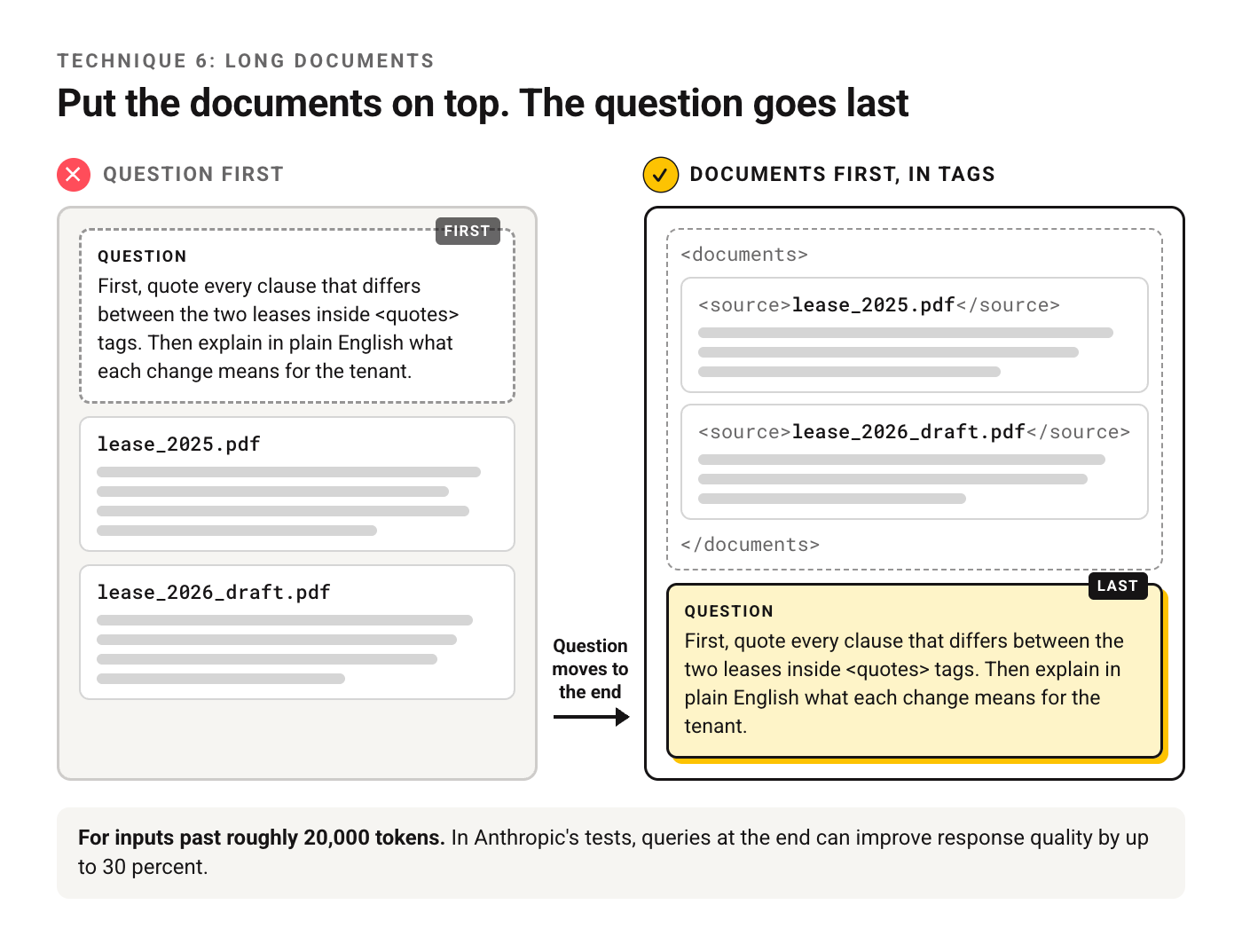
<documents>
  <document index="1">
    <source>lease_2025.pdf</source>
    <document_content>[paste]</document_content>
  </document>
  <document index="2">
    <source>lease_2026_draft.pdf</source>
    <document_content>[paste]</document_content>
  </document>
</documents>

First, quote every clause that differs between the two leases inside <quotes> tags. Then explain in plain English what each change means for the tenant.
7. Ask for the format you want
Three moves from the formatting section. Describe the format you want instead of the one you don't. Name a tag for the output. And match your own prompt's style to the answer you want back, because a prompt full of markdown tends to get markdown in return.
Before:
Don't use bullet points.

After:
Write your answer as two or three short paragraphs of plain prose, inside <answer> tags.
8. Ask for action when you want action
The docs point out that "Can you suggest some changes" may get you suggestions and no edits. If you want the work done, phrase it as the work.
Before:
Could you take a look at my cover letter?

After:
Edit my cover letter. Cut it to 250 words, move the strongest result into the first paragraph, and return the full revised letter followed by a three-line list of what you changed.
9. Let Claude check its own draft
Claude now handles most multistep reasoning internally, and the page says explicit chaining still earns its place when you want to inspect the steps. The pattern it calls the most common is self-correction, run as three separate requests.
Request 1: Draft a 300-word onboarding email for new customers of [product].

Request 2: Review this draft against these criteria: one clear next step, no feature list longer than three items, readable on a phone. List every place it fails.
<draft>[paste draft]</draft>

Request 3: Rewrite the draft to fix every issue in this review. Change nothing else.
<draft>[paste draft]</draft>
<review>[paste review]</review>
10. Give it permission to say "I don't know"
This one lives on the separate hallucination page. It recommends three habits: explicit permission to admit uncertainty, word-for-word quotes before analysis on long documents, and checking each claim against a quote, deleting any claim that can't be supported. For a wider set of tactics, see nine more ways to cut made-up answers.
Using only the report below, list the three biggest risks to the launch date.
For each risk, quote the sentence that supports it.
If the report doesn't support a risk, don't include it. If it lacks the information to judge, say "The report doesn't say."

<report>[paste]</report>
What Changed From Older Guides
Several pages that rank for this topic were written for Claude 2 or Claude 3. Some of their advice now fails outright, and some of it backfires. Each row below comes from the current docs.
| Older advice | What the docs say now | Source |
|---|---|---|
| Start Claude's answer for it (prefill) to force a format | Not supported on the last assistant turn from Claude 4.6 models on; the request returns an error. Use structured outputs or a direct instruction | Best practices |
Cap thinking with budget_tokens |
Claude 4.6 and later use adaptive thinking; on 4.7 and later, budget_tokens returns an error. The effort setting controls depth |
Best practices, thinking section |
| Shout: "CRITICAL: You MUST use this tool" | Opus 4.5 and 4.6 react more strongly to the system prompt and can overtrigger. Plain wording works | Best practices, tool use section |
| "Think carefully before answering" in a chat system prompt | For Opus 5.5, consider removing it; the model decides how much to think | Opus 5.5 page |
| Long anti-markdown rules | Fable 5.1 already formats less, and the block can suppress structure the content needs | Best practices, formatting section |
| Tutorial chapter on "speaking for Claude" | The tutorial targets Claude 3. Follow the best practices page where they differ | Overview |
The pattern across the table: older prompts compensated for models that needed pushing. Current models need less of it, and the extra pressure shows up as overcorrection.
One Prompt Built From the Whole Guide
Here's a single task taken through every technique above: turning customer interview transcripts into product decisions.
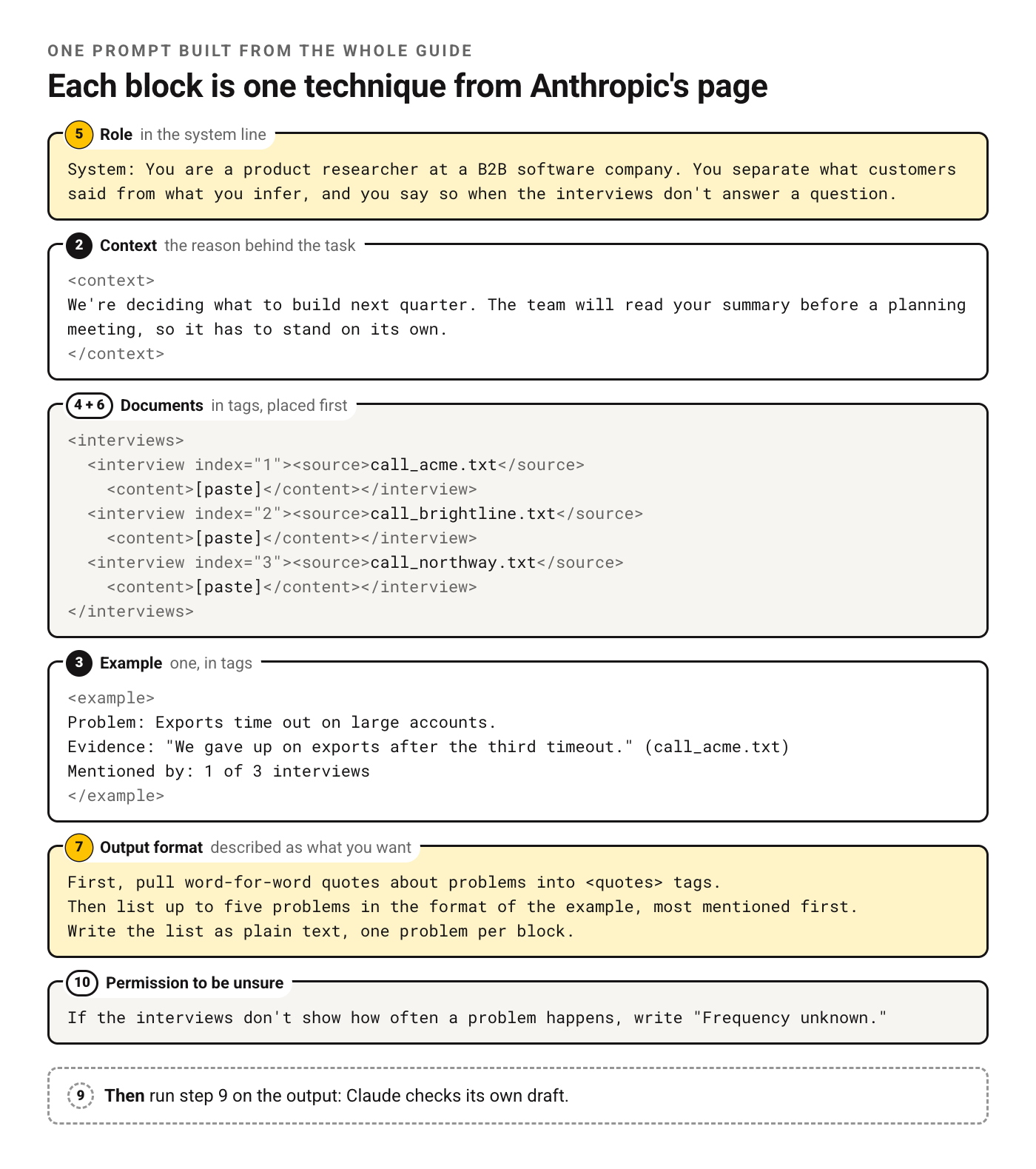
System: You are a product researcher at a B2B software company. You separate what customers said from what you infer, and you say so when the interviews don't answer a question.

<context>
We're deciding what to build next quarter. The team will read your summary before a planning meeting, so it has to stand on its own.
</context>

<interviews>
  <interview index="1"><source>call_acme.txt</source><content>[paste]</content></interview>
  <interview index="2"><source>call_brightline.txt</source><content>[paste]</content></interview>
  <interview index="3"><source>call_northway.txt</source><content>[paste]</content></interview>
</interviews>

<example>
Problem: Exports time out on large accounts.
Evidence: "We gave up on exports after the third timeout." (call_acme.txt)
Mentioned by: 1 of 3 interviews
</example>

First, pull word-for-word quotes about problems into <quotes> tags.
Then list up to five problems in the format of the example, most mentioned first.
Write the list as plain text, one problem per block.
If the interviews don't show how often a problem happens, write "Frequency unknown."
Read it top to bottom and you'll find each part of the guide: role in the system line (5), reasons in the context block (2), tagged documents placed first (4 and 6), one example in tags (3), the format described positively (7), and permission to be unsure (10). Then run step 9 on the output.
Frequently Asked Questions
Is there an Anthropic prompt engineering guide PDF?
None that we could find. Adding .md to a docs address gives a printable copy.
Is Anthropic's prompt engineering interactive course free?
The tutorial on GitHub is public, and a Google Sheets version exists too. Running the exercises requires an API key; without one, Anthropic points you to a static answer key you can read.
Does Anthropic have a tool that drafts prompts for you?
The overview links a prompt generator notebook in the Claude Cookbook, a "metaprompt" that drafts a first prompt for you to refine. If you'd rather skip the notebook, our Claude prompt generator does a similar first pass in the browser.
Does the guide apply to claude.ai or only the API?
Most of it is about the words in the prompt, so it carries over. A few items are API-only: the system field, effort settings, thinking configuration and prefill. If you mostly work in the Claude app, our before-and-after fixes for everyday Claude tasks are written for that.
Which page should I read first?
The page for the model you use, then the general techniques. That's the order Anthropic gives. Each model page lists what changed from the model before it, so a prompt tuned for an older model gets its fixes there first.
Your Move
Take a prompt you already use every week. Run it through techniques 1, 2 and 6, which only ask you to add a few lines or move a block, and compare the two answers side by side.
For everything that doesn't fit here, our guide to general principles that hold across models picks up where Anthropic's page stops.
Put this into practice: browse the Claude section and the coding collection in the God of Prompt library. Copy, paste, run.
Once a prompt works, you'll want to stop re-pasting it. The Claude Skills Mini Course shows how to package it as a Skill with its own SKILL.md file, so the setup lives in one place.
Prompts for this topic
Put this article to work with ready-to-use prompts from the God of Prompt library.
Keep reading
Prompt Caching Explained: Claude, OpenAI, Gemini (2026)
How prompt caching works on Claude, OpenAI, Gemini and Bedrock: minimum lengths, cache lifetimes, prices and a worked example of what a cached prefix saves.

Claude Prompting Best Practices: 10 Before-and-After Fixes
Claude prompting best practices shown as 10 before-and-after rewrites for everyday tasks, plus the fixes each current Claude model needs, with sources.
LLM Prompts: 14 Ready-to-Use Templates for Any Model
14 copy-paste LLM prompts for summaries, data extraction, critique and system prompts, written to run in ChatGPT, Claude, Gemini or a local model.

The best of the blog, in your inbox
One email when notable prompts, tools, and model updates land. No spam, unsubscribe anytime.
Join 100,000+ subscribers. One email a week, real prompts, tools, and model updates. Unsubscribe anytime.