Prompt Caching Explained: Claude, OpenAI, Gemini (2026)
How prompt caching works on Claude, OpenAI, Gemini and Bedrock: minimum lengths, cache lifetimes, prices and a worked example of what a cached prefix saves.

On this page
- What Is Prompt Caching?
- Prompt Caching on Each Provider
- Anthropic (Claude) prompt caching
- OpenAI prompt caching
- Gemini context caching
- Bedrock prompt caching
- What a Cached Prefix Saves: A Worked Example
- How to Structure a Prompt So It Caches
- Why Your Cache Isn't Hitting
- When Prompt Caching Isn't Worth It
- Frequently Asked Questions
- When to use prompt caching?
- Is prompt caching worth it?
- Can you provide an example of prompt caching?
- How to trigger prompt caching?
- When should you not cache?
- Your Move
Prompt caching lets a model reuse the part of a request it has already processed, so you pay less for those tokens and wait less for the answer. If your system prompt, tool definitions and reference documents are the same from one call to the next, the provider keeps its work on that opening stretch for a few minutes and charges a fraction of the normal input price when the next request starts the same way.
Every major API has it now, and every one of them does it a little differently: what turns it on, how long the cache lives, how short a prompt can be before it's ignored, and what a cached token costs. This page puts those four answers side by side for Claude, OpenAI, Gemini and Bedrock, checked in November 2026, then walks through what a cached prefix saves and why a cache sometimes refuses to hit.
What Is Prompt Caching?
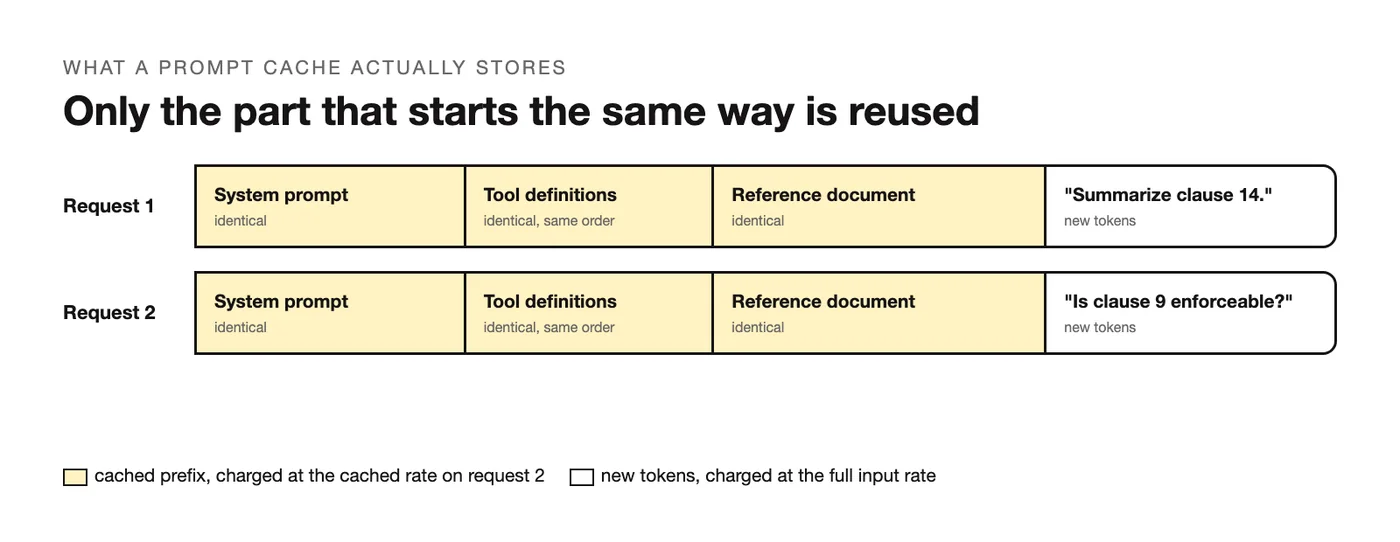
A prompt cache is a copy of the model's internal state after it has read the beginning of your prompt. The provider stores that state under a key built from the exact tokens it read, and when the next request starts with the same tokens, in the same order, it loads the state instead of reading the text again. The rest of the request, the part that differs, is processed as usual.
Three words in that description do all the work. The first is prefix: only the opening stretch of the prompt is cached, from the first token up to the point where the two requests diverge, so anything you want cached has to come before anything that changes. The second is exact: a single changed character inside the prefix, a reordered tool, a timestamp in the system prompt, and the key no longer matches. The third is lifetime: the stored state expires after a set time, often five minutes, unless another request hits it and resets the clock.
That makes prompt caching a different thing from two neighbors it gets confused with. It's a cache of the prompt, so it has nothing to do with whether the model remembers earlier chats, which is a question of what context means in a prompt and what you send with each call. And it's a cache of the input, so it doesn't store answers: a semantic cache that returns an old response to a similar question is a separate layer you'd build yourself.
Prompt Caching on Each Provider
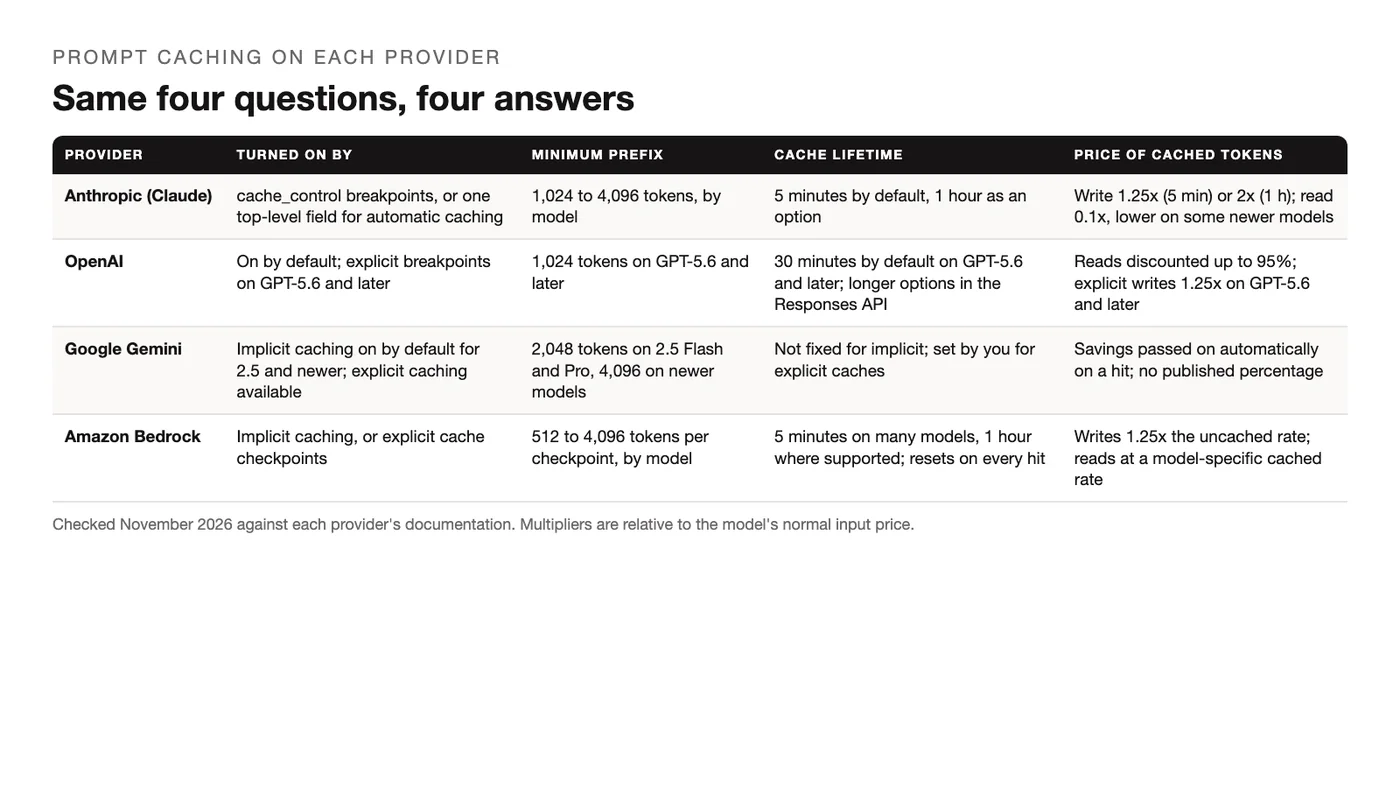
The four columns that decide whether caching helps you are the same on every platform. Here they are on one date, with each row pointing at the page it came from. Prices are multipliers of the model's normal input rate, because the dollar figures change with every model and the multipliers don't.
| Provider | Turned on by | Minimum prefix | Cache lifetime | Price of cached tokens | Source |
|---|---|---|---|---|---|
| Anthropic (Claude) | cache_control breakpoints, or one top-level field for automatic caching |
1,024 to 4,096 tokens, by model | 5 minutes by default, 1 hour as an option | Write 1.25x (5 min) or 2x (1 h); read 0.1x, lower on some newer models | Anthropic docs, checked November 2026 |
| OpenAI | On by default for supported models; explicit breakpoints on GPT-5.6 and later | 1,024 tokens on GPT-5.6 and later | 30 minutes by default on GPT-5.6 and later; longer options in the Responses API | Reads discounted up to 95%; explicit writes 1.25x on GPT-5.6 and later | OpenAI docs, checked November 2026 |
| Google Gemini | Implicit caching on by default for Gemini 2.5 and newer; explicit caching available | 2,048 tokens on 2.5 Flash and Pro, 4,096 on newer models | Not fixed for implicit caching; set by you for explicit caches | Savings passed on automatically on a hit; no published percentage for implicit caching | Gemini docs, checked November 2026 |
| Amazon Bedrock | Implicit caching, or explicit cache checkpoints | 512 to 4,096 tokens per checkpoint, by model | 5 minutes on many models, 1 hour where the model supports it; resets on every hit | Writes 1.25x the uncached input rate; reads at a model-specific cached rate | Bedrock docs, checked November 2026 |
Anthropic (Claude) prompt caching
Anthropic (Claude) prompt caching is the explicit kind. You mark where the cacheable prefix ends with a cache_control block, up to four of them in one request, or you set one cache_control field at the top level of the request and let the API pick the breakpoints. The default lifetime is five minutes and a one-hour version costs more to write. Minimums run from 1,024 to 4,096 tokens depending on the model, and a prompt below the minimum isn't cached even when it's marked, with no error to tell you so.
{
  "model": "claude-sonnet-5-5",
  "system": [
    { "type": "text", "text": "You are a contracts analyst. ... (long, stable instructions)",
      "cache_control": { "type": "ephemeral" } }
  ],
  "messages": [{ "role": "user", "content": "Summarize clause 14." }]
}
OpenAI prompt caching
OpenAI prompt caching is on by default for supported models, so a request that repeats a prefix of at least 1,024 tokens on GPT-5.6 and later gets the discount without any flag. The docs put the cached-input discount at up to 95% and ask you to put stable developer instructions and shared reference material first, with anything that changes per request at the end. On GPT-5.6 and later you can also set explicit breakpoints and a cache lifetime, with writes billed at 1.25x for the default 30-minute lifetime, and a prompt_cache_key to steer requests with the same prefix to the same place.
Gemini context caching
Gemini context caching comes in two forms. Implicit caching is on for every Gemini 2.5 and newer model: if a request starts with content the service has seen recently, and the prefix clears the minimum of 2,048 tokens on 2.5 Flash and Pro or 4,096 on newer models, Google passes the savings on without any setting. Explicit caching lets you store a block of content once, give it a lifetime, and reference it from later calls, which is the route for a large document you'll question for an afternoon. The Gemini API guide covers where those calls sit in the rest of the API.
Bedrock prompt caching
Bedrock prompt caching mirrors the model underneath it, so Claude on Bedrock behaves like Claude elsewhere, but the vocabulary is Amazon's: the markers are called cache checkpoints, and there's an implicit mode that needs no markers. Minimums range from 512 to 4,096 tokens per checkpoint by model, the lifetime is five minutes on many models and resets on every hit, writes cost 1.25x the uncached input rate, and none of it applies to batch inference. If you're deciding between hosts for the same model, the LLM API providers compared page is the wider view.
What a Cached Prefix Saves: A Worked Example
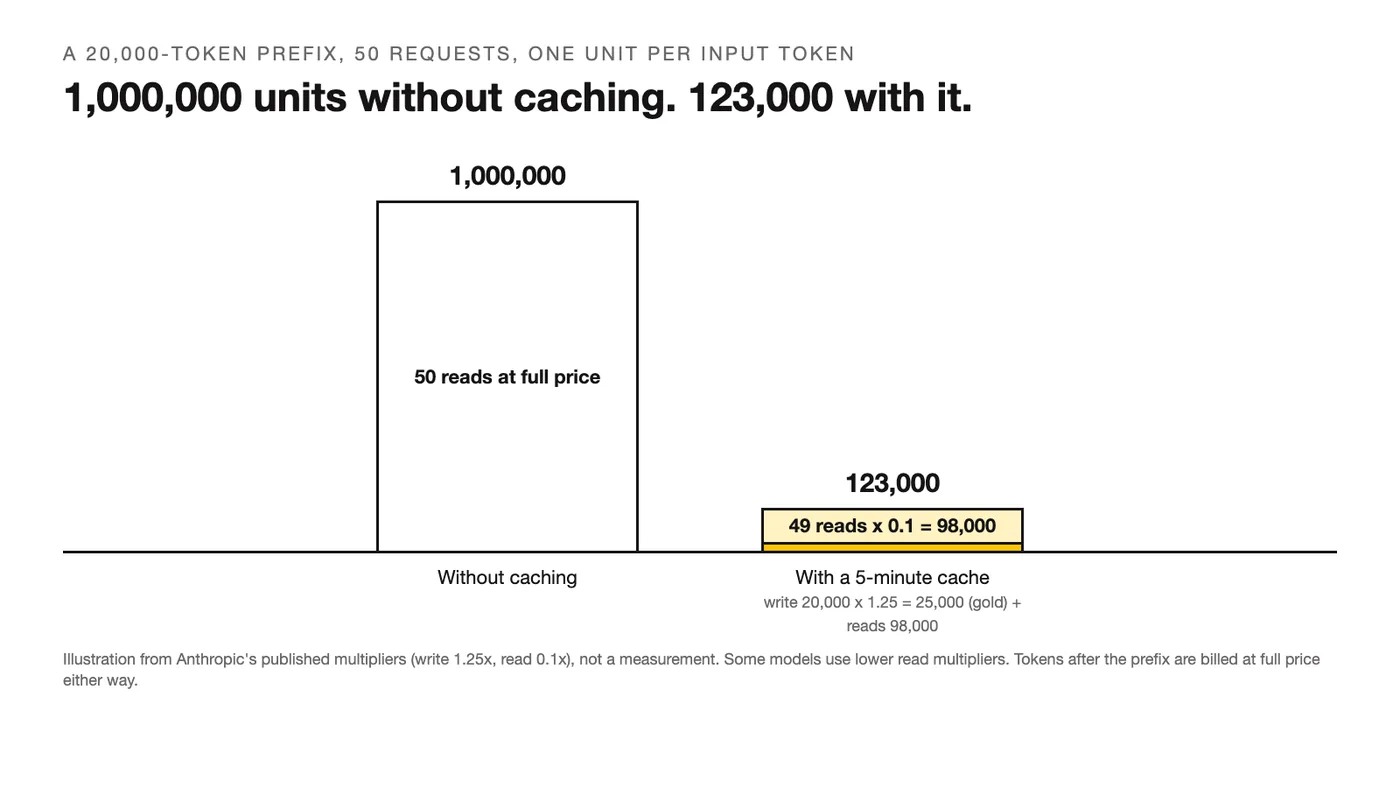
Take a prefix of 20,000 tokens, a system prompt plus a reference document, and 50 requests that all start with it inside one cache window. Call the price of one normal input token one unit. Without caching, the 50 requests read the prefix 50 times: 50 x 20,000 = 1,000,000 units.
With Anthropic's five-minute cache and the multipliers from its docs, the first request writes the prefix at 1.25x, and the other 49 read it at 0.1x:
| Tokens | Multiplier | Units | |
|---|---|---|---|
| Cache write (request 1) | 20,000 | 1.25 | 25,000 |
| Cache reads (requests 2 to 50) | 49 x 20,000 | 0.1 | 98,000 |
| Total with caching | 123,000 |
That's 12.3% of the uncached cost for the prefix, or a bit under an eighth. This is an illustration built from Anthropic's published multipliers, not a measurement; some models use lower read multipliers, and the tokens after the prefix, the questions and the answers, are billed at full price either way. The shape of the result is the same on the other providers: one slightly more expensive first call, then a long run of cheap ones, as long as the calls land inside the lifetime.
How to Structure a Prompt So It Caches
Because the cache is a prefix match, the order of your prompt decides whether it works. The rules are the same on every provider, and they're the same rules that make a prompt easier to read in the first place.
- Put the stable part first. System instructions, the persona, the output format: anything that's identical across requests goes at the very top. The system prompts for agents in the library are written this way, with the invariant block at the start.
- Keep tool definitions and their order fixed. On most providers the tools are part of the prefix, so adding, removing or reordering a tool changes the key for everything after it.
- Put reference material next. The document, the schema, the examples: large, shared, and the same for everyone, so it lands inside the cached stretch.
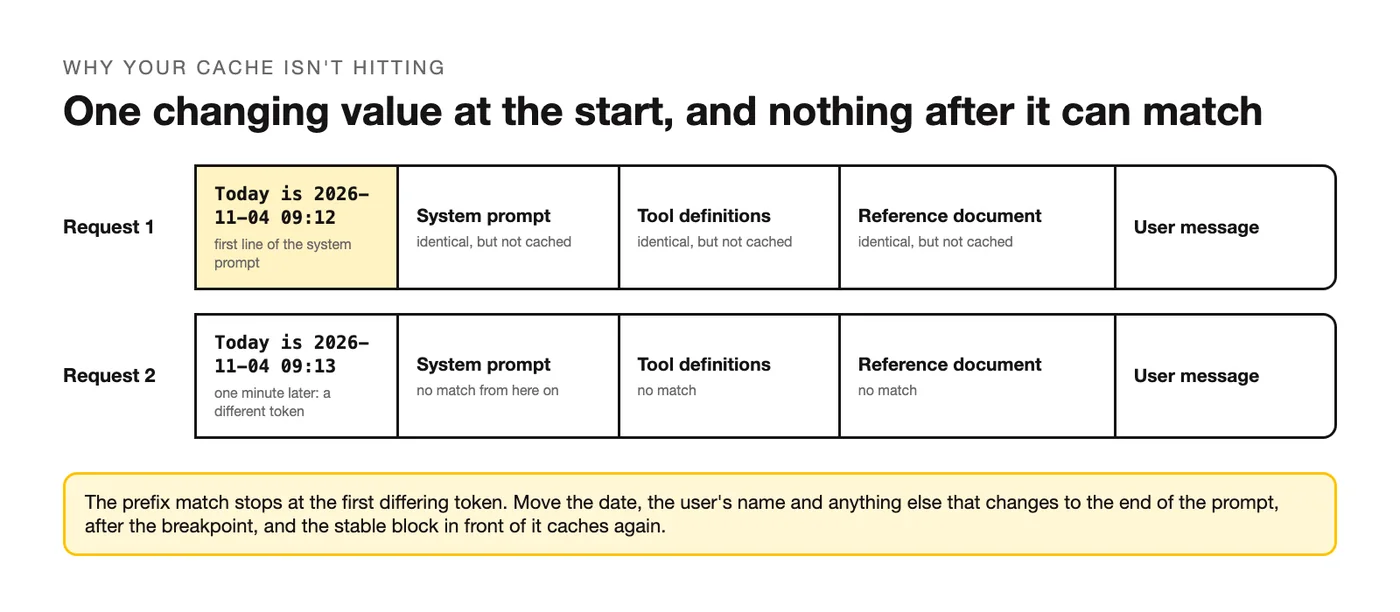
- Put the date, the user's name and the user's message last. Anything that differs per request belongs after the breakpoint. A timestamp in the system prompt is the single most common way to lose every cache hit.
- Mark the breakpoint after the static block. On Anthropic and Bedrock that's an explicit
cache_controlor checkpoint at the end of the stable content; on OpenAI and Gemini the implicit cache finds it, and an explicit breakpoint on GPT-5.6 and later lets you pin it. - Send the requests close together. A five-minute cache that's refreshed on every hit stays warm through a busy session and goes cold over lunch.
A request body that follows the order looks like this, with the breakpoint after the static block:
{
  "system": "<stable instructions and format>",
  "tools": "<fixed tool list, same order every call>",
  "messages": [
    { "role": "user", "content": [
      { "type": "document", "source": "<the shared reference, cached>",
        "cache_control": { "type": "ephemeral" } },
      { "type": "text", "text": "<today's date, the user's question>" }
    ] }
  ]
}
Why Your Cache Isn't Hitting
Most misses come from a handful of causes, and the usage fields in the response tell you which one you have: a count of cache-read tokens that stays at zero means the key never matched, a cache-write count on every call means every request is building a fresh cache.
| Symptom | Likely cause | Fix |
|---|---|---|
| No cached tokens on any request | The prefix is shorter than the model's minimum | Move more stable content above the breakpoint, or accept that this prompt is too short to cache |
| A write on every request, never a read | Something in the prefix changes each call: a date, a request id, a user name | Move the changing value after the breakpoint and keep the prefix byte-for-byte identical |
| Hits in testing, misses in production | Requests are spaced further apart than the cache lifetime | Batch the work into a session, or pay for the one-hour lifetime where the provider offers it |
| Hits stopped after a deploy | Tool list or system prompt changed, even slightly | Version the prefix on purpose and expect a cold cache after each change |
| Partial hits, far fewer cached tokens than expected | The breakpoint sits before most of the stable content | Place the breakpoint at the end of the static block, after the reference material |
| No caching at all on a job that runs overnight | The job uses batch inference on Bedrock, or a model without caching support | Check the provider's supported-model list; batch endpoints don't cache |
When Prompt Caching Isn't Worth It
The decision rule: if the same prefix of at least the provider's minimum is reused within its cache lifetime, cache it. If every request has a different start, or calls are hours apart on a five-minute cache, caching adds nothing, and on Anthropic a write costs more than a plain read.
Three cases fail that test often enough to name:
- One-off prompts. A single long request with no sibling pays the write premium and never collects the read discount.
- Prompts under the minimum. A 600-token system prompt with a 40-token question is below every provider's floor, so there's nothing to cache; if you want it cheaper, prompt optimization is the lever, not caching.
- Prefixes that drift by design. A personalized system prompt that embeds the user's profile is a different prefix per user, so the cache only helps users who send several requests in a row.
Frequently Asked Questions
When to use prompt caching?
Use it whenever the same opening content goes out more than once inside the cache lifetime: a chatbot with a long system prompt, an agent that carries the same tool definitions on every step, a batch of questions against one document, or an evaluation run that replays a fixed instruction block over many inputs. The more requests share the prefix, and the longer that prefix, the bigger the share of your input bill it covers.
Is prompt caching worth it?
For a repeated prefix above the minimum, yes, and the arithmetic is lopsided: on Anthropic's multipliers a prefix read 50 times costs about 12% of what it would uncached, and OpenAI discounts cached input by up to 95%. It stops being worth it when the prefix is short, when requests are rare, or when the prefix changes per request, because then you're paying a write premium for reads that never happen.
Can you provide an example of prompt caching?
A support assistant with a 15,000-token knowledge block in its system prompt. Every customer message is a new request that starts with that same block. With caching, the first message of the session writes the block to the cache and every message after it, from every customer, reads it at the cached rate for as long as the cache stays warm. The customer's message, the part that's new, is the only part billed at the full input price.
How to trigger prompt caching?
On OpenAI and Gemini you don't have to do anything beyond ordering the prompt correctly and clearing the minimum length; the service matches the prefix on its own. On Anthropic you add a cache_control block at the end of the content you want cached, or set the one top-level field that turns on automatic caching. On Bedrock you add a cache checkpoint, or use implicit caching where the model supports it. In every case the trigger is the same: an identical prefix, long enough, inside the lifetime.
When should you not cache?
Don't cache when the prefix changes on every call, when the prompt is below the provider's minimum, when requests arrive further apart than the cache lifetime, or when the workload runs through a batch endpoint that doesn't support caching. One more case that isn't about money: if you're caching to make the model "remember" a user between sessions, you've picked the wrong tool, and the page on why Claude doesn't remember earlier chats explains what does.
Your Move
Open your most-called prompt and check two things: how many tokens sit before the first thing that changes per request, and how far apart the calls are. If the first number clears your provider's minimum and the second fits inside its lifetime, reorder the prompt so the stable block comes first, add the breakpoint, and watch the cached-token count in the next response. For prompts built to run on more than one model, the LLM prompts templates already keep the stable block at the top.
Put this into practice: browse the agentic workflow prompts in the God of Prompt library, written with the static block first. Want all of it in one place? The Complete AI Bundle puts the whole prompt library, Custom GPTs and n8n workflow templates behind one payment, with lifetime access.
Prompts for this topic
Put this article to work with ready-to-use prompts from the God of Prompt library.
Keep reading

Complete Prompt Collections for ChatGPT, Claude and Gemini
Unlock the full potential of AI tools with effective prompts tailored for diverse tasks, enhancing productivity, marketing, and education.

Claude Prompting Best Practices: 10 Before-and-After Fixes
Claude prompting best practices shown as 10 before-and-after rewrites for everyday tasks, plus the fixes each current Claude model needs, with sources.
LLM Prompts: 14 Ready-to-Use Templates for Any Model
14 copy-paste LLM prompts for summaries, data extraction, critique and system prompts, written to run in ChatGPT, Claude, Gemini or a local model.

The best of the blog, in your inbox
One email when notable prompts, tools, and model updates land. No spam, unsubscribe anytime.
Join 100,000+ subscribers. One email a week, real prompts, tools, and model updates. Unsubscribe anytime.