LLM Prompts: 14 Ready-to-Use Templates for Any Model
14 copy-paste LLM prompts for summaries, data extraction, critique and system prompts, written to run in ChatGPT, Claude, Gemini or a local model.


On this page
- The Five Parts of an LLM Prompt That Works
- 1. The universal skeleton
- What the Model Makers' Own Docs Say
- LLM Prompt Templates for Everyday Work (2 to 6)
- 2. Summary someone will act on
- 3. Pull every field out of messy text into a clean table
- 4. Rewrite in your voice
- 5. Compare three options against your own criteria and pick one
- 6. Reply to a hard email
- Prompts for Thinking Work (7 to 10)
- 7. Red-team a plan
- 8. Ask me questions first, then do the task once I've answered
- 9. Check an answer you already have
- 10. Research brief that flags its own gaps and doesn't invent sources
- Prompts for Building With LLMs (11 to 14)
- 11. Support bot system prompt
- 12. Message classifier taught by a couple of labeled examples
- 13. Grader for model outputs
- 14. Prompt that rewrites another prompt after a bad result
- One Prompt, Three Kinds of Model
- Test a Prompt Before You Reuse It
- Frequently Asked Questions
- What is an LLM prompt?
- What are the best prompts for LLMs?
- What are the 5 P's of prompting?
- What is the best LLM for generating prompts?
- Your Move
LLM prompts are the instructions you type into a large language model, and the ones that hold up share a shape: a task, the context behind it, the material to work on, the limits, and the format you want back. Get those five in and the model you're using matters a lot less.
That's the point of this page. Below are 14 templates built on that shape, each with brackets for your own details and tags that keep your pasted text apart from your instructions. They're written to run as-is in ChatGPT, Claude, Gemini or a model on your own machine.
First the five parts. Then what OpenAI and Anthropic say in their own prompting docs, because a few popular tricks don't survive that check. Then the templates.
The Five Parts of an LLM Prompt That Works
| Part | What it tells the model | Weak | Strong |
|---|---|---|---|
| Task | the job, as a verb and a deliverable | "Help with this report" | "Summarize this report in five bullets" |
| Context | why you need it and for whom | nothing | "for a CFO deciding whether to renew the vendor" |
| Input | the material, fenced off | pasted loose under the request | wrapped in <report> tags |
| Constraints | limits and exclusions | none | "under 120 words, no recommendations" |
| Output | the exact shape of the answer | "make it nice" | "a table: risk, likelihood, owner" |
Skip the context row and the model writes for an imaginary average reader. That's where generic answers come from. There's a full breakdown of how much the context line carries if you want the long version.
Here is the skeleton every template on this page grows from.
1. The universal skeleton
Task: [verb + deliverable, e.g. "Draft a reply to the email below"]
Context: [who it's for, why it matters, what a good result changes]
Constraints: [length, tone, things to avoid, things that must stay]
Output format: [bullets / table / JSON / short paragraphs, with headings if needed]

<input>
[paste your text, data or notes here]
</input>

If anything above is ambiguous, ask me before you answer.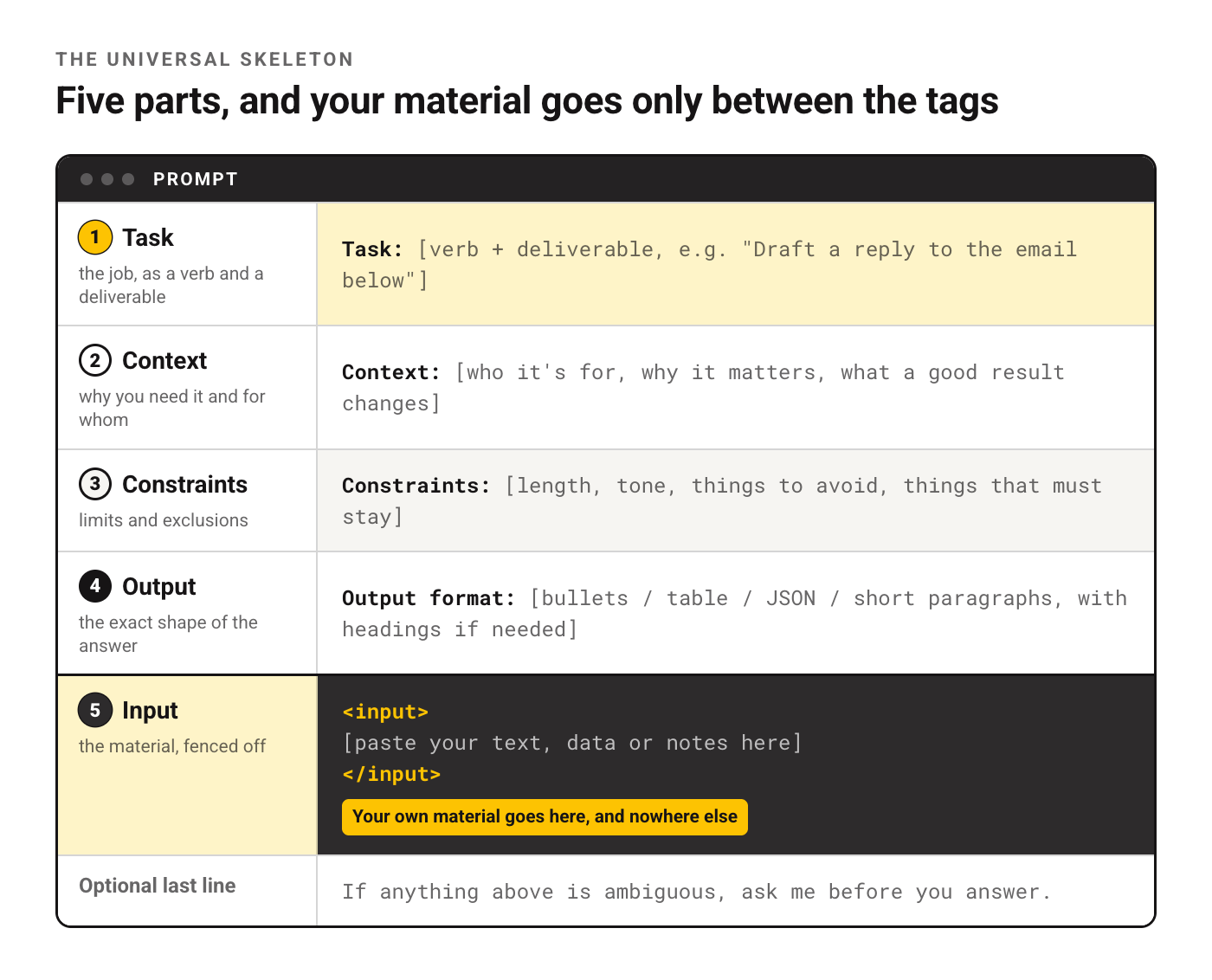
What the Model Makers' Own Docs Say
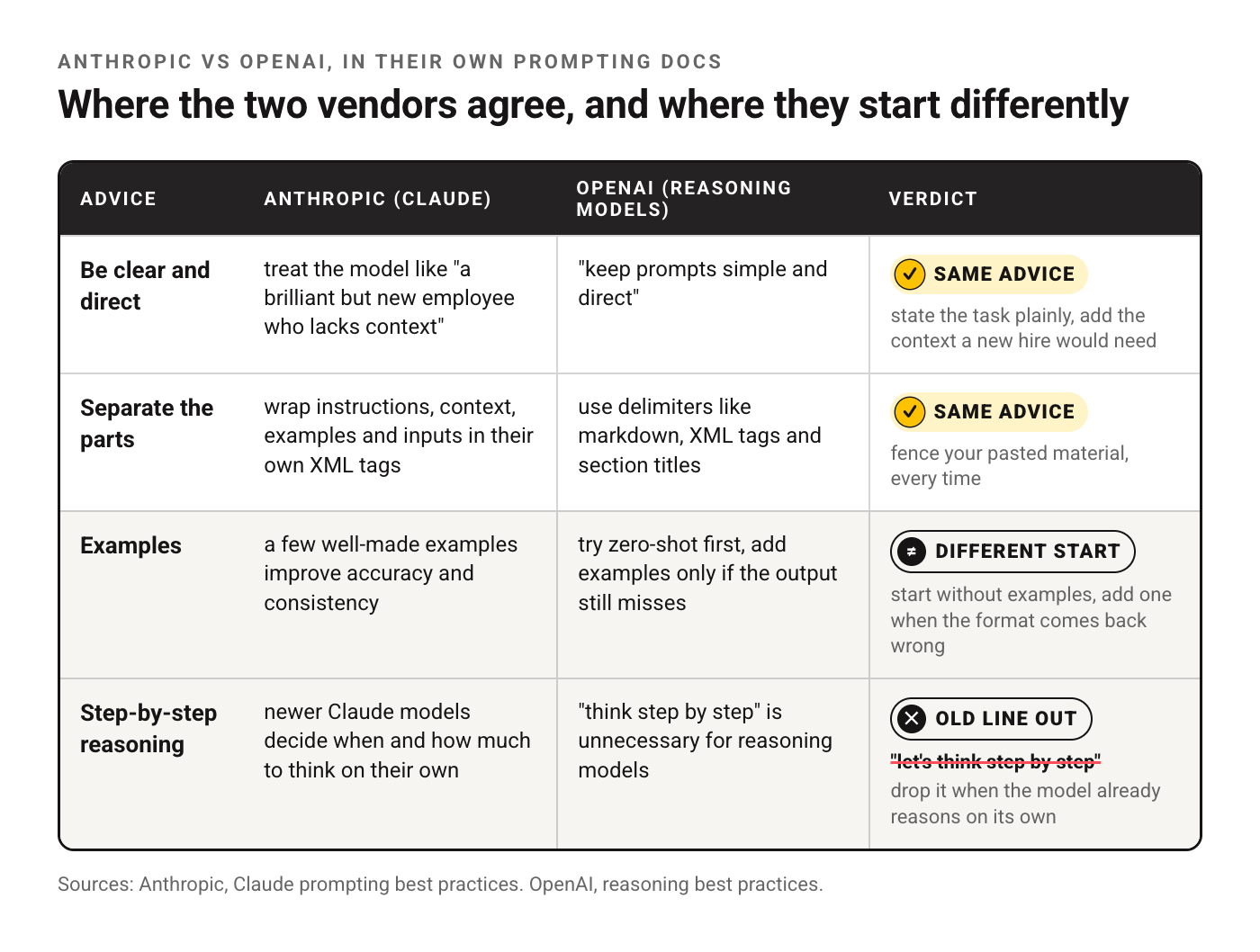
Plenty of the prompting advice online was written for older models. So before writing the templates we checked them against two official pages: Anthropic's Claude prompting best practices and OpenAI's reasoning best practices. The table only repeats what those pages state.
| Advice | Anthropic (Claude) | OpenAI (reasoning models) | What it means for your prompt |
|---|---|---|---|
| Be clear and direct | treat the model like "a brilliant but new employee who lacks context" | "keep prompts simple and direct" | state the task plainly, add the context a new hire would need |
| Separate the parts | wrap instructions, context, examples and inputs in their own XML tags | use delimiters like markdown, XML tags and section titles | fence your pasted material, every time |
| Examples | a few well-made examples improve accuracy and consistency | try zero-shot first, add examples only if the output still misses | start without examples, add one when the format comes back wrong |
| Step-by-step reasoning | newer Claude models decide when and how much to think on their own | "think step by step" is unnecessary for reasoning models | drop it when the model already reasons on its own |
Two things stand out. Both vendors want your sections fenced off, which is why every template here uses tags. And the old "let's think step by step" line, a fixture of older prompt lists, is something OpenAI now calls unnecessary for its reasoning models.
Anthropic's page goes well past this table: where long documents go, how to set a role, how to steer formatting. We've walked through it technique by technique, with an example for each, in our digest of the Anthropic prompting guide.
LLM Prompt Templates for Everyday Work (2 to 6)
These cover the jobs people hand to a model daily. They double as llm prompt examples you can study: each one shows the five parts in a different arrangement.
2. Summary someone will act on
Summarize the document below for [reader, e.g. "a manager with two minutes"].
They need to decide: [the decision this summary feeds].
Give: 1) a one-sentence bottom line, 2) up to five bullets with the facts that bear on the decision, 3) anything the document leaves unclear.
Quote numbers exactly as written. Don't add facts that aren't in the text.

<document>
[paste]
</document>
3. Pull every field out of messy text into a clean table
Extract every [item type, e.g. "invoice line"] from the text below.
Return a table with these columns: [column 1], [column 2], [column 3].
If a value is missing, write "not stated". Don't guess.
After the table, list any lines you couldn't classify and why.

<text>
[paste]
</text>
4. Rewrite in your voice
Here are two samples of my writing:
<sample_1>[paste]</sample_1>
<sample_2>[paste]</sample_2>

Rewrite the draft below so it sounds like the samples: same sentence length, same level of formality, same habits. Keep every fact and every number. Don't add new claims.

<draft>
[paste]
</draft>
5. Compare three options against your own criteria and pick one
I'm choosing between [option A], [option B] and [option C] for [goal].
What matters most to me, in order: [criterion 1], [criterion 2], [criterion 3].
Build a table scoring each option against each criterion with a one-line reason per cell.
Then recommend one option and name the single condition that would change your recommendation.
6. Reply to a hard email
Draft a reply to the email below. I'm [your role] and the sender is [their role].
What I want from this reply: [outcome].
What I can't offer: [limits].
Tone: calm and direct, no apologies beyond one sentence. Under 150 words.

<email>
[paste]
</email>
Template 3 pays off fastest once it's set up. Run it on one page, fix the column names until the table looks right, then reuse the exact same wording on the next hundred pages.
Prompts for Thinking Work (7 to 10)
Here the model isn't producing a document. It's checking your thinking, which means the prompt has to invite disagreement on purpose.
7. Red-team a plan
Here's my plan:
<plan>
[paste]
</plan>

Act as a skeptical reviewer who wants this plan to fail. List the five weakest assumptions, most dangerous first. For each, say what evidence would prove it wrong and how cheaply I could get that evidence. Don't rewrite the plan.
8. Ask me questions first, then do the task once I've answered
I need help with [task]. Before you answer, ask me up to five questions about anything you'd need to know to do this well. Ask them all at once, numbered. Wait for my answers, then do the task.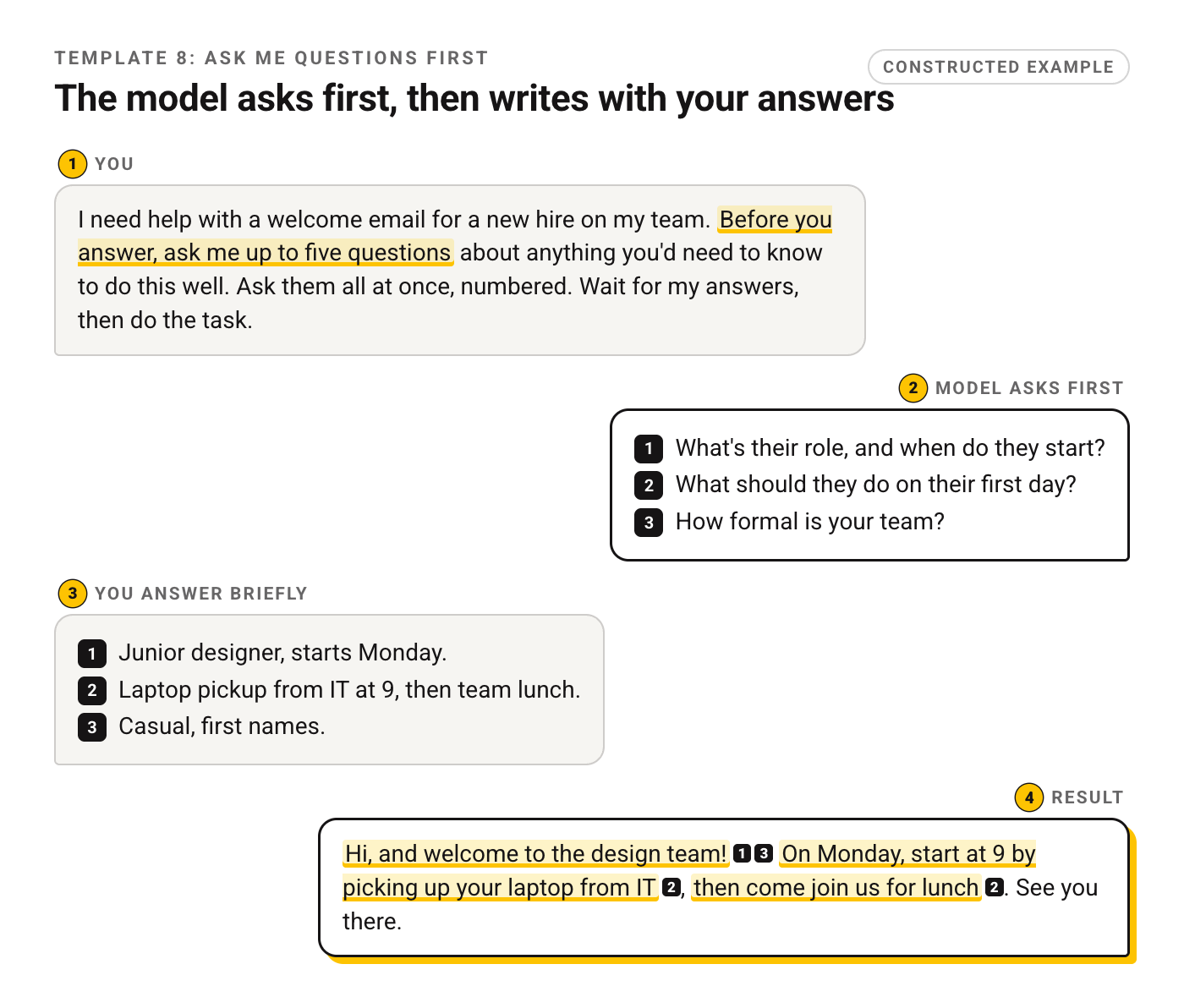
9. Check an answer you already have
Below is an answer I got to the question "[question]".
<answer>
[paste]
</answer>

Go through it claim by claim. Mark each one as: supported by the text, common knowledge, or unverified. For anything unverified, say what source would settle it. Don't soften the verdict.
10. Research brief that flags its own gaps and doesn't invent sources
I'm researching [topic] for [purpose].
Write a one-page brief: what's well established, what's disputed, and what I'd need to look up myself.
Flag every statement you're not confident about with [check].
No invented sources, no made-up figures. If you don't know, say so.
Templates 9 and 10 pair well with the other ways to cut down on made-up answers. Neither makes a model truthful. They make its uncertainty visible, which is the part you can act on.
Prompts for Building With LLMs (11 to 14)
These are for anyone wiring a model into a product, a workflow or an API call. Same five parts. The difference is that the "input" slot no longer holds something you pasted yourself: it gets filled by your users, your database or whatever the previous step in the pipeline returned.
11. Support bot system prompt
You are the support assistant for [company], which sells [product].
Your job: answer customer questions using only the knowledge base below.

<knowledge_base>
[paste or attach]
</knowledge_base>

Rules:
- If the answer isn't in the knowledge base, say you don't know and offer [escalation path].
- Never promise refunds, discounts or delivery dates.
- Keep answers under 120 words unless the customer asks for detail.
- Match the customer's language.
12. Message classifier taught by a couple of labeled examples
Classify each customer message into exactly one label: [label A], [label B], [label C], other.

<example>
Message: "[sample message]"
Label: [label A]
</example>
<example>
Message: "[sample message]"
Label: [label C]
</example>

Return only the label, nothing else.

<message>
[message to classify]
</message>
13. Grader for model outputs
You're grading answers produced by another model.
Criteria, each scored 1 to 5: [criterion 1], [criterion 2], [criterion 3].
For each criterion give the score and one sentence quoting the part of the answer that justifies it.
End with PASS if every score is 4 or higher, otherwise FAIL.

<question>[paste]</question>
<answer>[paste]</answer>
14. Prompt that rewrites another prompt after a bad result
Here is a prompt I use:
<prompt>
[paste]
</prompt>
Here is an output it produced that I didn't like, and why:
<output>[paste]</output>
<problem>[what was wrong]</problem>

Rewrite the prompt to fix that problem without breaking what already works. Show the new prompt, then list each change and the reason for it.
The last one is a small case of meta prompting: using the model to edit its own instructions. If you'd rather not write the first draft at all, our generator will turn a one-line idea into a full draft you can then sharpen with template 14.
One Prompt, Three Kinds of Model
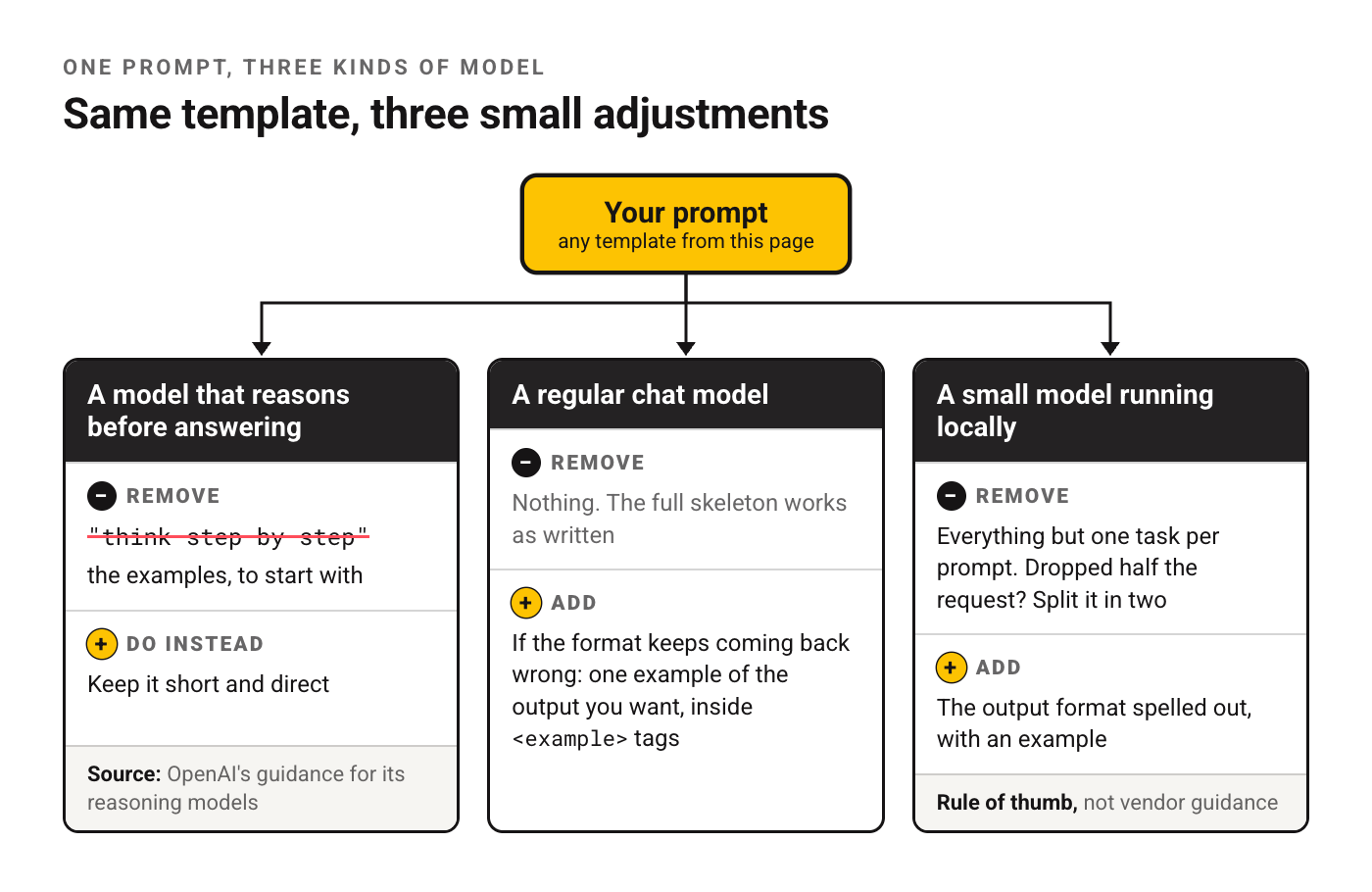
The same template behaves differently depending on what's behind it. A short rule covers it.
A model that reasons before answering. Keep it short and direct, cut "think step by step", and start without examples. That's OpenAI's own guidance for its reasoning models, quoted in the table above.
A regular chat model. The full skeleton works as written. If the format keeps coming back wrong, add one example of the output you want, inside <example> tags.
A small model running locally. This one is a rule of thumb, not vendor guidance: give it one task per prompt and spell out the output format with an example. Dropped half the request? Split it in two.
Test a Prompt Before You Reuse It
A prompt that worked once has passed exactly one test. Before it goes into a saved library, a team doc or a product, run it three times:
- On a typical input, to see the normal output.
- On an awkward one: very long, half empty, in another language, or full of jargon.
- On an input where the right answer is "I don't know" or "not stated".
The third run catches the expensive failures. A summary prompt that invents a figure when the document has none will do it again in production. If you're weighing two versions of the same prompt, there's a separate look at whether A/B testing prompts is worth the effort.
Frequently Asked Questions
What is an LLM prompt?
Whatever text you hand a large language model to act on. It can be a question, an instruction, pasted material or all three, and apart from what the app adds behind the scenes, it's everything the model knows about your task.
What are the best prompts for LLMs?
Ones that cover all five parts from the table up top. For everyday jobs, start with templates 2 to 6.
What are the 5 P's of prompting?
It isn't a standard term. Different trainers use the phrase for different sets of five words, so there's no fixed list to memorize. Use the five parts in the table at the top of this page as your checklist instead: a prompt that covers task, context, input, constraints and output format is covered whichever list you learned.
What is the best LLM for generating prompts?
Any current general-purpose model can draft a usable prompt. What decides the quality is what you give it: the goal, an example of a good output and an example of a bad one. Template 14 is built for exactly that.
Your Move
Pick the template closest to something you'll do this week. Paste your own material between the tags and run it once as written.
Then change one part and run it again. Usually that's the constraints, and seeing which single line moved the result will teach you more about how these models read instructions than collecting another list of prompts ever will.
Put this into practice: browse productivity prompts and writing prompts in the God of Prompt library. Copy, paste, run.
Switching between ChatGPT, Claude and Gemini during the week? The Complete AI Bundle keeps the prompt library, model cheatsheets and a guide for each major model in one place, so a model update doesn't send you back to a blank page.
Prompts for this topic
Put this article to work with ready-to-use prompts from the God of Prompt library.
Keep reading
Smart Prompts: 20 Prompts That Make the Model Think Before It Answers
A smart prompt makes the model plan, check and ask before it writes. These 20 do that for everyday tasks, from a decision memo to a bug fix, and they work in ChatGPT, Claude and Gemini.

5 Steps to Build Reusable Prompt Templates
Build flexible, consistent prompt templates in five steps: choose variables, set role and context, structure requests, define output format, then test and refine.

Best Multi-Model AI Prompt Libraries in One Package
Compare top multi-model AI prompt libraries—features, pricing, collaboration, and developer support—to pick the best solution for business users or technical teams.

The best of the blog, in your inbox
One email when notable prompts, tools, and model updates land. No spam, unsubscribe anytime.
Join 100,000+ subscribers. One email a week, real prompts, tools, and model updates. Unsubscribe anytime.