
On this page
- How to Run These Prompts in Gemini
- Couple Prompts for Gemini
- Golden hour couple portrait
- Save the date card
- Hug your younger selves
- Two photos in one frame
- Eye reflection close-up
- Traditional wedding portrait
- The Five Slots Behind Every Prompt Here
- Portrait Prompts (1 to 7)
- 1. Natural window-light headshot
- 2. Corporate headshot on white
- 3. Golden hour outdoor portrait
- 4. Low-key moody portrait
- 5. Candid lifestyle portrait
- 6. Black and white editorial portrait
- 7. Environmental portrait at work
- Editing Prompts (8 to 15)
- 8. Swap the background cleanly
- 9. Kill harsh midday light
- 10. Restore a damaged photograph
- 11. Colorize black and white
- 12. Change the time of day
- 13. Remove an object without a trace
- 14. Upscale and recover detail
- 15. Match two photos to one look
- More Gemini Edits: Backgrounds and Professional Photos
- Background: outdoor golden hour
- Background: city street at night
- Background: plain wall for a document photo
- Professional photo from a selfie
- Product and Commercial Prompts (16 to 22)
- 16. Clean e-commerce shot
- 17. Product in lifestyle context
- 18. Flat-lay arrangement
- 19. Dramatic hero shot
- 20. Scale reference
- 21. Packaging mockup
- 22. Before and after pair
- Creative and Stylized Prompts (23 to 30)
- 23. Cinematic still frame
- 24. Double exposure
- 25. Minimalist composition
- 26. Macro texture study
- 27. Long exposure motion
- 28. Retro film look
- 29. Architectural photography
- 30. Concept illustration from a photo
- The Trending Ones People Actually Search For
- 31. Childhood photo recreation
- 32. Couple portrait from two separate photos
- 33. Traditional outfit portrait
- 34. Studio glamour retouch
- Why Gemini Changes Your Face
- Five Things That Fix Most Bad Results
- Frequently Asked Questions
- How do I prompt Gemini for an image?
- What's the difference between editing and generating?
- Why do my Gemini photos look fake?
- Can Gemini keep the same face across several images?
- What aspect ratio should I ask for?
- Do these work in other image models?
- Is Gemini photo editing free?
- Why won't Gemini edit my photo?
- Can Gemini turn my photo into a video?
- Your Move
- Gemini AI prompts to copy and paste
- Frequently asked questions
- Are there Gemini prompts for couple photos?
A lot of the Gemini photo prompts floating around are one line long. "Make this photo look professional." Then people wonder why everything comes back looking like a stock image of nobody in particular.
It isn't the model. It's the input.
Gemini holds structure well. Give it a subject, a light direction, a lens, a mood and an aspect ratio, and it'll keep all five in the same frame. Leave one out and it fills the gap with an average of everything it has ever seen, which is exactly the flat, evenly lit, faintly plastic look that makes people give up and go back to a phone filter.
Below are 34 prompts, sorted by what you're actually trying to do. All copy-paste ready. After them there's the five-slot pattern they share, so you can stop collecting lists and write your own.
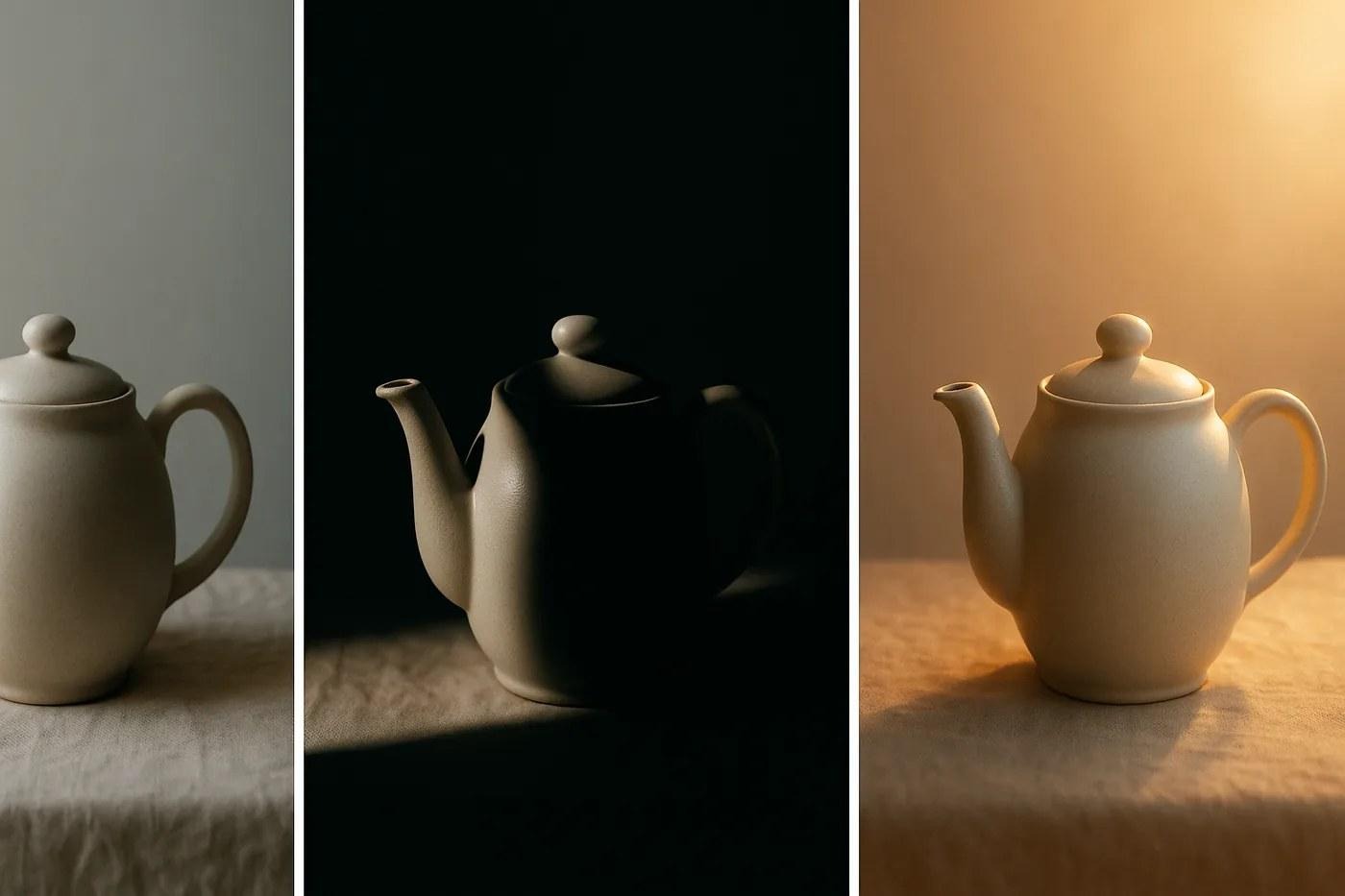
Same object, same lens, three light descriptions. Nothing else in the prompt changed. The lighting line does more for realism than any other part of it.
How to Run These Prompts in Gemini
Open Gemini, tap + to upload a photo if you're editing one, paste the prompt and swap the words in square brackets for your own. That's it.
What runs underneath, as of November 2026:
- The model is Nano Banana 2. Google's image generation and editing model, released February 26, 2026, and free to use in the Gemini app. Paid Google AI plans add Nano Banana 2.1 and a "Redo with Pro" option for images that need more detail.
- Editing needs an adult account. Google's help page says editing images isn't available to users under 18, and generating requires 13 or the local minimum age.
- Resolution depends on the plan. Downloads come out at 1K without a Google AI plan and 2K with one, per Gemini's image help page.
- Every image is marked. Invisible SynthID plus a visible watermark.
One line does more for photo edits than any other. Paste it into any prompt where a real person is in the picture:
Keep the face exactly as uploaded: same structure, same proportions, same skin tone, same moles and freckles. Change only [what you want changed].
The section "Why Gemini Changes Your Face" further down explains why it works.
Couple Prompts for Gemini

Couple edits need the face lock twice. Two faces drift. Worse, the model can borrow features from one person to fix the other. Two rules keep both people recognizable:
- Say who is who. "The man on the left in the first photo", not "him". With two uploads, name the photo each person comes from.
- Lock both faces in one sentence. "Keep both faces exactly as uploaded" works better than two separate clauses, because it tells the model not to blend them.
Google says Nano Banana 2 keeps the resemblance of up to five characters in one workflow, which is why the prompts below can mix two people with their childhood photos. Prompt 32 above covers the simplest case: two separate photos merged into one studio portrait.
Golden hour couple portrait
Keep both faces exactly as uploaded: same structure, proportions and skin tone, no blending between the two people. Place the couple standing close on [a beach / a rooftop / a field of tall grass] at golden hour, [her] head resting on [his] shoulder, both looking at each other mid-laugh. Low warm sun behind them, soft rim light on the hair, faces lit softly from the front. 85mm at f/2, shallow depth of field. Warm tones, fine grain, candid feel.Save the date card
Use the couple from this photo. Keep both faces exactly as uploaded. Place them in [a garden with string lights / a heritage courtyard] at dusk, holding hands, walking toward the camera. Leave clean space at the top of the frame. Add the text "Save the Date" and below it "[Name] & [Name] · [date] · [city]" in an elegant serif font, centered, cream color, sharp and correctly spelled. Portrait 4:5, soft romantic grade.Check every letter of the names and the date before you send it. Google lists text rendering among Nano Banana 2's features, and one wrong digit on an invitation is still expensive.
Hug your younger selves
I'm uploading three photos: photo 1 is the couple today, photo 2 is [name 1] as a child, photo 3 is [name 2] as a child. Create one photo where the adult couple sits on a sofa and each adult hugs their own younger self. Keep all four faces exactly as in their source photos, no blending. Warm indoor window light, 35mm, natural color, the children's clothes from their original photos.Two photos in one frame
Put these two photos side by side in one frame, split vertically down the middle. Left half: the first photo. Right half: the second photo. Keep both faces and both scenes exactly as uploaded. Match the color temperature and contrast across the two halves so they read as a pair. Thin white line between them, 16:9.Use this one when the two of you weren't in the same place. To merge two people into one scene instead, use prompt 32.
Eye reflection close-up
Extreme close-up of [name 1]'s eye from the first photo, filling the frame, eyelashes sharp. In the iris, show a small, clear reflection of [name 2] from the second photo, smiling. Keep the eye color and skin texture exactly as uploaded. Macro lens, soft light from a window, shallow depth of field, photorealistic, no fantasy glow.Traditional wedding portrait
Keep both faces exactly as uploaded: same structure, proportions and skin tone. Dress the couple in traditional wedding clothes: [her: a red silk saree with gold border and temple jewelry] and [him: an ivory sherwani with a maroon stole]. Fabric drapes with real weight and visible texture. They stand in front of a carved wooden doorway decorated with marigold garlands, soft diffused daylight, full-length framing, 50mm at f/2.8, rich but natural color.Swap the clothes in brackets for your own tradition. Describe the garment by fabric, color and one detail: "a saree" alone returns the most generic one the model knows.
The Five Slots Behind Every Prompt Here
Slot | What it controls | Example |
Subject | who or what, specifically | "a 35-year-old woman with short curly hair" |
Action | what's happening right now | "looking off-camera, mid-laugh" |
Light | the single biggest lever on realism | "soft window light from the left, no fill" |
Lens | depth of field and compression | "85mm at f/1.8, shallow depth of field" |
Finish | color and grain | "warm tones, fine grain, no HDR" |
Skip the light line and you get flat images. Skip the lens line and everything arrives at the same middle distance, framed like a passport photo. When a prompt below doesn't land, the fix is almost never more adjectives. It's one slot made sharper.
One more distinction before the list. Editing and generating aren't the same job. When you upload a photo, the picture already supplies the subject, so describe only what should change and say plainly what must stay. When you start from nothing, every slot matters, because anything you leave blank gets filled with an average.
Portrait Prompts (1 to 7)
All seven generate from scratch. To fix a photo you already have, skip to prompts 8 to 15.
1. Natural window-light headshot
A professional headshot of [describe person: age, hair, clothing], chest up, facing camera with a relaxed half-smile. Soft natural window light from the left, gentle falloff into shadow on the right cheek, no artificial fill. 85mm lens at f/1.8, shallow depth of field, background softly blurred neutral gray. Warm natural skin tones, fine grain, photorealistic, no retouching gloss.
2. Corporate headshot on white
A corporate headshot of [describe person], shoulders square to camera, direct eye contact, neutral closed-mouth expression. Clean white seamless background, large softbox key at 45 degrees, subtle rim light separating hair from background. 100mm lens at f/4, face sharp throughout. Neutral grade, crisp but natural skin texture.
3. Golden hour outdoor portrait
An outdoor portrait of [describe person] at golden hour, backlit by low sun making a warm rim around the hair, face lifted by soft light reflected from below. Shallow depth of field, warm bokeh from distant foliage. 135mm lens at f/2, compressed background. Golden tones, slight haze, photorealistic, no lens flare artifacts.
4. Low-key moody portrait
A low-key portrait of [describe person] against charcoal, lit by one hard source from the upper right, two-thirds of the face left in shadow. Deep contrast, single catchlight in the visible eye. 85mm at f/2.8. Desaturated color, rich blacks, cinematic. No fill light at all.
5. Candid lifestyle portrait
A candid photograph of [describe person] in [setting], caught mid-action rather than posed, attention directed away from the camera. Available light only, mixed color temperature. 35mm at f/2, environment visible and contextual. Slightly imperfect framing, as if grabbed quickly. Natural color, documentary feel.
6. Black and white editorial portrait
A black and white editorial portrait of [describe person], three-quarter angle, serious expression, jawline lit by one large source to the left. High contrast with a full tonal range from pure black to clean white. 85mm at f/2.8. Fine grain, deep shadows that still hold detail, no color whatsoever.
7. Environmental portrait at work
An environmental portrait of [describe person] in their workspace, surrounded by the tools of their trade, hands occupied by the work, eyes on the camera. Mixed practical lighting from the room plus soft window light. 24mm at f/4, wide enough to show context, subject placed off-center. Natural color, lived-in atmosphere.
Portraits are where people usually start, and where the light line does most of the work. Worth trying prompt 1 and prompt 4 back to back on the same description. Same person, same lens, completely different photograph.
Editing Prompts (8 to 15)
These assume a photo is already uploaded. Describe the change. Don't re-describe the picture.
8. Swap the background cleanly
Keep the subject exactly as is: same pose, same light on the face, same edges around the hair. Replace only the background with softly blurred neutral studio gray. Match the new background's light direction to the existing lighting on the subject so it reads as one photograph, not a cut-out.
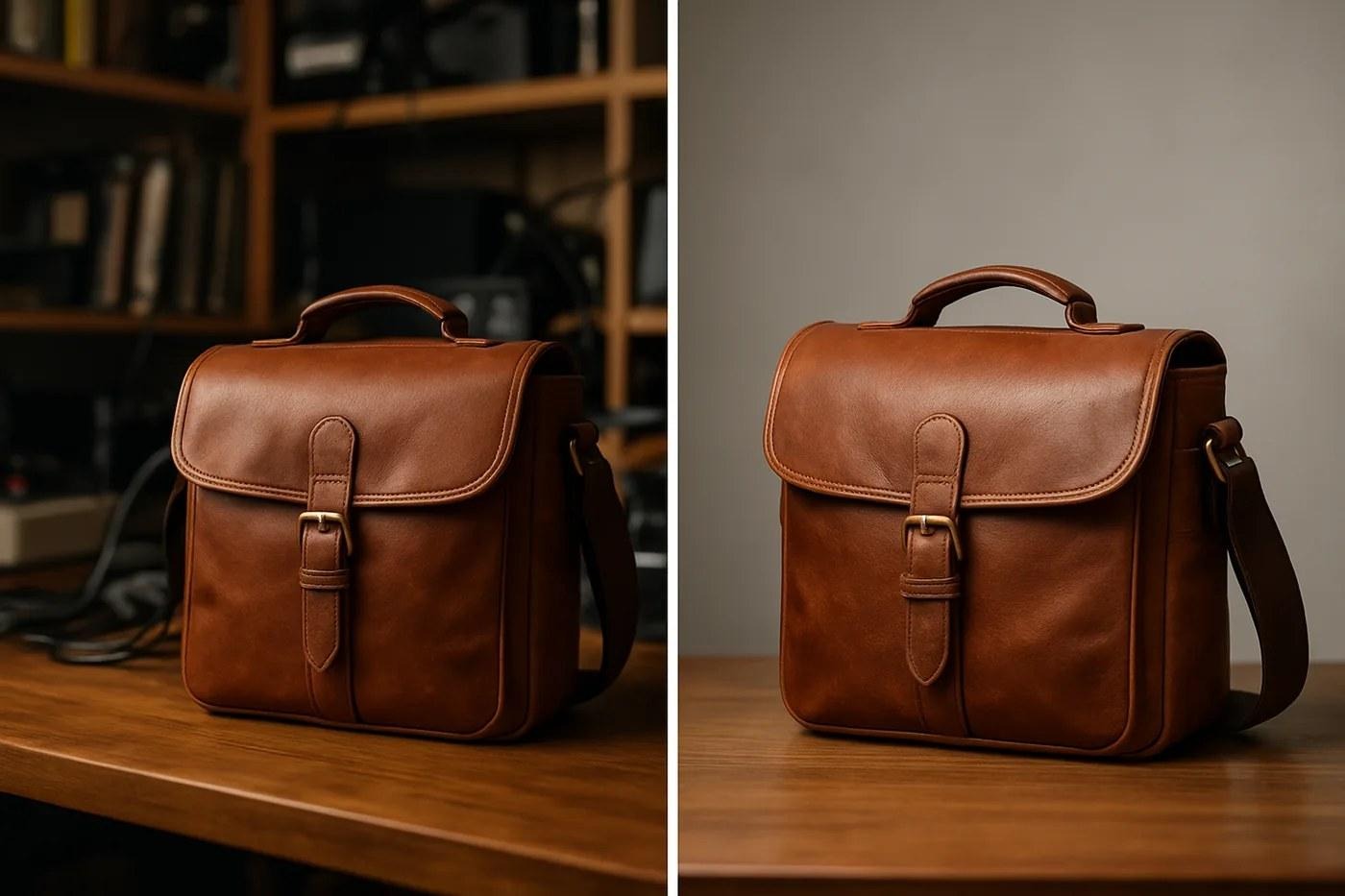
Prompt 8. Same object, same light on it. Only the background moved.
9. Kill harsh midday light
Soften the harsh overhead light in this photo. Lift the shadows under the eyes, nose and chin without flattening the face. Pull down the specular highlights on forehead and cheeks. Keep skin texture intact, do not smooth or blur skin. Result should look shot in open shade, not direct sun.
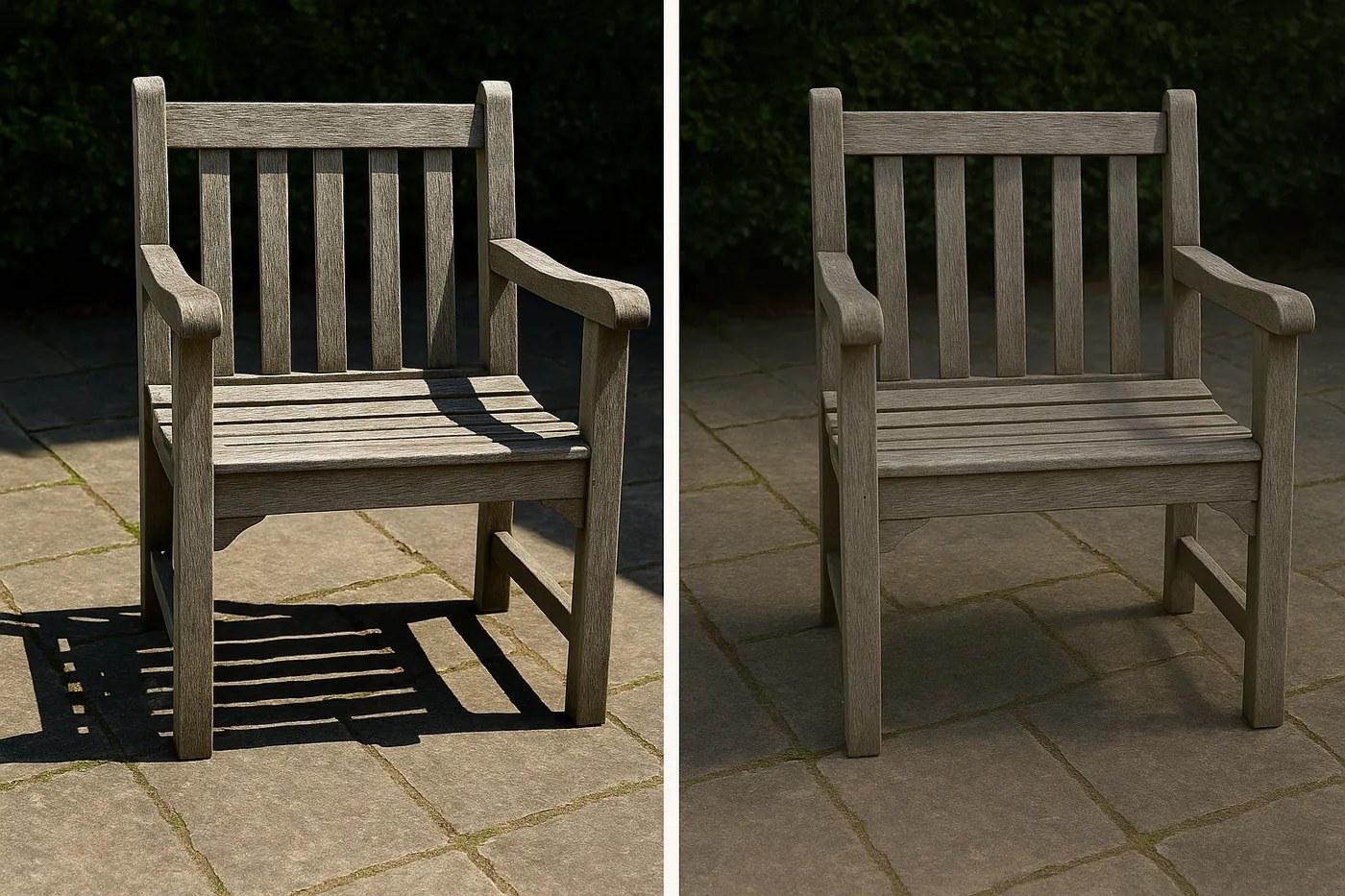
Prompt 9. Shadows opened up, highlights pulled down, wood grain still visible. The clause about keeping texture is the one people leave out.
10. Restore a damaged photograph
Restore this old photograph. Repair scratches, creases, dust and torn edges. Recover detail in faded areas without inventing facial features that aren't there. Keep the original grain structure and the period tonality. Don't modernize it, don't sharpen aggressively, don't add color.
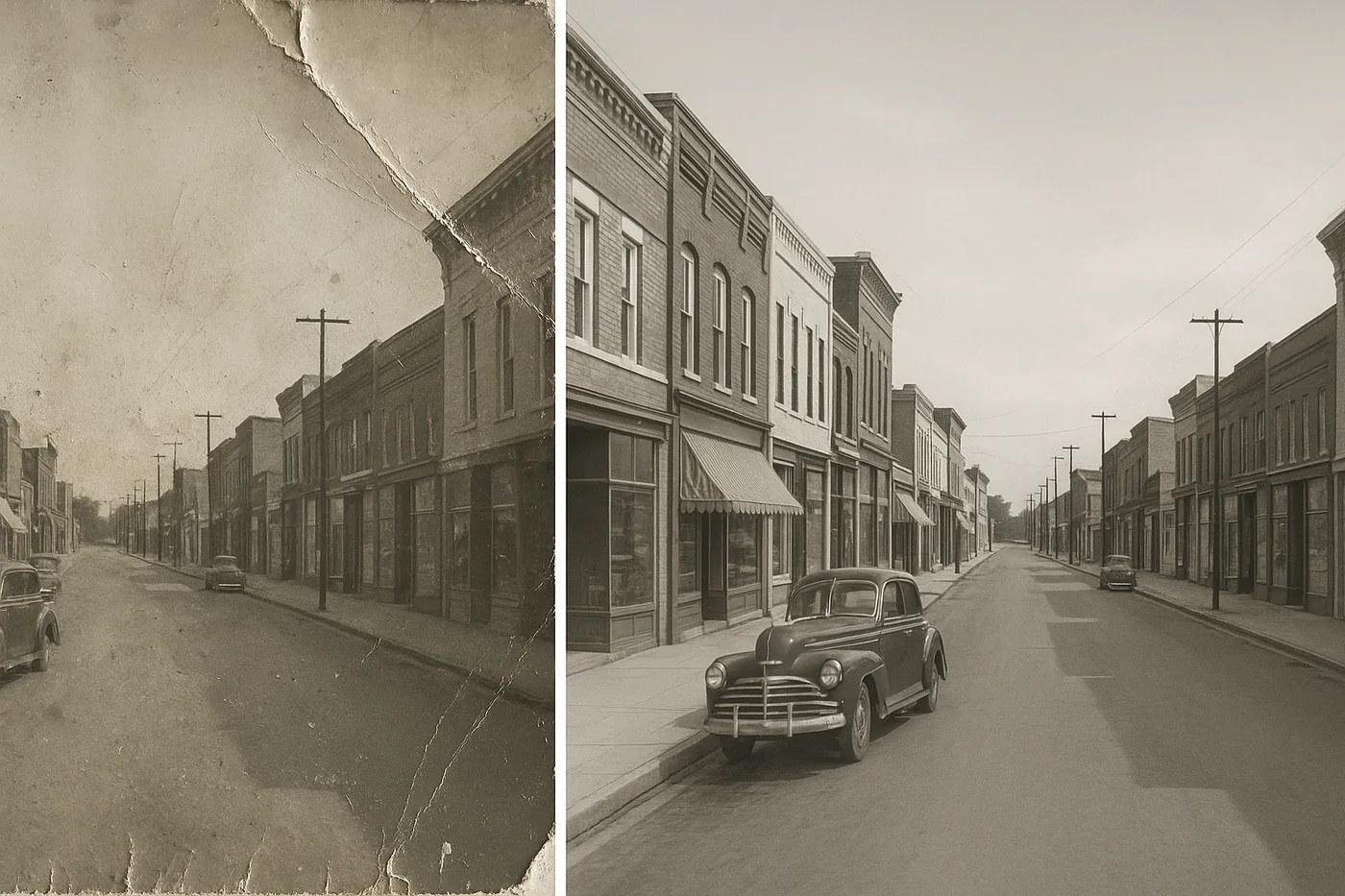
Prompt 10. Scratches and creases repaired, period grain and tonality kept.
11. Colorize black and white
Colorize this black and white photograph with restrained, period-accurate color. Muted natural tones, not saturated ones. Skin should read as skin, not as tint. Leave the original contrast and grain untouched. Where you're uncertain about an object's color, pick the most probable neutral rather than guessing boldly.
12. Change the time of day
Change the lighting from [current] to [target: late golden hour]. Redirect the shadows to match a low sun from the [left/right]. Warm the highlights, cool the shadows slightly, add gentle atmospheric haze in the distance. Subject, composition and focal length stay exactly as they are.
13. Remove an object without a trace
Remove [object]. Reconstruct what would realistically sit behind it, matching surrounding texture, pattern continuity, light direction and grain. No blurred patch, no smoothed area where the object used to be.
14. Upscale and recover detail
Increase resolution and recover fine detail in [area]. Sharpen edges that already exist rather than inventing new ones. Keep noise characteristics consistent across the whole frame. Don't add texture that wasn't there. No sharpening halos around high-contrast edges.
15. Match two photos to one look
Grade this photo to match the color, contrast and tonality of the reference image I'm giving you. Match the black point, the highlight roll-off and the color cast sitting in the shadows. Composition, crop and subject stay untouched.
Prompt 10 is the one people underestimate. Restoration works far better than expected, right up until you ask it to recover a face that's genuinely gone, at which point it'll happily invent one. The clause about not inventing features is doing real work there.
More Gemini Edits: Backgrounds and Professional Photos
Background swaps and professional-looking selfies are two of the edits readers come to this page for. Prompt 8 covers the neutral studio version. These cover the rest, and each one starts with the face lock.
Background: outdoor golden hour
Keep the person exactly as uploaded: same face, same pose, same clothes, same hair edges. Replace only the background with [a park / a beach / a hillside] at golden hour, softly out of focus. Relight the person to match: warm low sun from behind on the [left/right], soft fill on the face, a thin warm rim on the hair. Photorealistic, no halo around the edges.Background: city street at night
Keep the person exactly as uploaded: same face, same pose, same clothes. Replace only the background with a city street at night after rain, neon signs and car lights blurred into bokeh. Add colored reflections from the signs onto the person's face and clothes so the light matches the scene. 50mm look, shallow depth of field, photorealistic.Background: plain wall for a document photo
Keep the face exactly as uploaded: same structure, proportions and skin tone, no retouching. Replace only the background with a plain, evenly lit off-white wall with no shadows or texture. Center the head and shoulders, face straight to camera, both ears visible, neutral expression. Even front light, no shadows on the face. Crop to [35x45 mm / 2x2 inch] proportions.Before you submit an edited photo anywhere official, check that office's own photo rules. They decide whether an edited photo is accepted, not the prompt.
Professional photo from a selfie
Turn this selfie into a professional profile photo. Keep the face exactly as uploaded: same structure, same proportions, same skin tone. Change the clothing to [a navy blazer over a white shirt / a plain dark kurta]. Replace the background with a softly blurred light-gray office. Soft key light from the left at 45 degrees, gentle fill, chest-up framing, eyes to camera. 85mm look, natural skin texture, no beauty filter.Use it for LinkedIn, a résumé or a company page. If the result still looks off, look at the selfie itself. A phone held close makes the nose look bigger, and the edit starts from that face. Shoot the source photo from arm's length or more.
Product and Commercial Prompts (16 to 22)
Swap [product] for the real object, material and color included. "A mug" and "a matte black ceramic mug" come back as two different photographs.
16. Clean e-commerce shot
A product photograph of [product] on pure white seamless, centered, slight three-quarter angle showing the front face and one side. Even diffused light from two large softboxes, soft gradient shadow directly beneath for grounding. 100mm macro at f/8, product sharp front to back. Accurate color, no studio reflections, no props.
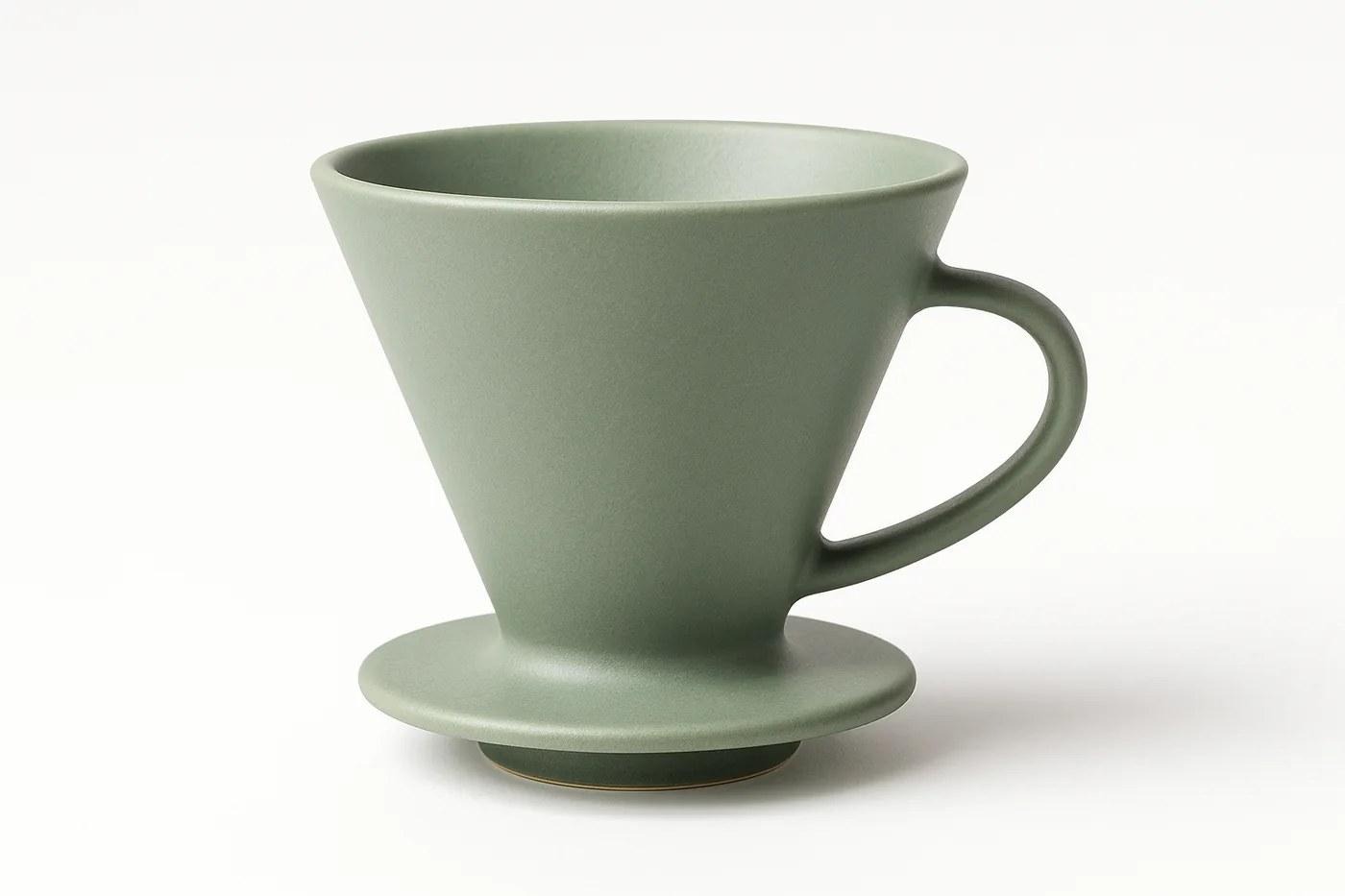
Prompt 16. Two softboxes, contact shadow, nothing else in frame.
17. Product in lifestyle context
A lifestyle photograph of [product] in [realistic setting], placed as if someone just set it down. Soft natural light from a window out of frame. 50mm at f/2.8, product sharp, background falling gently out of focus. Warm inviting palette, a few contextual objects, no clutter.
18. Flat-lay arrangement
An overhead flat-lay of [products] on [surface], shot dead-on at 90 degrees. Even soft light, minimal shadows. Balanced negative space between objects, aligned to an invisible grid. 35mm at f/5.6. Muted background tone, high color accuracy. Styled, not crowded.
19. Dramatic hero shot
A hero shot of [product] on a dark reflective surface, lit by one hard source above and behind, making a strong rim highlight along the top edge. Deep shadow filling the foreground. 85mm at f/5.6. Rich contrast, controlled reflections, premium advertising look.
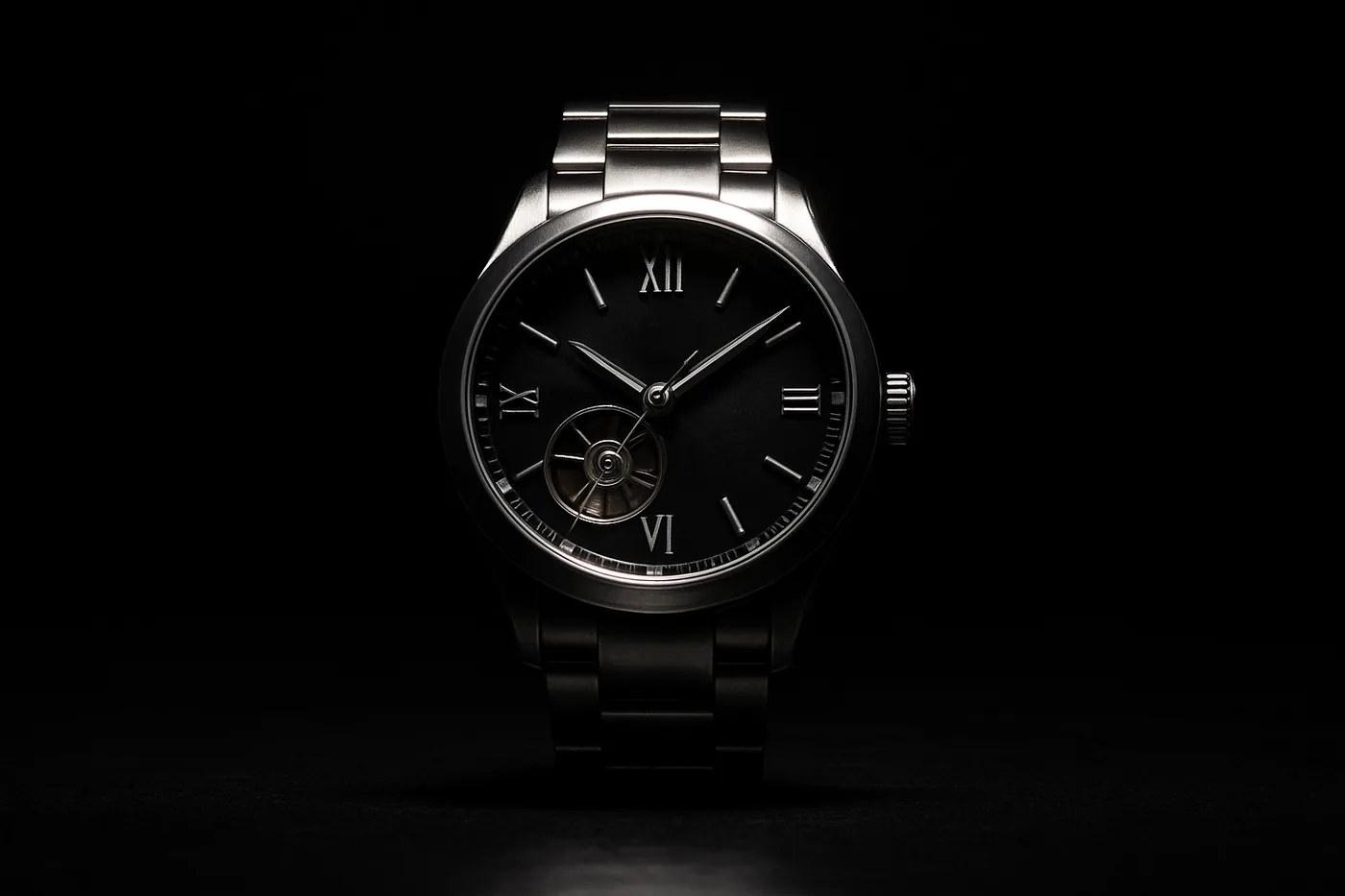
Prompt 19. One light, deep foreground shadow, controlled reflection.
20. Scale reference
[Product] held in a human hand to show real scale. Natural skin tones, product sharp, hand slightly softer. Clean neutral background. 50mm at f/4, framed so the product sits in the central third. Even daylight-balanced light.
21. Packaging mockup
A photorealistic mockup of [packaging type] standing on light gray with a subtle contact shadow. Front face clearly visible and undistorted for artwork placement. Soft studio light from upper left, gentle highlight down the left edge. 85mm at f/8. Neutral color, nothing competing in the background.
22. Before and after pair
Two images side by side of the same [subject], identical framing, identical light, identical camera position. Left shows [state A], right shows [state B]. The only difference between the frames is [the variable]. Neutral background, even light, no cues that they were shot at different times.
If you sell anything physical, 16 and 22 pay for themselves the first week. The rest are nice. Those two replace a shoot.
Creative and Stylized Prompts (23 to 30)
These leave realism behind on purpose, so the finish slot carries more of the result than the light slot does.
23. Cinematic still frame
A cinematic film still of [scene], framed 2.39:1. Anamorphic lens character with horizontal flare and oval bokeh. Motivated practical lighting inside the scene itself. Teal and orange grade held subtly, not pushed. Shallow depth of field, slight grain, no text or credits.
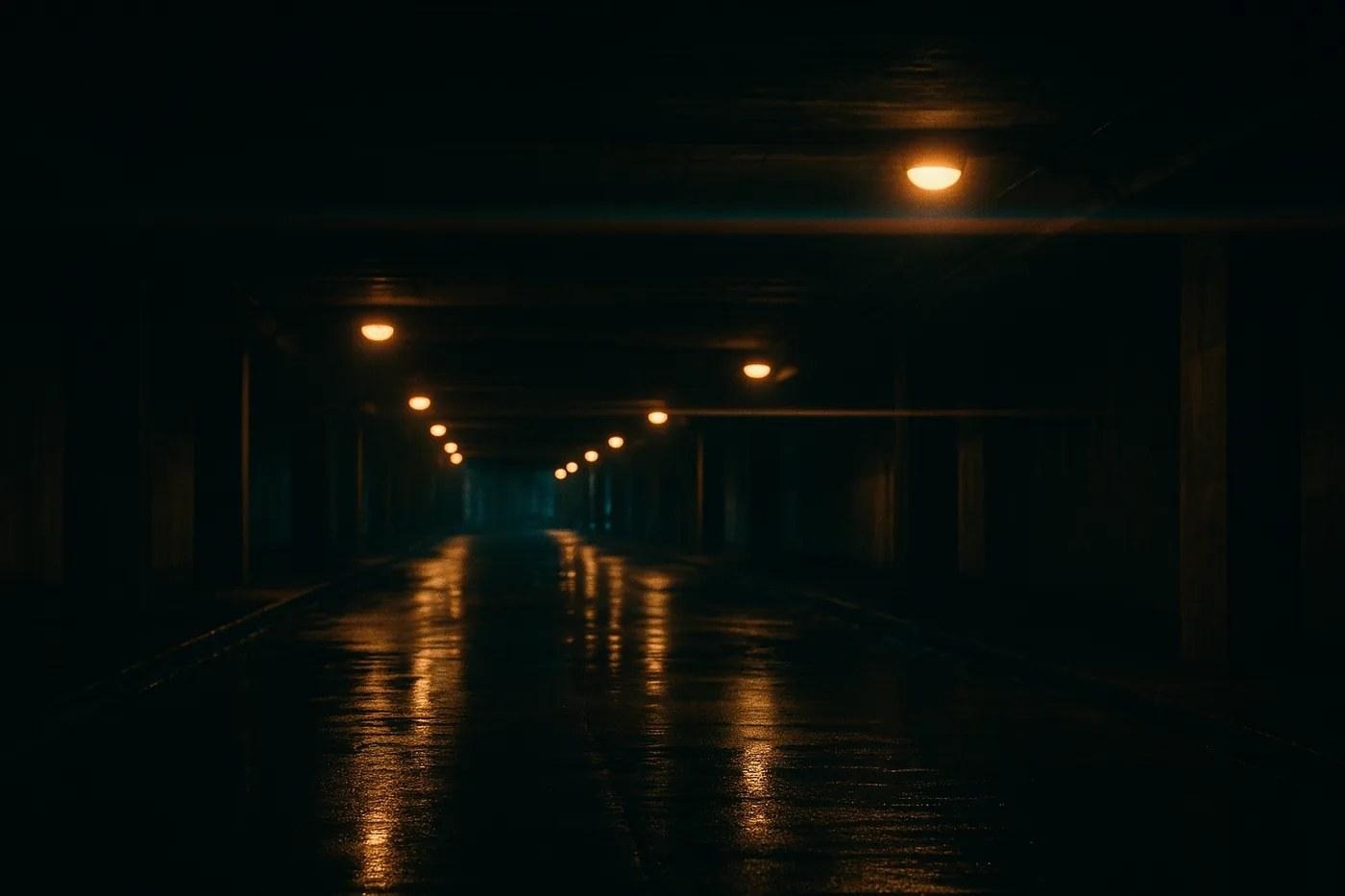
Prompt 23. Practical lights inside the scene, grade held back rather than pushed.
24. Double exposure
A double exposure combining [subject silhouette] with [texture or scene] filling the interior of the silhouette. High contrast between the two exposures. Clean edges where silhouette meets background. Monochrome with one accent tone. Artistic, not photorealistic.
25. Minimalist composition
A minimalist photograph of [single subject] against a large expanse of [flat color] negative space, subject at the lower right third. Soft even light, no visible shadow direction. Palette limited to three tones. 50mm at f/5.6. Calm, uncluttered, gallery-print quality.
26. Macro texture study
An extreme macro of [surface] filling the entire frame, showing texture invisible at normal distance. Raking side light to emphasize relief. 100mm macro at f/11, focus stacked for edge-to-edge sharpness. Neutral color, abstract composition.
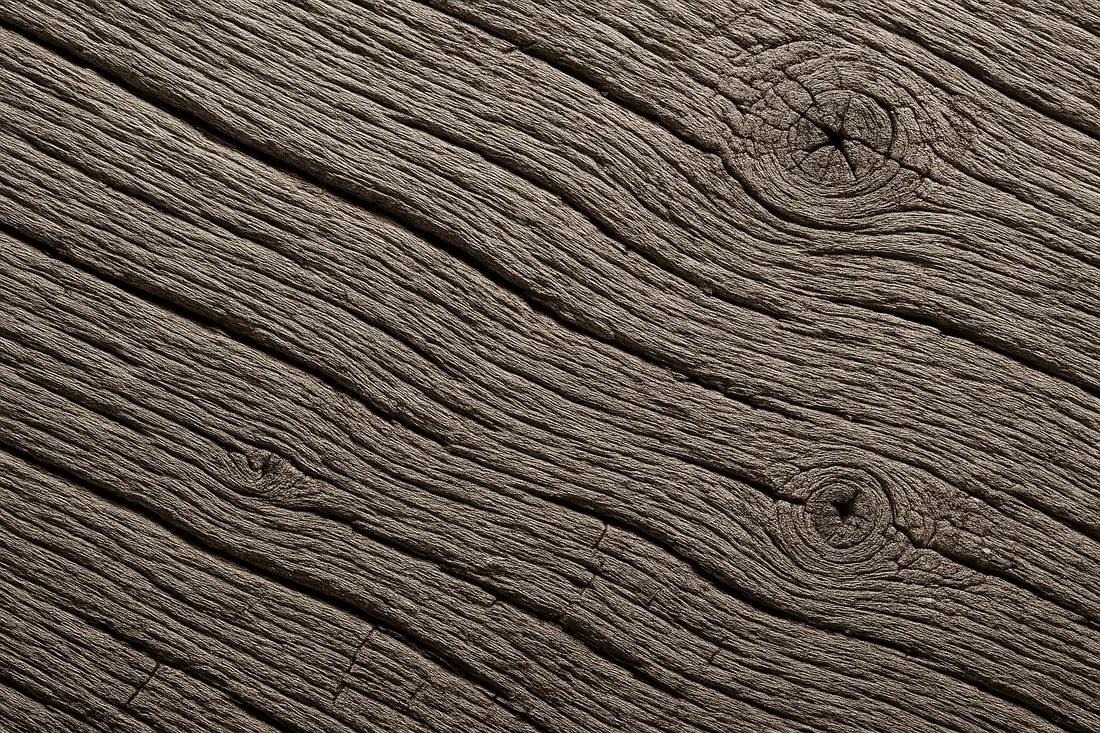
Prompt 26. Raking side light is what makes the relief readable.
27. Long exposure motion
A long exposure of [scene] where [moving element] blurs into smooth motion while [static element] stays razor sharp. Tripod-stable framing, 15-second exposure. Cool blue hour temperature. 24mm at f/11, deep focus throughout.
28. Retro film look
[Subject], made to look shot on 35mm film in the late 1980s. Slightly faded blacks, warm shift toward magenta in the highlights, visible grain, minor halation around bright areas. No date stamp. 35mm at f/2.8, slightly soft corners, imperfect focus the way a consumer camera produced it.
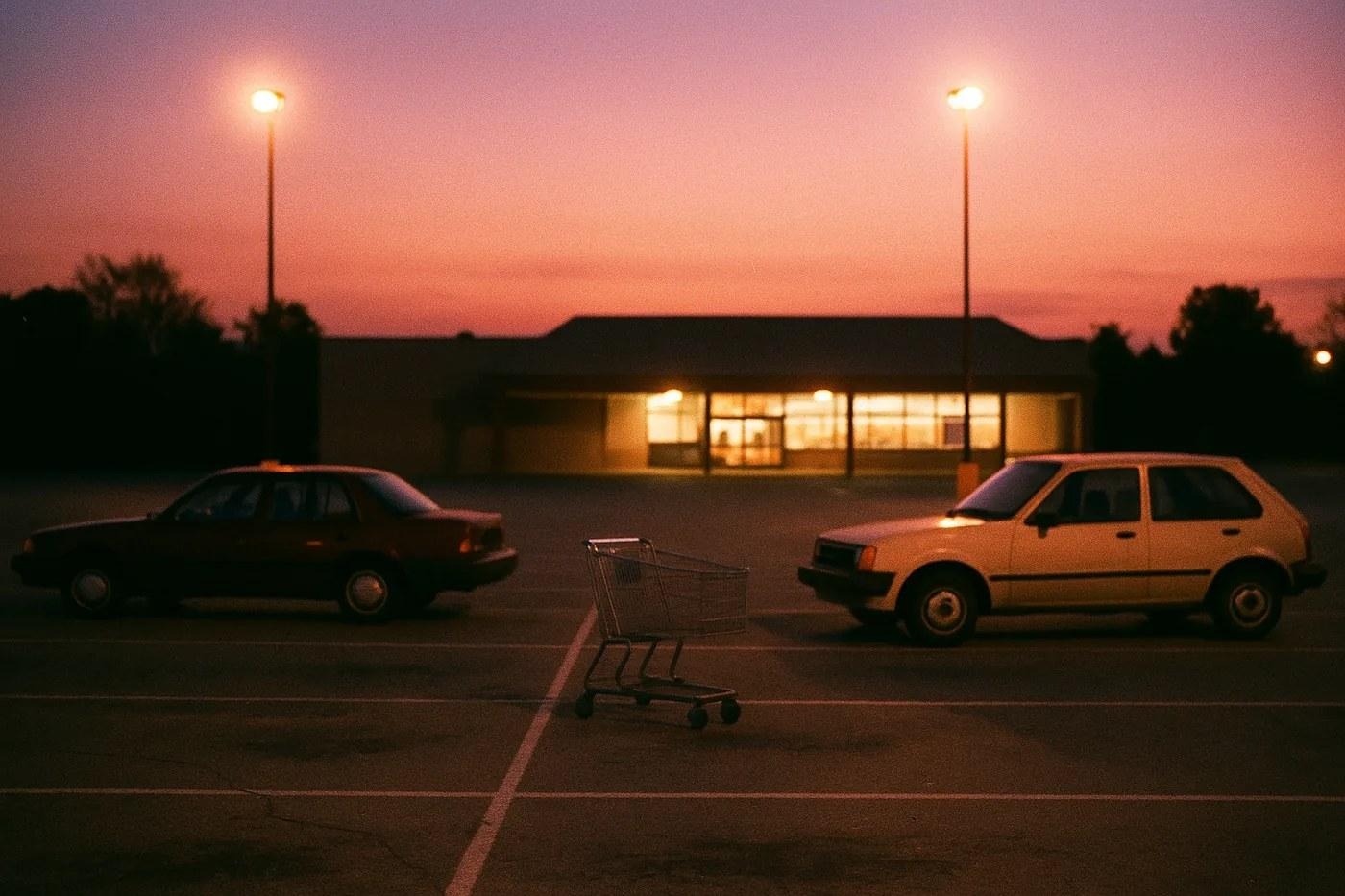
Prompt 28. Faded blacks, magenta shift in the highlights, halation around the lamp posts.
29. Architectural photography
An architectural photograph of [building or interior], all vertical lines kept vertical, no keystone distortion. Blue hour with interior lights on, balancing ambient against artificial. 24mm tilt-shift at f/8. Clean symmetrical composition, neutral white balance, nobody in frame.
30. Concept illustration from a photo
Turn this photograph into a clean technical illustration: black line art on white, consistent line weight, light hatching on side planes only. Keep the exact proportions and perspective of the original. Strip all color, texture and background detail. Structure only.
The Trending Ones People Actually Search For
Worth saying out loud: plenty of Gemini photo searches aren't about lighting theory. They're about one specific look somebody saw on a feed that week, and the same handful keeps coming back (in December that's our Gemini Christmas photo prompts).
31. Childhood photo recreation
Recreate this photo as if it were taken in the early 1990s on consumer film. Keep the face exactly as it is, do not alter facial structure or proportions. Change only the era: film grain, slightly faded color, warm cast, soft focus at the edges, period-appropriate clothing and background. The person must remain recognizably themselves.
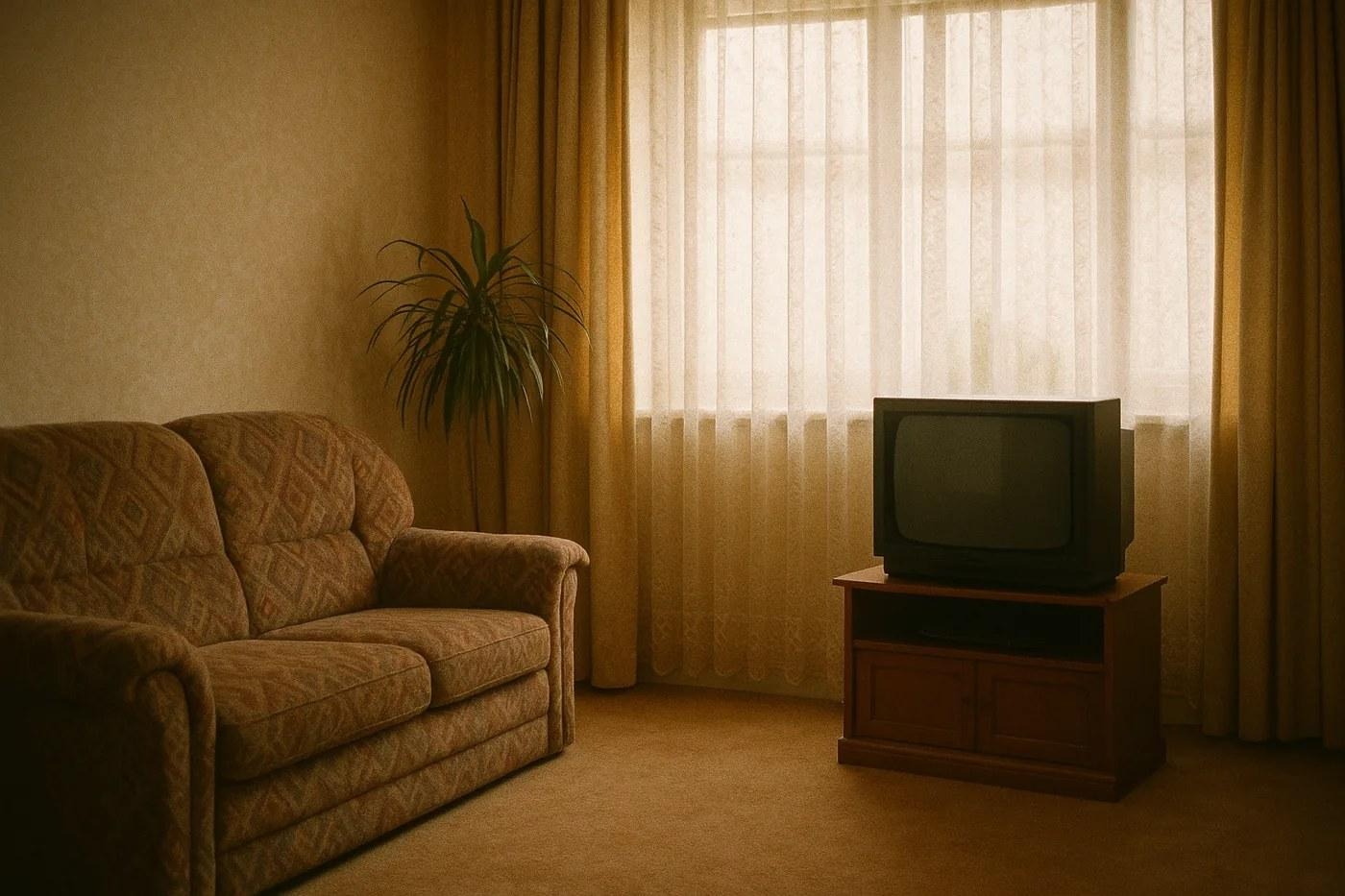
Prompt 31 applied to a room rather than a person. The era markers are doing the work: grain, faded color, warm cast, soft edges.
32. Couple portrait from two separate photos
Combine the two uploaded photos into one portrait of both people standing together, matched lighting and color temperature across both faces. Preserve each face exactly as uploaded, including skin tone and proportions. Neutral studio background, soft even light, 85mm at f/2.8. No blending or morphing of features between the two people.
33. Traditional outfit portrait
Show the person from the uploaded photo wearing [traditional garment], full-length framing, standing naturally. Keep the face unchanged in structure, expression and skin tone. Fabric should drape realistically with visible texture and weight. Soft natural light, simple uncluttered background, 50mm at f/2.8.
34. Studio glamour retouch
Retouch this portrait to magazine standard while keeping the person recognizable. Even the skin tone, reduce shine on the forehead and nose, brighten the eyes slightly. Do not reshape the face, jaw, nose or body. Do not remove moles, scars or freckles. Skin must keep visible pores and texture.
Notice what those four have in common. Every one of them contains a clause protecting the face, because that's the single most common complaint about this model, and it's the next section.
Why Gemini Changes Your Face
You upload a photo, ask for an edit, and the person who comes back isn't quite you. Slightly different nose. Younger. Smoother.
That's the model re-generating the face instead of editing it, and it happens because nothing in your prompt told it not to.
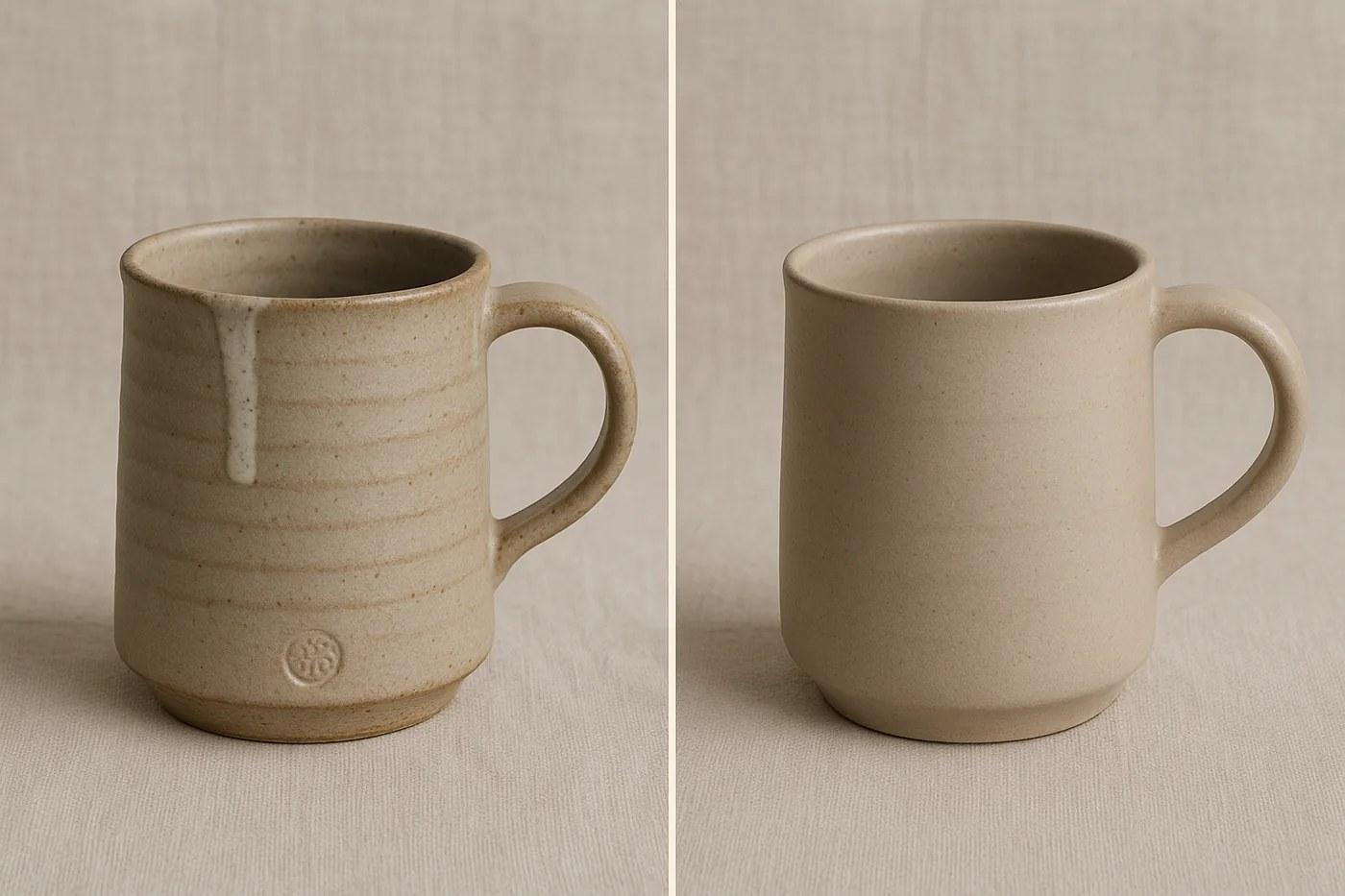
Easier to see on an object than on a face, and it's the same mechanism. Without a protection clause the model removes exactly the details that made the thing real: the chip, the uneven glaze, the throwing rings, the maker's mark.
Three fixes, in order of how much they help:
Protect the face explicitly. "Keep the face exactly as uploaded: same structure, same proportions, same skin tone." One sentence, and it does most of the work.
Ask for less per generation. A prompt that changes background, lighting, outfit and grade at once invites a rebuild. Split it: background first, then lighting on the result.
Say what not to remove. Models smooth aggressively by default. Moles, freckles, scars and laugh lines disappear unless you name them, and naming them is what keeps the photo looking like a photograph.
If the face still drifts after all three, the source image is usually the problem. Low resolution, heavy compression or a face occupying a small part of the frame all give the model less to preserve and more to invent.
Five Things That Fix Most Bad Results
Change one slot, not four. If a result is close but wrong, edit only the light line and run it again. Change three things at once and you learn nothing about which one mattered.
Say what to avoid. Negatives carry real weight here. "No HDR", "no lens flare", "don't smooth the skin": generic output usually comes from prompts that never said what to avoid.
"A woman" gives you an average. "A 35-year-old woman with short curly hair and reading glasses" gives you a person. Age plus one specific detail does most of the work.
Stop re-describing the photo. When you're editing, every sentence spent re-describing the photo is a sentence Gemini might read as an instruction to change it. Say what changes. Say what stays. Stop there.
Save the ones that land. Keep the output attached to the prompt. Rebuilding a prompt from memory three weeks later almost never produces the same picture, which is the most annoying way to lose good work.
Want the whole set organized instead of scattered across browser tabs? The Gemini prompt collection in our library is sorted by use case, and product photography prompts live next door for anyone shooting things rather than people.
Frequently Asked Questions
How do I prompt Gemini for an image?
Five things, in this order: subject, action, light, lens, finish. Every prompt on this page follows that shape.
What's the difference between editing and generating?
Upload a photo and Gemini already knows the subject, so you describe only the change and protect what should stay put. Generate from scratch and you supply every slot yourself. The mistake people make is prompting an edit as if it were a generation, re-describing the entire scene, which invites the model to rebuild parts you were happy with.
Why do my Gemini photos look fake?
Usually the light line. Real photographs have one dominant direction and visible falloff into shadow. Prompts that say nothing about light produce evenly lit images, and even lighting is the strongest single cue that a picture is synthetic. Add a direction and a quality, something like "soft window light from the left, no fill", and most of the plastic look disappears in one generation.
Can Gemini keep the same face across several images?
Not reliably from text alone. Upload a reference and work in editing mode instead, and add the protection clause: same structure, same proportions, same skin tone. Without it the model treats every generation as license to rebuild the face from scratch, which is why people end up with a slightly younger, slightly smoother stranger.
What aspect ratio should I ask for?
Say it explicitly or you'll get the default. 1:1 for square social, 4:5 for vertical feeds, 16:9 for covers, 2.39:1 for cinematic stills. Aspect ratio belongs in the prompt, because cropping afterwards throws away part of the composition you asked for.
Do these work in other image models?
The five-slot structure does. The specific wording doesn't always transfer, and ChatGPT image prompts need a slightly different shape, mostly because the two models weight lens language differently.
Is Gemini photo editing free?
Yes. The free plan runs Nano Banana 2 for both, with 1K downloads and a daily quota Google doesn't put a number on.
Why won't Gemini edit my photo?
Two usual reasons. The account belongs to someone under 18, and Google switches editing off for those accounts. Or you've used up the day's quota, in which case even a paid plan's "Redo with Pro" stops working too.
Can Gemini turn my photo into a video?
Yes, with a paid plan. Gemini Omni, the video model that replaced Veo in the Gemini app, can animate up to five photos into a clip of about 10 seconds. Google lists it as requiring a Google AI subscription and an 18+ account (Gemini video page).
Your Move
Pick the one prompt that matches what's actually on your desk today. Run it unchanged. Then change exactly one slot and run it again.
Two generations will teach you more about how this model reads instructions than another twenty prompts copied from another list.
Put this into practice: browse Gemini prompts and portrait prompts in the God of Prompt library. Copy, paste, run.
Working across ChatGPT, Claude and Gemini at once? The Complete AI Bundle collects the tested sets for all three in one place, so you're not rebuilding this from scratch every time a model updates.
Gemini AI prompts to copy and paste
Every prompt on this page is written to be pasted as it stands. Change the words in brackets, leave the structure. Three that readers copy most, in one place:
- Edit this photo: keep my face and body exactly as they are, change the background to a rainy Tokyo street at night, match the lighting on me to the neon, photorealistic.
- Create a portrait of the person in this photo in a 1970s film still style, warm grain, 35mm, soft window light, same face.
- Turn this product photo into a studio shot on a white background, soft shadow, no reflections, keep every detail of the product.
More copy-paste Gemini prompts are in the library, sorted by what you want out of the image.
Frequently asked questions
Are there Gemini prompts for couple photos?
Yes. Upload the photo of the two of you and ask Gemini to keep both faces unchanged, then describe the scene: "Keep both faces exactly as they are, place us on a beach at golden hour, soft backlight, candid framing." Name both people in the instruction so neither face drifts, and ask for one change per prompt when the first result swaps details between the two.
For illustrated stories rather than photos, see the ChatGPT prompts for children's book ideas.
Prompts for this topic
Put this article to work with ready-to-use prompts from the God of Prompt library.
Keep reading
Gemini Christmas Photo Prompts: 24 to Copy (2026)
24 Gemini AI Christmas photo prompts to turn your own photo into a cozy holiday portrait, family shot or card, with a face-keeping line in every one.

ChatGPT Christmas Photo Prompts: 30 to Copy (2026)
30 copy-paste ChatGPT Christmas photo prompts for portraits, family, couples, pets and cards, plus the one line that stops ChatGPT changing your face.
Negative Prompts: What They Are, When They Work and 50 You Can Copy
A negative prompt tells an image model what to leave out. Here is how negative prompts work in Stable Diffusion, Midjourney and the newer models, when they help, when they do nothing, and 50 ready to copy by problem.

The best of the blog, in your inbox
One email when notable prompts, tools, and model updates land. No spam, unsubscribe anytime.
Join 100,000+ subscribers. One email a week, real prompts, tools, and model updates. Unsubscribe anytime.