ChatGPT Christmas Photo Prompts: 30 to Copy (2026)
30 copy-paste ChatGPT Christmas photo prompts for portraits, family, couples, pets and cards, plus the one line that stops ChatGPT changing your face.

On this page
- Before You Paste: Upload or Start From Scratch
- The Line That Keeps Your Face
- Cozy Portrait Prompts (1 to 7)
- 1. Christmas morning by the tree
- 2. Snowy street at night
- 3. By the fireplace with a book
- 4. Christmas market with a hot drink
- 5. Window seat with snow outside
- 6. Decorating the tree
- 7. Studio holiday portrait, no upload needed
- Family and Couple Christmas Photos (8 to 14)
- 8. Two people from two photos at a snowy cabin
- 9. Family on the sofa, matching pajamas
- 10. Couple under the mistletoe
- 11. Grandparents and grandkids baking
- 12. Three generations from three photos
- 13. Sledding candid
- 14. Couple's first Christmas, no upload needed
- Trend Prompts People Search For (15 to 20)
- 15. Candy cane portrait
- 16. Night train window
- 17. Inside a snow globe
- 18. Gingerbread house doorway
- 19. Santa's workshop
- 20. Ugly sweater party
- Pets, Kids and Babies (21 to 24)
- 21. Dog in a Santa hat
- 22. Cat in the tree
- 23. Kids opening presents
- 24. Baby's first Christmas
- Christmas Cards and New Year Prompts (25 to 30)
- 25. Vintage card with your name on it
- 26. Minimal modern card
- 27. Card with the pet, no upload needed
- 28. New Year's Eve toast
- 29. The "2027" sign
- 30. Table scene for an invitation, no upload needed
- When the Photo Comes Back Wrong
- Frequently Asked Questions
- Is there a ChatGPT Christmas photo prompt template?
- Are these ChatGPT Christmas photo prompts free?
- Why does ChatGPT change my face in Christmas photos?
- Can I put two people from different photos into one Christmas picture?
- How do I get the text on a Christmas card spelled right?
- Do these prompts work in Gemini?
- Your Move
ChatGPT Christmas photo prompts fall into two kinds: the ones that turn a photo you already have into a holiday picture, and the ones that build a scene from nothing. Most of the 30 below are the first kind, because that's what people actually want in December: themselves, their family or their dog in front of a tree, at a snowy cabin, on a card with their name on it. Each prompt is written to be pasted as it stands, with brackets for the details that are yours.
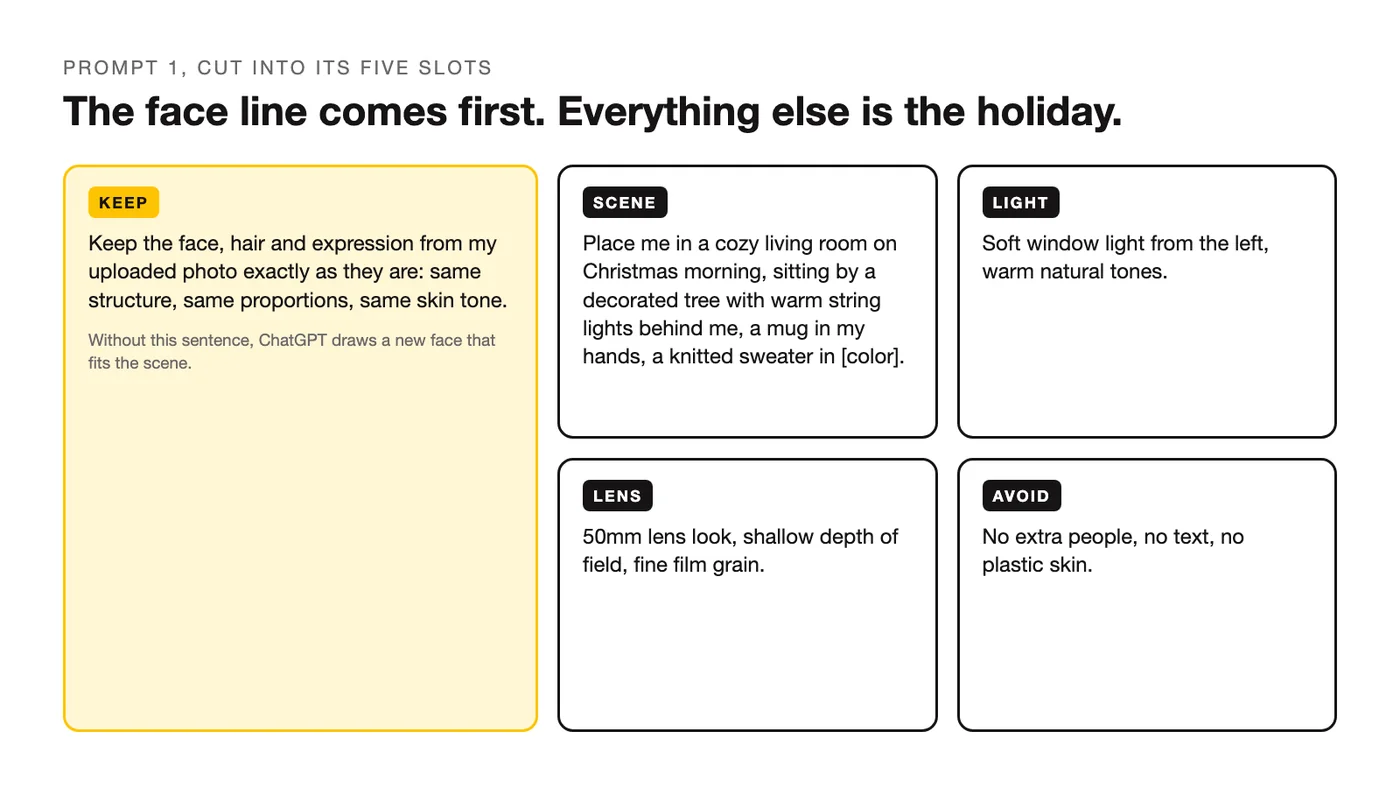
Every prompt follows the same five slots: what to keep, the scene, the light, the lens, and what to avoid. The upload prompts all open with the same face-keeping line, because without it ChatGPT treats your photo as a loose reference and hands back someone who looks like your cousin.
Before You Paste: Upload or Start From Scratch
An AI Christmas photo prompt behaves differently depending on whether there's a photo attached. With an upload, ChatGPT edits: it keeps your face, pose and clothes unless you tell it otherwise, and changes the scene around you. Without one, it generates: it invents a person, a room and a light setup from your words alone, and the result can look like a stock photo if you don't give it specifics.
An edit prompt spends its words on what stays the same. A from-scratch prompt spends them on who and what you want to see. The prompts further down are labeled so you know which kind you're copying.
| Upload a photo | Generate from text | |
|---|---|---|
| First line | "Keep the face, hair and expression from my uploaded photo exactly as they are" | "Create a photo of [who: age range, hair, outfit]" |
| What to describe | Only the new scene, light and framing | The person, the scene, the light and the framing |
| Clothing | Say "keep my clothes" or name a new outfit | Name the outfit, or you'll get a random one |
| Best for | You, your family, your pet, your card | Mood boards, backgrounds, product and decor shots |
| Common mistake | Forgetting the keep line, then getting a stranger | Vague scenes ("a Christmas photo") that come back generic |
The Line That Keeps Your Face
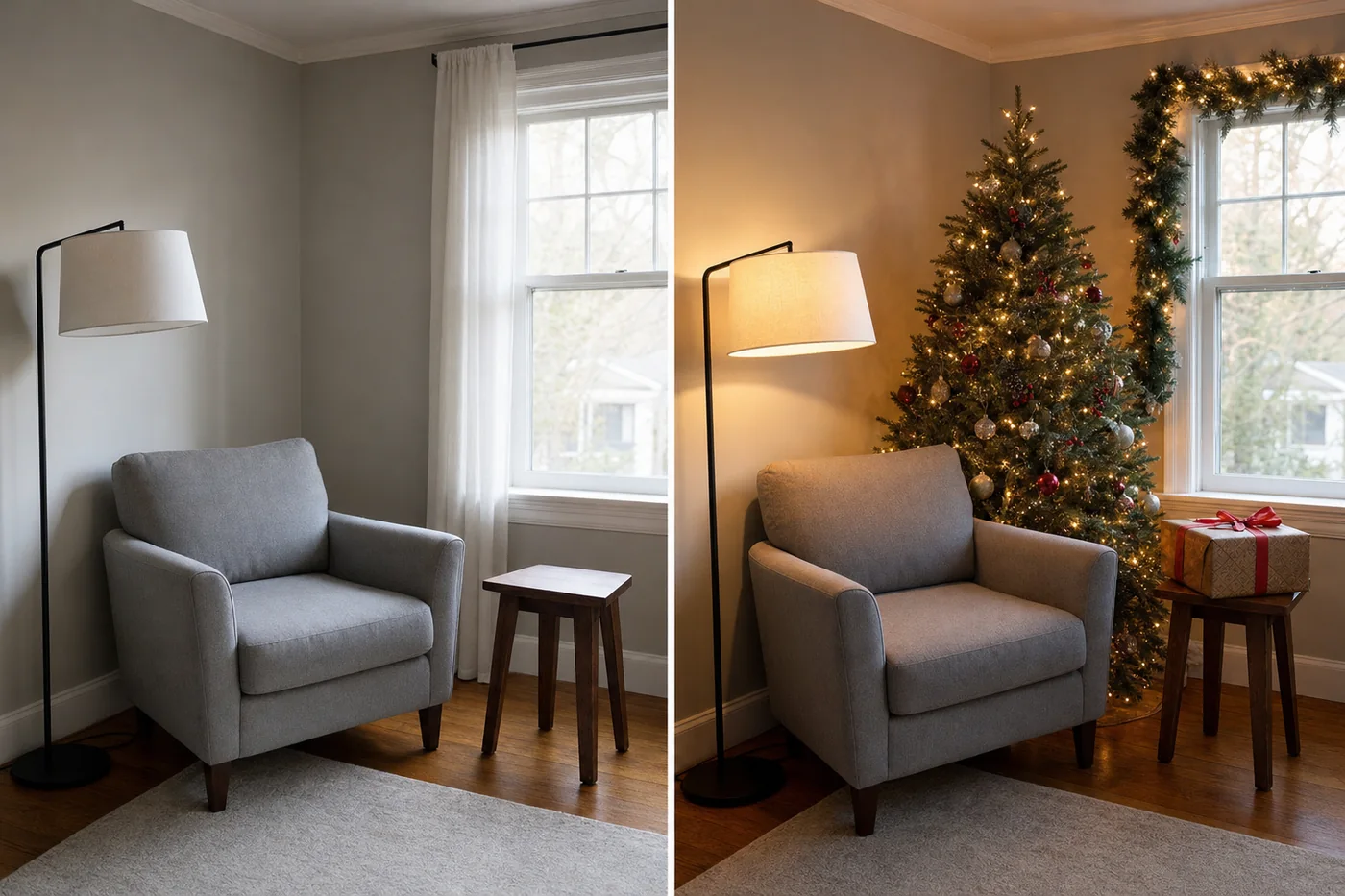
The single biggest difference between a holiday picture that looks like you and one that doesn't is one sentence at the top of the prompt. ChatGPT's image model got a lot better at this at the end of 2025: OpenAI's own release notes for the new ChatGPT Images say it "delivers the changes you ask for while keeping important details like facial likeness consistent across edits." It still helps to ask. Without the line, the model is free to smooth your skin, shave off ten years and nudge your features toward an average face. With it, those changes stay off the table and the model spends its effort on the tree, the snow and the light.
Keep the face, hair and expression from my uploaded photo exactly as they are: same structure, same proportions, same skin tone, same age. Change only what I describe below.Paste that first, then describe the scene. If you're combining two photos, say "both faces from both uploaded photos." If the result still drifts, add "no retouching, no beauty filter, real skin texture" to the last line of the prompt and run it again.
Cozy Portrait Prompts (1 to 7)
These are the ones to start with. One person, one warm room or one snowy street, and a lens line that keeps the picture looking like a photograph rather than a render. Swap the sweater color, the mug and the window side, and keep everything else.
1. Christmas morning by the tree
The classic. "No extra people" matters, because the model likes to add a family.
Keep the face, hair and expression from my uploaded photo exactly as they are: same structure, same proportions, same skin tone. Place me in a cozy living room on Christmas morning, sitting by a decorated tree with warm string lights behind me. Soft window light from the left, a mug in my hands, a knitted sweater in [color]. 50mm lens look, shallow depth of field, warm natural tones, fine film grain. No extra people, no text, no plastic skin.2. Snowy street at night
City lights and falling snow. The streetlamp gives the model a light source.
Keep my face, hair and expression from the uploaded photo exactly as they are. Put me on a quiet snow-covered street at night, standing under a warm streetlamp with shop windows glowing behind me, light snow falling. I'm wearing a [color] wool coat and a scarf, hands in pockets, small smile. 85mm lens look, shallow depth of field, soft bokeh from the lights, cool blue shadows with warm highlights. No other people, no text.3. By the fireplace with a book
A quieter frame. Fire as the only light source makes it feel real.
Keep the face, hair and expression from my uploaded photo exactly as they are. Seat me in an armchair next to a lit fireplace with stockings on the mantel and a small tree in the corner. I'm holding an open book, wearing a [color] cardigan, legs tucked up. The fire is the main light source, warm and low, with soft shadows. 35mm lens look, natural color, slight grain. No added people, no text, no changes to my face.4. Christmas market with a hot drink
Outdoors, crowd blurred, you sharp.
Keep my face, hair and expression from the uploaded photo exactly as they are. Place me at an outdoor Christmas market at dusk, holding a paper cup of hot chocolate, wooden stalls with string lights and a blurred crowd behind me. I'm wearing a [color] beanie and a puffer jacket. 85mm lens look, shallow depth of field so the stalls turn into soft bokeh, warm tungsten light on my face. No text, no logos, no extra faces in focus.5. Window seat with snow outside
Daylight version, no costume, just a season.
Keep the face, hair and expression from my uploaded photo exactly as they are. Put me on a window seat with a view of a snowy garden, a blanket over my legs and a cup of tea on the sill, a small wreath hanging in the window. Overcast daylight from the window, soft and even, cool tones outside and warm tones inside. 50mm lens look, natural skin, fine grain. No extra people, no text.6. Decorating the tree
An action frame. Keep the face lock, let the body move.
Keep my face and hair from the uploaded photo exactly as they are, but change my pose: I'm standing on tiptoe hanging an ornament on a tall Christmas tree, looking at the ornament, not the camera. Living room with warm string lights, boxes of decorations on the floor. Soft lamp light plus the tree lights, 35mm lens look, candid feel, gentle motion in the hands. No other people, no text.7. Studio holiday portrait, no upload needed
No upload needed. A clean from-scratch portrait for a card or a profile picture.
Create a studio holiday portrait of [a woman in her 30s with shoulder-length dark hair] wearing a [deep green] knit sweater, seated on a wooden stool in front of a plain cream backdrop with a single string of warm fairy lights out of focus behind. Relaxed smile, hands folded. Large soft key light from the front left, subtle fill, 85mm lens look. Natural skin texture, no text, no props beyond the lights.Family and Couple Christmas Photos (8 to 14)
Group shots are where the face line does the most work, because every face is a chance for the model to drift. Name every person, say which photo they come from, and change one thing per prompt. If you're combining people from separate pictures, upload all of them in the same message and refer to them as "the person in the first photo," "the second photo," and so on, as prompts 8 and 12 do.
8. Two people from two photos at a snowy cabin
Two photos in one message. The prompt says which is which.
Keep everyone's faces from both uploaded photos exactly as they are: the person in the first photo and the person in the second photo, same features, same skin tones. Combine the two people into one photo, standing close together outside a snowy cabin at dusk, wrapped in one plaid blanket, warm light from the cabin windows behind them. Natural candid pose, mid-laugh. 85mm lens look, gentle snowfall in the foreground, cool blue shadows and warm highlights. No added people, no text.9. Family on the sofa, matching pajamas
Works best from one group photo.
Keep every face in my uploaded photo exactly as it is: same features, same expressions, same skin tones for each person. Dress everyone in matching [red and white] plaid pajamas and seat the group on a sofa in front of a decorated Christmas tree, mugs on the coffee table, presents underneath. Warm lamp light plus tree lights, 35mm lens look, cozy and slightly messy, like a real living room. No extra people, no text, no changes to anyone's face.10. Couple under the mistletoe
One photo of you both. "Same height difference" keeps proportions honest.
Keep both faces from my uploaded photo exactly as they are, and keep the same height difference between us. Place us in a hallway doorway with a sprig of mistletoe above, about to kiss, foreheads nearly touching. Warm string lights along the doorframe, a tree glowing in the room behind, soft and romantic. 50mm lens look, shallow depth of field, warm tones, light grain. No other people, no text.11. Grandparents and grandkids baking
One photo of the group. Flour on hands, not faces.
Keep every face in my uploaded photo exactly as it is, same features and expressions for each person. Put the group around a kitchen island rolling out cookie dough, cookie cutters and a tray of gingerbread shapes on the counter, aprons on, a little flour on hands and aprons. Warm kitchen light with a window on one side, 35mm lens look, candid and busy. No added people, no text, no changes to anyone's face.12. Three generations from three photos
Three uploads, one frame. Say the order, or the model guesses.
Keep the faces from all three uploaded photos exactly as they are: the person in the first photo on the left, the second photo in the middle, the third photo on the right. Seat the three of them together on a bench in front of a snowy pine forest in afternoon light, wearing winter coats and scarves in [navy, cream and burgundy]. Relaxed, looking at the camera, shoulders touching. 85mm lens look, soft golden light, light snow on the ground. No extra people, no text.13. Sledding candid
A family action shot. Expect one regeneration for the pose.
Keep every face in my uploaded photo exactly as it is. Change the scene: the group is at the top of a snowy hill with a wooden sled, mid-laugh, one person pushing, scarves flying, bright overcast daylight. Winter coats in [colors], knit hats. 35mm lens look, candid, slight motion in the snow spray. No extra people, no text, no changes to faces.14. Couple's first Christmas, no upload needed
No upload needed. A from-scratch couple for a card where you'd rather not use real faces.
Create a photo of a couple in their late 20s, [one with short curly hair, one with a long braid], sitting on the floor in front of a Christmas tree wrapping a present together, surrounded by ribbon and paper. Warm tree lights and one lamp, 50mm lens look, shallow depth of field, natural skin, candid laugh. No text, no other people.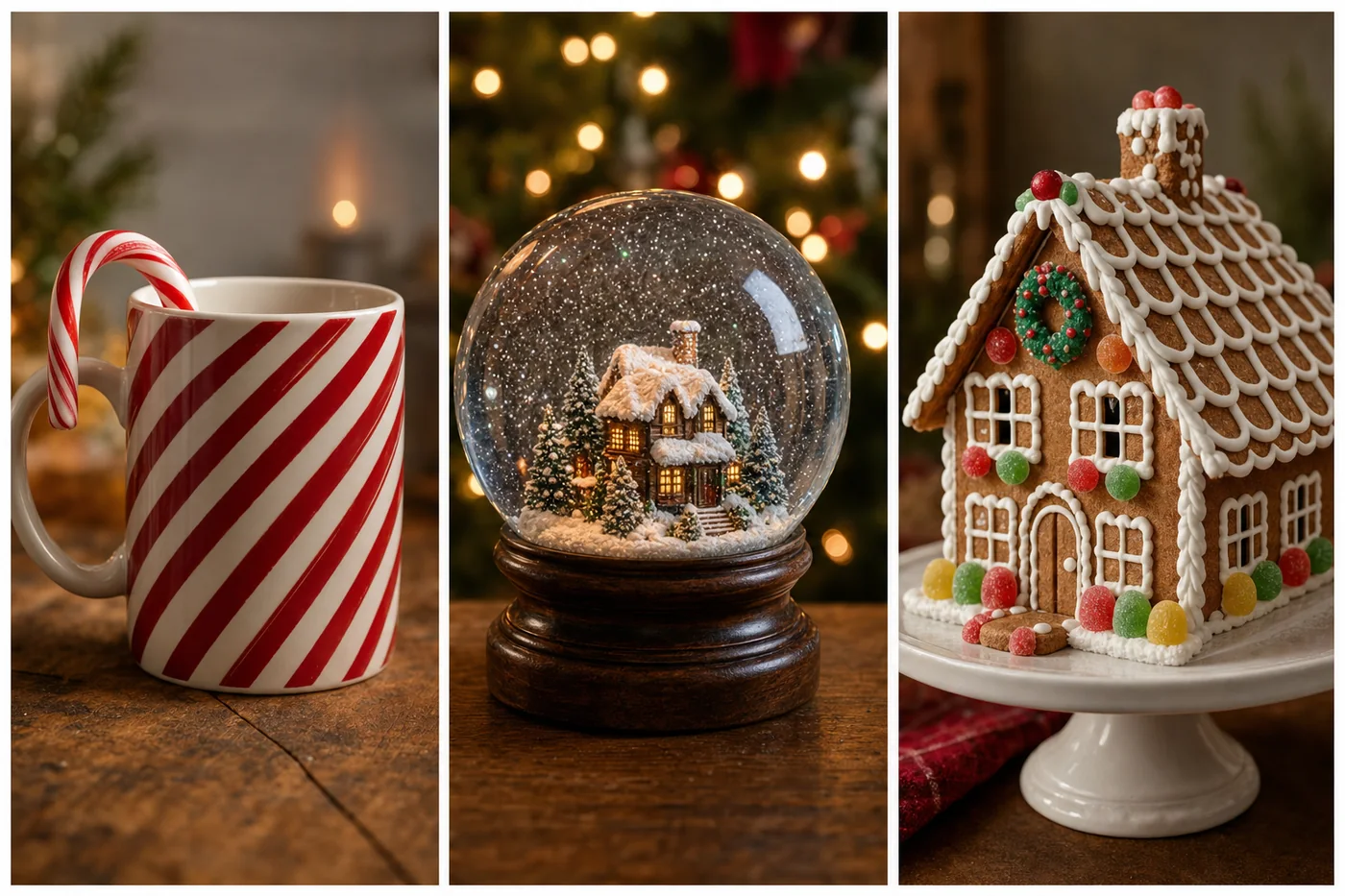
Trend Prompts People Search For (15 to 20)
Every Christmas photo trend starts as a search: candy cane, train window, snow globe, gingerbread, Santa's workshop, ugly sweater. These six cover the ones people type most, written without film or brand names so the model doesn't refuse or wander. All six are upload prompts, so you end up inside the trend.
15. Candy cane portrait
Stripes everywhere except your face.
Keep the face, hair and expression from my uploaded photo exactly as they are. Dress me in a red and white candy cane striped sweater and put me in front of a wall of oversized candy canes and white tinsel, holding one giant candy cane like a walking stick. Bright, even studio light with a slight red bounce, 50mm lens look, playful, slightly glossy. No text, no other people, no stripes on my face.16. Night train window
The vintage night train look, no movie required.
Keep my face, hair and expression from the uploaded photo exactly as they are. Seat me by the window of a vintage night train carriage in winter, warm brass lamps inside, snowy mountains and a starry sky outside the glass, a cup of cocoa on the fold-down table, a wool coat over my shoulders. Reflection of the lamps faintly in the window. 35mm lens look, warm interior, cool exterior, cinematic but realistic. No text, no other passengers.17. Inside a snow globe
A miniature you, so proportions matter.
Keep my face, hair and outfit from the uploaded photo exactly as they are, but shrink me to miniature scale standing inside a glass snow globe on a wooden base, next to a tiny snow-covered cottage and a pine tree, glitter snow drifting around me. The globe sits on a table with soft blurred Christmas lights behind it. Macro lens look, sharp on the globe, soft background, warm light. No text, no other figures.18. Gingerbread house doorway
In the door of a house you could eat.
Keep the face, hair and expression from my uploaded photo exactly as they are. Place me in the doorway of a life-size gingerbread house with white icing trim, gumdrop buttons and candy windows, snow on the roof, evening light with warm glow from inside. I'm wearing a [color] coat and holding a plate of cookies. 50mm lens look, slightly whimsical but photographic, real skin texture. No text, no other people.19. Santa's workshop
You among the toys. Keep "no elves" to have the frame to yourself.
Keep my face and hair from the uploaded photo exactly as they are. Put me at a wooden workbench in a cozy toy workshop, shelves of wooden toys and wrapped gifts behind me, a lantern and a red felt hat on the bench, sawdust and ribbon around. I'm wearing a [green] apron over my clothes and holding a half-painted toy train. Warm lantern light, 35mm lens look, rich wood tones. No elves, no other people, no text.20. Ugly sweater party
The group chat photo everyone asks for. Loud sweater, unchanged face.
Keep the face, hair and expression from my uploaded photo exactly as they are. Dress me in a deliberately ugly Christmas sweater: [bright green with a pom-pom reindeer and flashing lights], and put me at a living room party with tinsel, a disco ball and blurred guests holding drinks behind me. I'm holding a glass of eggnog and grinning. Flash photo look, slight vignette, direct on-camera flash, 28mm lens feel. No text, no readable faces in the background.Pets, Kids and Babies (21 to 24)
Two rules here. Pets get the same face line as people, because a golden retriever can drift into a different dog as easily as you can drift into a stranger. Children only ever appear as edits of a photo you already have: these four prompts all start with an upload, and none of them asks ChatGPT to invent a child.
21. Dog in a Santa hat
A clear photo of your dog. Markings and ears are the "face" here.
Keep my dog from the uploaded photo exactly as it is: same breed, same coat markings, same ear shape, same expression. Add a red Santa hat sitting slightly crooked on its head and place it on a rug in front of a decorated tree with presents, warm string lights, a chewed ribbon nearby. Low camera angle at the dog's eye level, 50mm lens look, shallow depth of field. No people, no text, no changes to the dog's face or markings.22. Cat in the tree
The model wants the cat beside the tree. The prompt says inside.
Keep my cat from the uploaded photo exactly as it is: same coat colors and pattern, same eye color, same face. Put the cat sitting inside the branches of a decorated Christmas tree, batting at a dangling ornament, tree lights lighting its fur from below. Living room out of focus behind. 85mm lens look, shallow depth of field, warm tones. No people, no text, no change to the cat's markings.23. Kids opening presents
Your own photo only. The expression line keeps the moment real.
Keep the children's faces from my uploaded photo exactly as they are: same features, same ages, same expressions. Change the scene so they're sitting on the floor on Christmas morning tearing wrapping paper off a big present, ribbon and paper everywhere, a decorated tree and stockings behind them, pajamas on. Soft morning window light, 35mm lens look, candid and a little chaotic. No added children or adults, no text, no changes to faces.24. Baby's first Christmas
From a photo of your baby. Keep the real size and skin, let the scene do the work.
Keep the baby's face, skin tone and size from my uploaded photo exactly as they are. Place the baby lying on a soft white knit blanket next to a small wooden sign that says "First Christmas," a tiny wreath and a few wrapped boxes around, a tree softly out of focus behind. Gentle, even window light, 50mm lens look, pastel tones, no harsh shadows. Spell the sign text exactly as written. No other people, no changes to the baby's face.Christmas Cards and New Year Prompts (25 to 30)
A holiday photo prompt for a card has one extra job: text. ChatGPT can put words on a picture, but it spells best when the phrase is short, in quotes, and followed by "spell the text exactly as written." Keep names to one line, check the result before you print, and regenerate if a letter went sideways. The last two prompts carry the season into New Year's Eve, with a "2027" sign you can swap for any year.
25. Vintage card with your name on it
Your photo becomes the card. Border and serif font make it look printed.
Turn this uploaded photo into a vintage Christmas card. Keep the subject exactly as uploaded. Add a cream paper border, a small embossed holly corner and the text "Merry Christmas from the [Family Name]s" in a classic serif under the photo. Spell the text exactly as written. Muted red and green, slight paper texture, no other text.26. Minimal modern card
One line of text, lots of white.
Turn my uploaded photo into a modern minimal Christmas card: keep me exactly as uploaded, crop to a square, place the photo on a plain white card with generous margins and the words "Happy Holidays" in small, thin sans-serif capitals centered below it. Spell the text exactly as written. Clean, flat lighting on the card, soft shadow on a light gray surface. No other text, no decorations.27. Card with the pet, no upload needed
No upload needed. A generic animal for when the real pet won't sit still.
Create a Christmas card photo of a [golden retriever] wearing a red knitted scarf, sitting in snow in front of a wooden fence with a small lit tree beside it, soft snowfall. Add the words "Warm Wishes" in white script at the top of the image. Spell the text exactly as written. Blue-hour light, warm glow from the tree, 85mm lens look, shallow depth of field. No people, no other text.28. New Year's Eve toast
Champagne, confetti, and a face that stays yours at midnight.
Keep the face, hair and expression from my uploaded photo exactly as they are. Put me at a New Year's Eve party at midnight, raising a glass of champagne, gold and silver confetti falling, a dark room lit by string lights and a few sparklers behind me, a [black] outfit with a bit of shine. 50mm lens look, shallow depth of field, warm gold highlights, slight motion in the confetti. No text, no other faces in focus.29. The "2027" sign
Hold the year. Swap the digits each December.
Keep my face, hair and expression from the uploaded photo exactly as they are. I'm standing on a rooftop at night holding a small light-up sign that reads "2027," city skyline and a few fireworks behind me, cold breath visible, a [color] coat and gloves. Spell the sign exactly as written, four digits only. 35mm lens look, cool night tones with warm light from the sign on my face. No other text, no other people.30. Table scene for an invitation, no upload needed
No upload needed. A product-style shot for an invite or a menu.
Create a photo of a New Year's Eve dinner table from above: dark linen tablecloth, gold chargers, black candles half burned, a sprig of fir and a scattering of gold confetti, two champagne flutes with bubbles, a small card that reads "Join us" in gold script. Spell the card text exactly as written. Moody candlelight with a soft overhead fill, 50mm lens look. No people, no other text.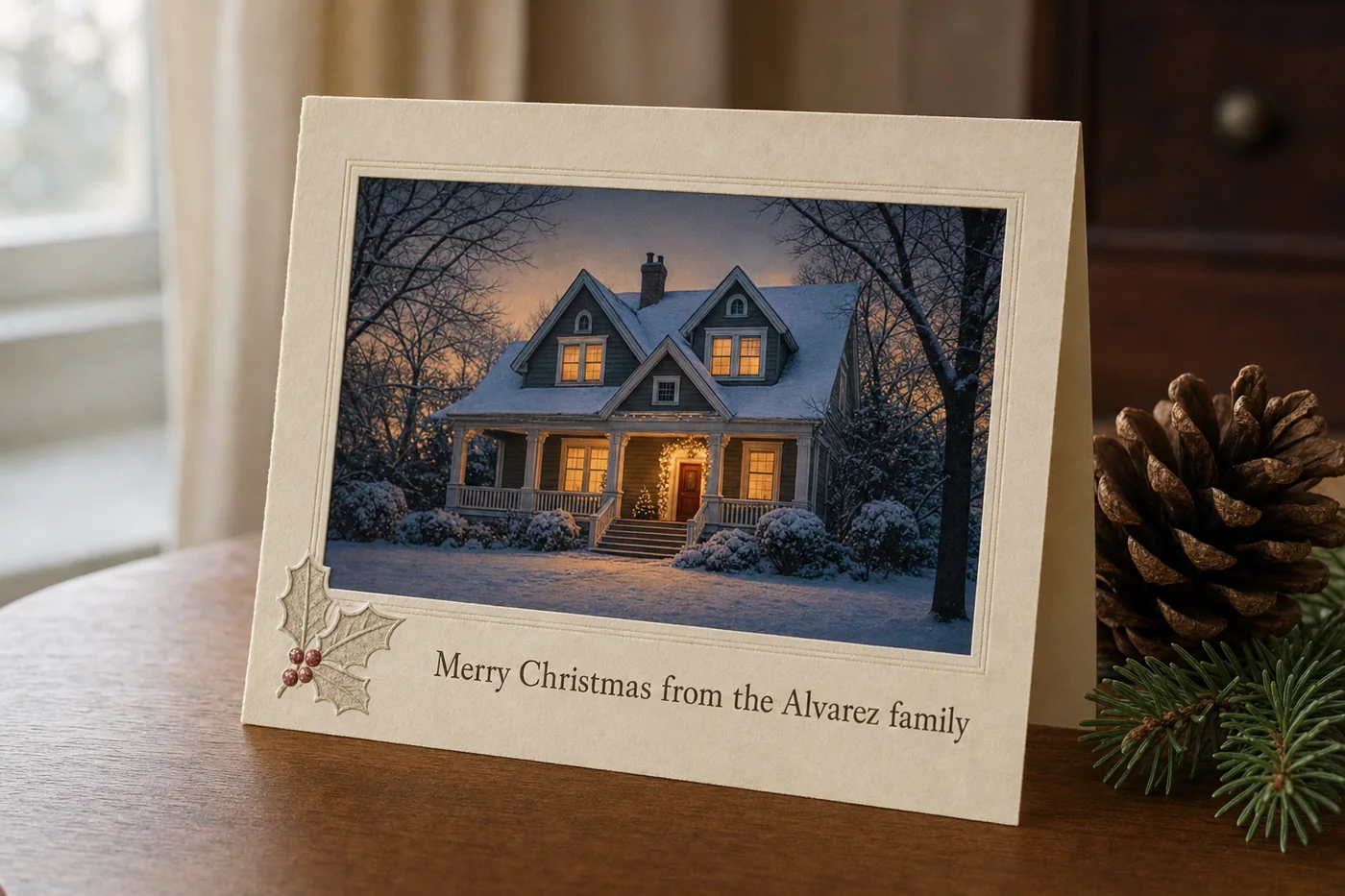
When the Photo Comes Back Wrong
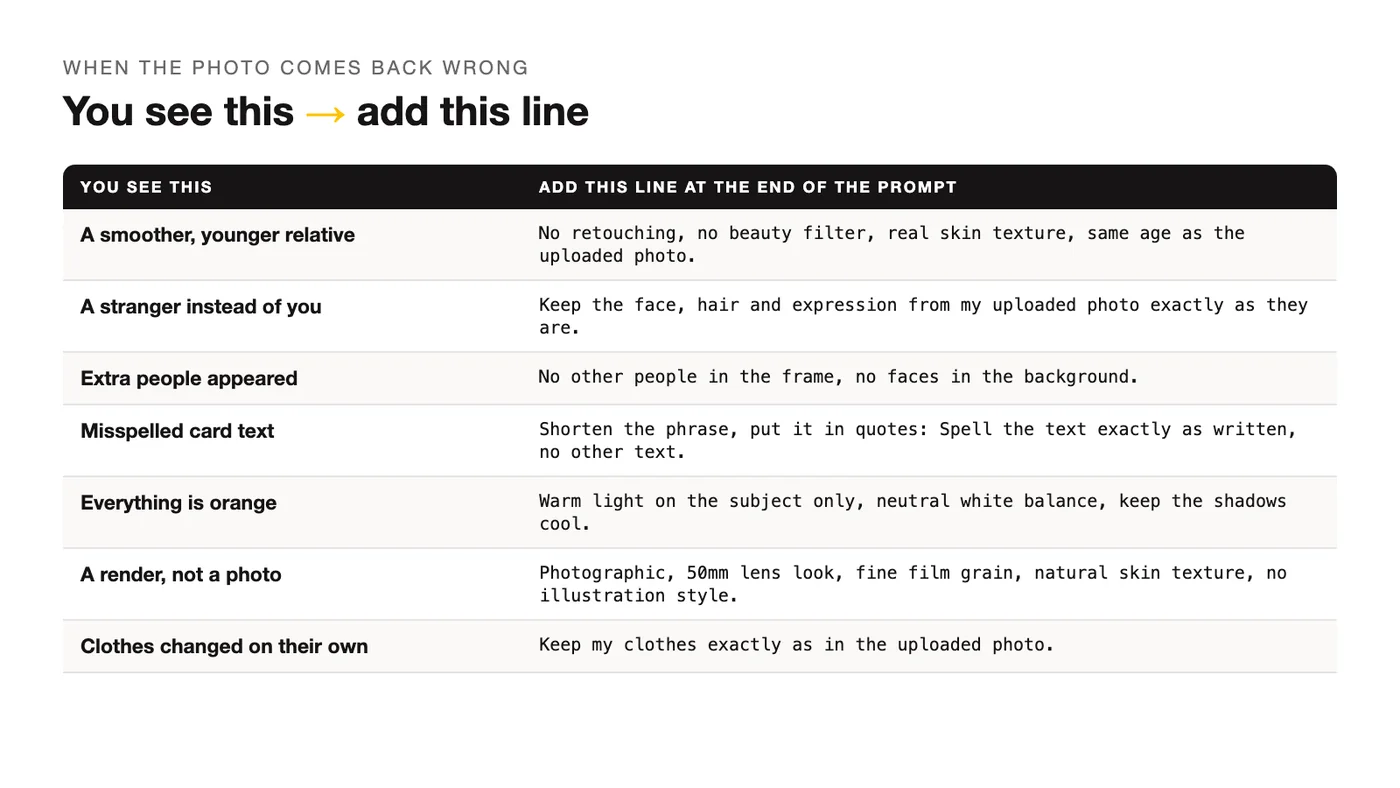
Most bad results have one cause, and one line fixes it. Run the prompt again with the extra line at the end and change nothing else, so you can tell what the fix did. Face first, scene second.
| You see this | Add this line |
|---|---|
| The face looks like a smoother, younger relative | "No retouching, no beauty filter, real skin texture, same age as the uploaded photo." |
| A stranger instead of you | "Keep the face, hair and expression from my uploaded photo exactly as they are." (You forgot the first line.) |
| Extra people appeared | "No other people in the frame, no faces in the background." |
| The text on the card is misspelled | Shorten the phrase, put it in quotes, and add "Spell the text exactly as written, no other text." |
| Everything is orange | "Warm light on the subject only, neutral white balance, keep the shadows cool." |
| It looks like a render, not a photo | "Photographic, 50mm lens look, fine film grain, natural skin texture, no illustration style." |
| Clothes changed when you didn't ask | "Keep my clothes exactly as in the uploaded photo." |
If the scene is right but the light is off, that's an editing job rather than a scene job: the prompts for fixing light and background in an existing photo handle that without touching the face.
Frequently Asked Questions
Is there a ChatGPT Christmas photo prompt template?
Yes, and every prompt on this page is built from it. Five slots in a fixed order: what to keep (the face line), the scene, the light, the lens, and what to avoid. Write those five as plain sentences, 40 to 90 words in all, and you've got a template for any holiday. The order matters more than the wording: keep first, avoid last, so the model reads the lock before the creative part.
Are these ChatGPT Christmas photo prompts free?
The prompts cost nothing: copy any of the 30 and use them however you like, including for cards you sell. ChatGPT Images itself is available on every plan, the free one included, so you don't need a paid account to try them. What changes between plans is how many images you can make and how quickly, and OpenAI doesn't publish a fixed number for the free tier, so if a prompt stops working mid-session, that's usually the reason.
Why does ChatGPT change my face in Christmas photos?
Because an image prompt without a keep line is a request to generate, not to edit. The model uses your photo as a loose reference and draws a face that fits the scene, which is how you end up ten years younger with different eyebrows. The late-2025 update to ChatGPT Images made likeness far more stable across edits, but it still does what you ask. Put the face line first, add "same age" and "real skin texture," and the drift mostly stops.
Can I put two people from different photos into one Christmas picture?
Yes. Upload both photos in the same message and refer to each person by photo: "the person in the first photo," "the second photo." Say both faces stay exactly as uploaded, describe one scene, and ask for one change per prompt, as prompts 8 and 12 do. If the model swaps details between the two people, regenerate with "keep each person's hair and clothing from their own photo" at the end.
How do I get the text on a Christmas card spelled right?
Keep the phrase short, put it in quotes, and add "spell the text exactly as written, no other text." Long sentences and unusual names are where letters go wrong, so a card that says "Merry Christmas from the Alvarez family" is safer than one that also carries an address and the year. Check every letter before you print, and if one is off, run the same prompt again. If a name keeps failing, generate the card without text and add the words in any photo app.
Do these prompts work in Gemini?
The structure does: keep, scene, light, lens, avoid works in any image model that accepts an uploaded photo. The wording that holds the face is a little different in Gemini, which is why there's a separate page of Gemini Christmas photo prompts. If you're deciding which tool to use for the whole holiday season, start with how ChatGPT and Gemini differ on images and pick the one whose edits you like.
Your Move
Pick one portrait prompt, upload your clearest photo, and run it before the family ones. A single face is the fastest way to learn how far you can push the scene before the likeness slips, and the group prompts behave the same way with more names in them.
When the holidays are over, the five-slot structure keeps working: there are more ideas for ChatGPT pictures beyond the holidays built the same way, and the face line is worth keeping in every one of them.
Put this into practice: browse portrait prompts in the library and photo editing and restoration prompts in the God of Prompt library. Want all of it in one place? The Complete AI Bundle puts the whole prompt library, Custom GPTs and n8n workflow templates behind one payment, with lifetime access.
Prompts for this topic
Put this article to work with ready-to-use prompts from the God of Prompt library.
Keep reading
Gemini Christmas Photo Prompts: 24 to Copy (2026)
24 Gemini AI Christmas photo prompts to turn your own photo into a cozy holiday portrait, family shot or card, with a face-keeping line in every one.


12 ChatGPT Photo Editing Prompts That Replace Expensive Software
Explore how text prompts can revolutionize photo editing, making it accessible and affordable without costly software.

ChatGPT Photo Editing: Goodbye Photoshop Forever
Easily edit photos with AI-powered tools that require no advanced skills, transforming images through simple text commands.

The best of the blog, in your inbox
One email when notable prompts, tools, and model updates land. No spam, unsubscribe anytime.
Join 100,000+ subscribers. One email a week, real prompts, tools, and model updates. Unsubscribe anytime.