Gemini Christmas Photo Prompts: 24 to Copy (2026)
24 Gemini AI Christmas photo prompts to turn your own photo into a cozy holiday portrait, family shot or card, with a face-keeping line in every one.

On this page
- How to Use These in Gemini
- Portrait Prompts (1 to 6)
- 1. Beside the tree, fireplace on
- 2. Snowy street, warm coat
- 3. Window seat with cocoa
- 4. Christmas market lantern light
- 5. Hanging the last ornament
- 6. Vintage studio portrait
- Family, Couple and Baby Prompts (7 to 12)
- 7. Matching pajamas on the sofa
- 8. Two photos, one snowy cabin
- 9. Family of four around the tree
- 10. Couple under the mistletoe
- 11. Grandparents with the grandkids
- 12. Baby's first Christmas
- Santa, Snow and Winter Scenes (13 to 18)
- 13. You as Santa
- 14. Meeting Santa
- 15. Snowy forest walk
- 16. Winter cabin porch
- 17. North Pole workshop
- 18. Sleigh ride
- Christmas Cards and Greetings (19 to 24)
- 19. Classic card with your family name
- 20. Holding a "Merry Christmas" sign
- 21. Minimal modern greeting
- 22. Pet card
- 23. New Year's Eve card
- 24. Card with a short handwritten note
- Edit in Two Passes, Not One
- Frequently Asked Questions
- Are these Gemini Christmas photo prompts free?
- Which Gemini model should I pick for Christmas photos?
- Why is there a watermark on my Gemini Christmas photo?
- Can I make a Christmas photo of my baby with Gemini?
- Do these prompts work in ChatGPT?
- Your Move
A Gemini AI Christmas photo prompt works best as an edit, not a drawing. You upload a photo you already like, tell Gemini what to keep, and describe the holiday around it: the tree, the snow, the card. Gemini's image model, Nano Banana, is built for that job, and every prompt below opens with the same line that keeps your face as it is.
The routine: open Create images in Gemini, upload your photo, paste a prompt, change the words in brackets, send. If a result changes something you didn't ask for, the two-pass section near the end is the fix.
How to Use These in Gemini
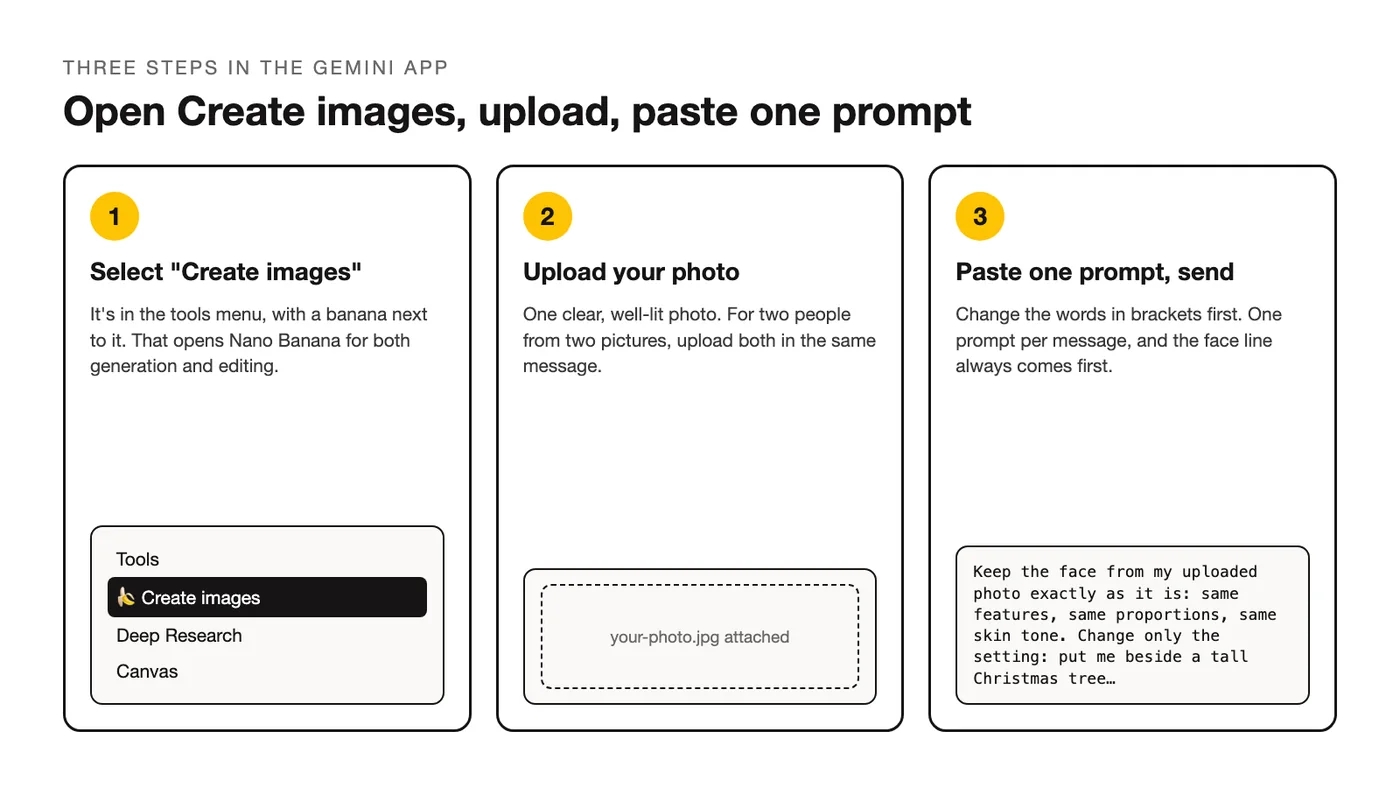
Christmas prompts for Gemini run inside the app's image tool, three steps away:
- Open the tools menu in the Gemini app and select "Create images." That's the name Google's own help text uses, with a banana next to it.
- Upload the photo to edit. For two people from two pictures, upload both in the same message; Gemini can combine two photos into one image.
- Paste one prompt, change the bracketed words, send. One prompt per message.
The free version of Gemini runs Nano Banana for generation and editing alike. On a paid Google AI plan you get a second pass with the stronger model: open the three-dot menu on a result and choose "Redo with Pro." It's worth it on a group photo where one face drifted. Before you print anything, know that Gemini adds an invisible SynthID watermark and a visible watermark marking the image as AI-generated, as Google's image generation page says, so crop with a margin.
Portrait Prompts (1 to 6)
One person, one scene. The first sentence of every prompt is the same lock, the rest is the holiday.
1. Beside the tree, fireplace on
The baseline. Keep the pose, change the room.
Keep the face from my uploaded photo exactly as it is: same features, same proportions, same skin tone. Change only the setting: put me beside a tall Christmas tree with gold and red ornaments in a warm living room, fireplace glowing on the right. Keep my pose. Soft warm light, shallow depth of field, cinematic color, realistic skin texture. No extra people.2. Snowy street, warm coat
Dusk outdoors, shop windows doing the lighting.
Keep the face from my uploaded photo exactly as it is: same features, same proportions, same skin tone. Replace the background with a snow-covered street at dusk, string lights across the street and warm shop windows on the left, light snow falling. Dress me in a [camel] wool coat and a knit scarf, keep my pose. Match the light on my face to the shop windows. Photorealistic, 85mm look. No other people.3. Window seat with cocoa
Daylight and quiet, no costume.
Keep the face from my uploaded photo exactly as it is: same features, same proportions, same skin tone. Seat me on a cushioned window seat with a mug of cocoa, a knit blanket over my legs, frost on the window and a snowy yard outside, a small wreath hanging in the glass. Soft overcast daylight from the window. Natural color, realistic skin, no extra people, no text.4. Christmas market lantern light
Blurred crowd behind, you sharp.
Keep the face from my uploaded photo exactly as it is: same features, same proportions, same skin tone. Place me at a wooden Christmas market stall at night holding a paper cup, lanterns and string lights above, a soft blurred crowd behind. Dress me in a [burgundy] coat and beanie. Warm lantern light on my face, cool blue night behind. Photorealistic, shallow depth of field. No readable faces in the background, no text.5. Hanging the last ornament
A pose change, so the prompt says what the hands do.
Keep the face and hair from my uploaded photo exactly as they are: same features, same proportions, same skin tone. Change my pose: I'm reaching up to hang a gold ornament on a tall tree, looking at the ornament. Living room with warm string lights and open decoration boxes on the floor. Candid, soft lamp light, 35mm look, realistic skin. No extra people, no text.6. Vintage studio portrait
A 1960s holiday studio look, face locked.
Keep the face from my uploaded photo exactly as it is: same features, same proportions, same skin tone, same age. Turn this into a vintage 1960s holiday studio portrait: plain [green] backdrop, a small tinsel tree on a side table, a [red] cardigan, soft studio key light from the front left. Slight film grain and faded color, square crop. No text, no other people.Family, Couple and Baby Prompts (7 to 12)
Group edits are where you name everyone. Say how many people are in the photo and that every face stays, or Gemini may treat one as background. The baby prompt edits your own photo; nothing here asks Gemini to invent a child.
7. Matching pajamas on the sofa
One group photo, everyone dressed the same.
Keep both faces from the uploaded photo exactly as they are. Dress the two of us in matching red plaid pajamas and seat us on a sofa with mugs of cocoa, a decorated tree behind us, snow visible through the window. Natural candid smile, warm string lights, photorealistic, vertical 4:5.8. Two photos, one snowy cabin
Two uploads in one message. Say which is which.
Keep the faces from both uploaded photos exactly as they are: the person in the first photo and the person in the second photo, same features and skin tones for each. Combine them into one photo standing together outside a snow-covered cabin at dusk, sharing one plaid blanket, warm light from the windows behind. Candid, mid-laugh, light snowfall. Photorealistic, 85mm look. No added people, no text.9. Family of four around the tree
Say the number; it keeps everyone in.
Keep all four faces from my uploaded photo exactly as they are, same features and expressions for each person. Put the family on the floor around a decorated Christmas tree opening presents, wrapping paper everywhere, stockings on the mantel behind. Warm tree lights plus one lamp, candid, slightly messy, 35mm look. No added people, no text, no changes to anyone's face.10. Couple under the mistletoe
Keep the height difference, or the shorter person grows.
Keep both faces from my uploaded photo exactly as they are, and keep the same height difference between us. Place us in a doorway with mistletoe above, foreheads almost touching, about to kiss. String lights on the doorframe, a tree glowing in the room behind. Warm, soft, shallow depth of field, realistic skin. No other people, no text.11. Grandparents with the grandkids
One photo of the group. Aprons and flour, faces untouched.
Keep every face from my uploaded photo exactly as it is, same features and expressions for each person. Move the group to a kitchen island decorating gingerbread cookies, icing bags and sprinkles on the counter, aprons on, a window with snow outside. Warm kitchen light, candid, 35mm look. No added people, no text, no changes to faces.12. Baby's first Christmas
Your own photo only. Keep the baby's size and skin exactly.
Keep the baby's face, skin tone and size from my uploaded photo exactly as they are. Lay the baby on a soft white knit blanket beside a small wooden sign that says "First Christmas," a tiny wreath and two wrapped boxes nearby, a tree softly blurred behind. Gentle even window light, pastel tones, no harsh shadows. Spell the sign exactly as written. No other people, no changes to the baby's face.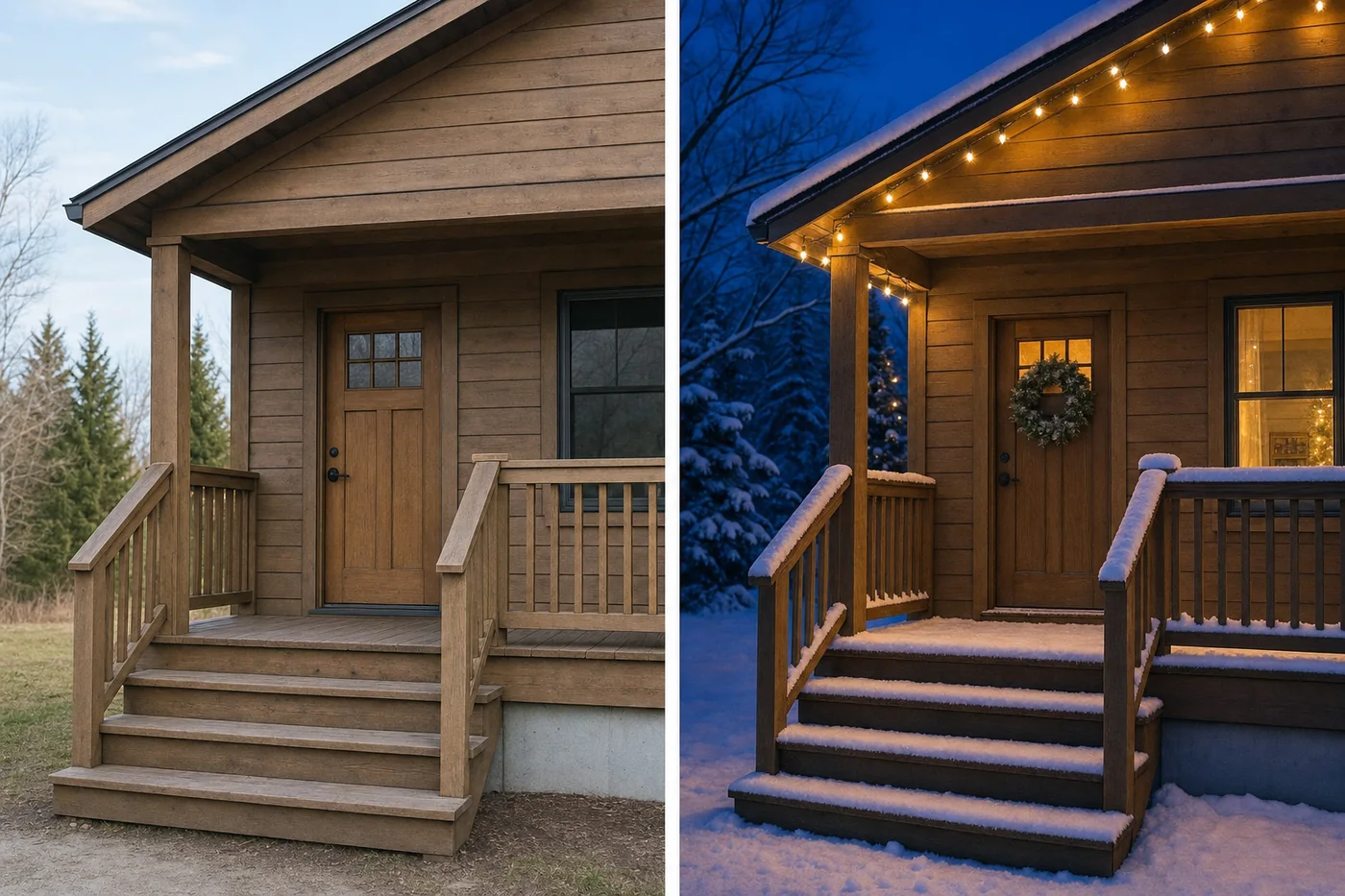
Santa, Snow and Winter Scenes (13 to 18)
A Santa Claus prompt for Gemini comes two ways: you as Santa, or you next to him. The rest is scenery around your unchanged face.
13. You as Santa
The beard is the only thing that touches the face.
Keep the face from my uploaded photo exactly as it is: same features, same proportions, same skin tone. Dress me as Santa Claus: red suit with white fur trim, red hat, black belt, and a full white beard added over my chin without changing my eyes, nose or mouth. Seat me in a big armchair by a fireplace with a sack of presents. Warm firelight, photorealistic, 50mm look. No other people, no text.14. Meeting Santa
Santa is generated here, so only your face is locked.
Keep the face from my uploaded photo exactly as it is: same features, same proportions, same skin tone. Put me standing next to a friendly Santa Claus in a cozy decorated living room, both of us looking at the camera, Santa's hand on my shoulder. Warm tree lights and a lamp, photorealistic, 35mm look. Only one Santa, no other people, no text.15. Snowy forest walk
Cold tones, warm colors on you.
Keep the face from my uploaded photo exactly as it is: same features, same proportions, same skin tone. Replace the background with a snow-covered pine forest in soft afternoon light, a narrow path behind me. Dress me in a [dark green] parka and a [cream] knit hat, keep my pose. Cool blue shadows, warm light on my face, light breath visible. Photorealistic, 85mm look. No other people.16. Winter cabin porch
Blue hour, window light on you.
Keep the face from my uploaded photo exactly as it is: same features, same proportions, same skin tone. Place me on the wooden porch of a log cabin at blue hour, snow on the railing, warm light from the window beside me, a mug in my hands and a blanket over my shoulders. Match the warm window light on my face, cool dusk behind. Photorealistic, shallow depth of field. No other people, no text.17. North Pole workshop
You at the bench, no elves unless you want them.
Keep the face from my uploaded photo exactly as it is: same features, same proportions, same skin tone. Put me at a wooden workbench in a toy workshop, shelves of wooden toys and wrapped gifts behind, a lantern on the bench, a [green] apron over my clothes, a half-painted toy train in my hands. Warm lantern light, rich wood tones, photorealistic. No elves, no other people, no text.18. Sleigh ride
Motion blur on the snow, never on the face.
Keep the face from my uploaded photo exactly as it is: same features, same proportions, same skin tone. Seat me in a red wooden sleigh on a snowy country road at sunset, a plaid blanket on my lap, a horse out of focus in front. Slight motion blur on the snow and the road, my face sharp. Golden low light, photorealistic, 50mm look. No other people, no text.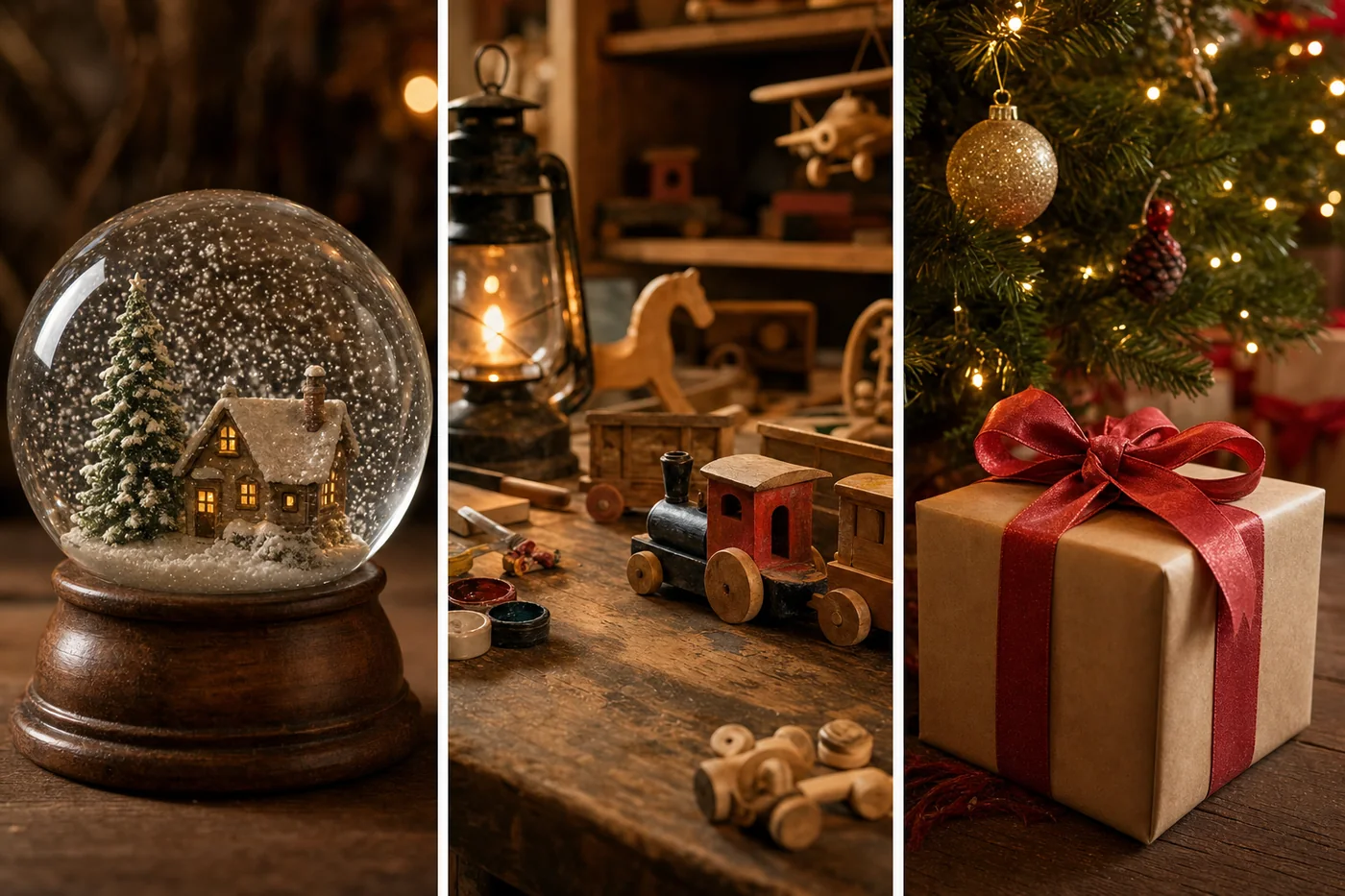
Christmas Cards and Greetings (19 to 24)
Gemini is good with words on an image. Keep the phrase short, in quotes, and ask it to spell the text exactly as written. If a letter slips, run the prompt again.
19. Classic card with your family name
Your photo inside a printed-looking card.
Keep the face from my uploaded photo exactly as it is: same features, same proportions, same skin tone. Turn the photo into a classic Christmas card: cream paper border, a small holly illustration in one corner, and the text "Merry Christmas from the [Family Name]s" in a traditional serif below the photo. Spell the text exactly as written. Muted red and green, light paper texture. No other text.20. Holding a "Merry Christmas" sign
The words are part of the scene.
Keep the face from my uploaded photo exactly as it is: same features, same proportions, same skin tone. Put a small wooden sign in my hands that reads "Merry Christmas" in white hand-painted letters, with a decorated tree softly blurred behind me and warm string lights. Spell the sign exactly as written. Photorealistic, 50mm look. No other text, no other people.21. Minimal modern greeting
White space and one line.
Keep the face from my uploaded photo exactly as it is: same features, same proportions, same skin tone. Crop the photo to a square and place it on a plain white card with wide margins, with "Happy Holidays" in small thin sans-serif capitals centered underneath. Spell the text exactly as written. Flat even light on the card, soft shadow on a light gray surface. No decorations, no other text.22. Pet card
Markings locked the way a face would be.
Keep my pet from the uploaded photo exactly as it is: same breed, same coat markings, same eye color, same expression. Add a small red knitted scarf and place the pet in front of a decorated tree on a rug, warm string lights, a wrapped gift beside it. Add the words "Warm Wishes" in white script at the top. Spell the text exactly as written. Photorealistic, low camera angle. No people, no other text.23. New Year's Eve card
Midnight scene, a year you can change.
Keep the face from my uploaded photo exactly as it is: same features, same proportions, same skin tone. Put me at a rooftop party at midnight holding a glass of champagne, gold confetti falling, city lights behind, and a small light-up sign in the corner that reads "2027." Spell the sign exactly as written, four digits. Photorealistic, warm gold highlights, cool night tones. No other text, no other faces in focus.24. Card with a short handwritten note
A longer message, still short enough to spell right.
Keep the face from my uploaded photo exactly as it is: same features, same proportions, same skin tone. Place the photo on a kraft paper card with a twine bow in the corner and the handwritten-style text "Thinking of you this Christmas" below it. Spell the text exactly as written. Warm natural light on the card, slight paper texture, photorealistic. No other text, no decorations beyond the bow.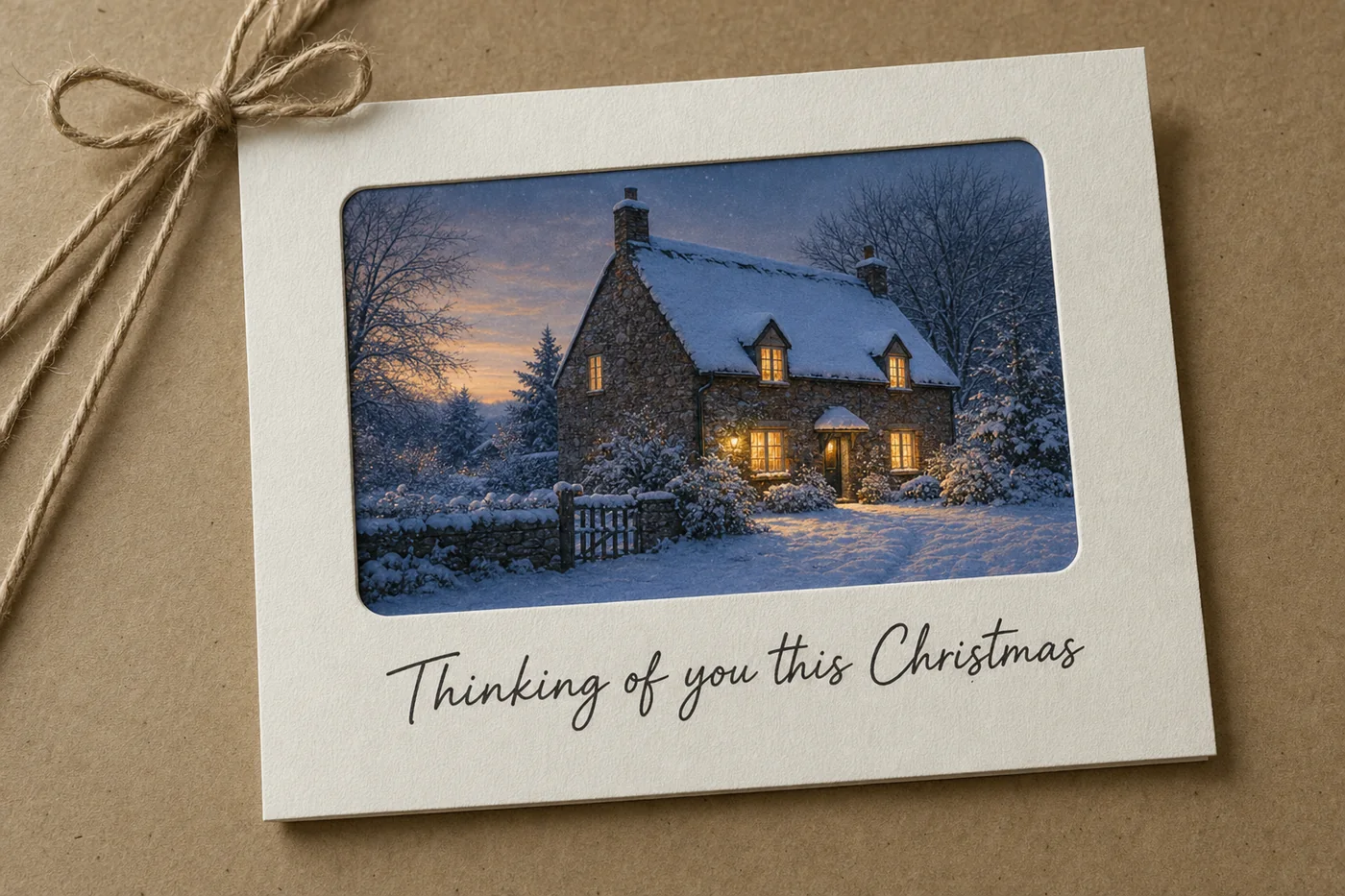
Edit in Two Passes, Not One
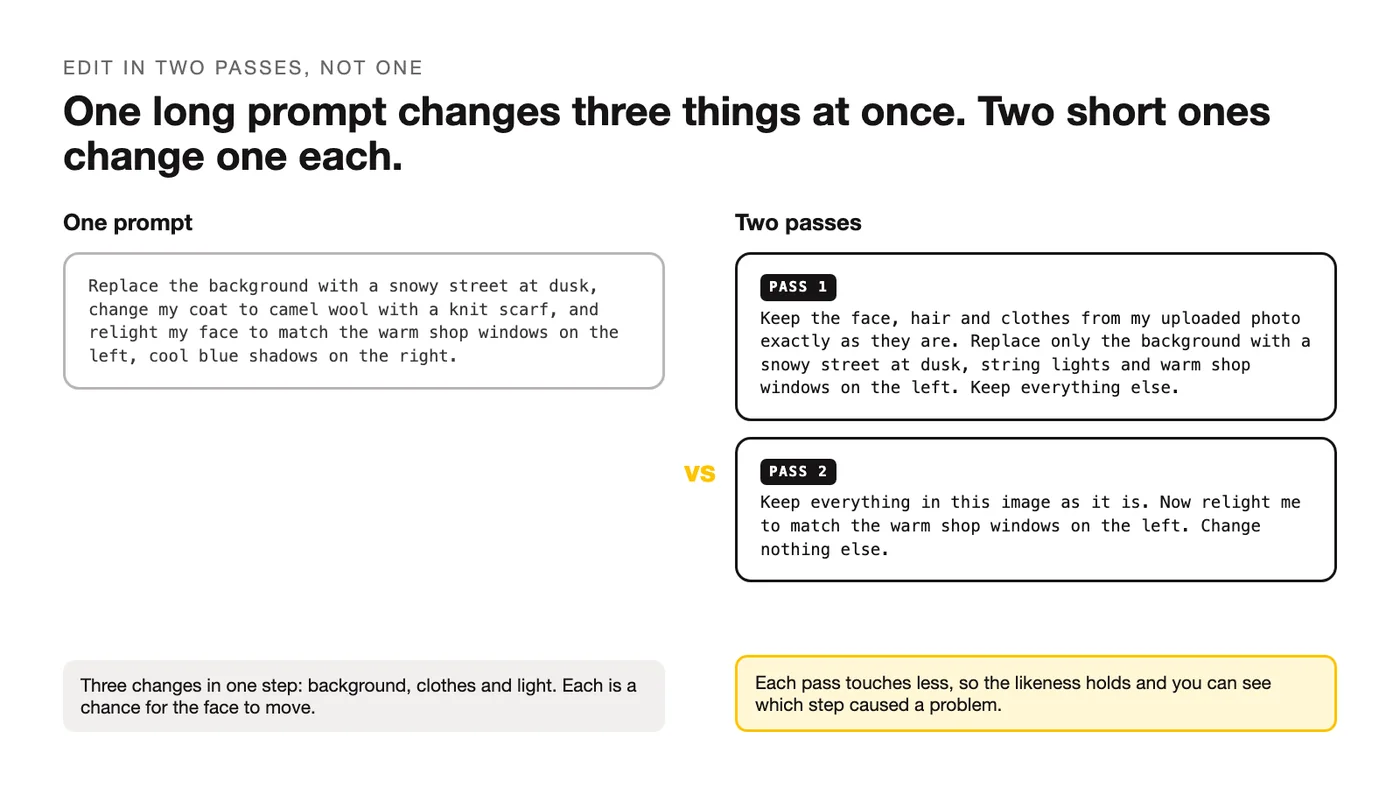
A long prompt changes the background, the clothes and the light in one step, and every extra change is another chance for the face to move. When a result is close but not right, split the job: scene first, light second. Each pass touches less, so the likeness holds.
Prompt 2 as two passes. First the scene:
Keep the face, hair and clothes from my uploaded photo exactly as they are. Replace only the background with a snowy street at dusk, string lights and warm shop windows on the left. Keep everything else.Then the light, on the result of the first pass:
Keep everything in this image as it is. Now relight me to match the warm shop windows on the left: warm light on my face and shoulders, cool blue shadows on the right. Change nothing else.The same split works for clothes and for cards (photo first, text second). For more of this kind of editing, read how Nano Banana edits a photo; if you'd rather write edits as fields than sentences, there's a guide to structured prompts for Nano Banana.
Frequently Asked Questions
Are these Gemini Christmas photo prompts free?
The prompts are, and so is the tool: Google lists Nano Banana as available for free in Gemini. Paid Google AI plans add the "Redo with Pro" pass and higher generation limits, and Google doesn't publish a number for the free tier, so if Gemini pauses you mid-session, that's the limit, not the prompt.
Which Gemini model should I pick for Christmas photos?
Start with the default. Nano Banana handles single portraits and most family edits, and every account has it. Use "Redo with Pro" from the three-dot menu, on a paid plan, when a result is almost right but one face or one piece of text slipped. Save it for the images you'll print.
Why is there a watermark on my Gemini Christmas photo?
Every image Gemini makes carries one: an invisible SynthID watermark plus a visible mark showing the picture is AI-generated, with no setting to remove it. Keep the corner where it lands clear of text, and crop with a margin on a card. The invisible one also lets you upload an image later and ask Gemini whether Google AI made it.
Can I make a Christmas photo of my baby with Gemini?
Yes, as an edit of a photo you already have. Lock the baby's face, skin tone and size in the first line and change only the scene, as prompt 12 does. Don't ask Gemini to generate a baby from a description, and don't upload photos of children who aren't yours.
Do these prompts work in ChatGPT?
The shape does: keep, scene, light, lens, avoid. The wording that holds a face is different in ChatGPT's image model, and ChatGPT is the better of the two at building a scene from nothing, so there's a separate set of ChatGPT Christmas photo prompts. Gemini for editing your own photo, ChatGPT for starting from a blank page.
Your Move
Run prompt 1 on your clearest photo before the family ones. One face shows how much scene Gemini will change before the likeness slips. Past the holidays, there are 34 more photo prompts for Gemini, sorted by job, built on the same face-keeping line.
Put this into practice: browse the Nano Banana prompt collection and the portrait prompts in the God of Prompt library. Want all of it in one place? The Complete AI Bundle puts the whole prompt library, Custom GPTs and n8n workflow templates behind one payment, with lifetime access.
Prompts for this topic
Put this article to work with ready-to-use prompts from the God of Prompt library.
Keep reading
ChatGPT Christmas Photo Prompts: 30 to Copy (2026)
30 copy-paste ChatGPT Christmas photo prompts for portraits, family, couples, pets and cards, plus the one line that stops ChatGPT changing your face.

34 Gemini AI Photo Prompts That Actually Work (2026)
Negative Prompts: What They Are, When They Work and 50 You Can Copy
A negative prompt tells an image model what to leave out. Here is how negative prompts work in Stable Diffusion, Midjourney and the newer models, when they help, when they do nothing, and 50 ready to copy by problem.

The best of the blog, in your inbox
One email when notable prompts, tools, and model updates land. No spam, unsubscribe anytime.
Join 100,000+ subscribers. One email a week, real prompts, tools, and model updates. Unsubscribe anytime.