Seedance Prompts: 20 Ready-to-Use Templates for 2.5 and 2.0
20 copy-paste Seedance prompts for text-to-video, reference images, dialogue, edits and ads, written to the patterns in ByteDance's own prompt guides.

On this page
- What Seedance Is Right Now
- How ByteDance Lays Out a Seedance Prompt
- Text-to-Video Prompts (1 to 6)
- 1. Nature documentary moment
- 2. Rainy city establishing shot
- 3. Coffee pour product shot
- 4. Kitchen sizzle with real sound
- 5. One-shot sci-fi corridor
- 6. Dolly-zoom reveal
- Prompts With Reference Images and Video (7 to 12)
- 7. Same character, new scene
- 8. Product ad with the exact product
- 9. Borrow a look from a still
- 10. First and last frame
- 11. Keyframes in a fixed order
- 12. Copy motion from a video
- Dialogue and Sound Prompts (13 to 15)
- 13. Two-person dialogue
- 14. Ambience only
- 15. A line in another language
- Prompts to Edit or Extend a Clip (16 to 18)
- 16. Change one thing for a few seconds
- 17. Remove subtitles from your own clip
- 18. Extend a clip backward
- Ad and Social Prompts (19 and 20)
- 19. 15-second vertical hook
- 20. 30-second three-part story
- When a Generation Goes Wrong
- Frequently Asked Questions
- Is there a Seedance prompts PDF?
- Does Seedance follow timestamps?
- How long can a Seedance video be?
- Can Seedance generate dialogue and sound?
- Is there an official tool to improve Seedance prompts?
- Your Move
Good Seedance prompts read like a shot list, not a string of adjectives (cinematic, epic, 8K, stunning). That's the format ByteDance's own prompt guides for the model ask for. Who's in the frame, what happens second by second, how the camera moves, what you should hear.
Below are 20 prompts grouped by the job you're doing (text-to-video, reference images, dialogue with sound, edits to an existing clip, short ads). Every one follows the patterns in ByteDance's guides on BytePlus, checked on November 2, 2026. Each is complete as written: run it once, then swap in your own subject, setting and sounds.
What Seedance Is Right Now
Seedance is the video model from ByteDance's Seed team. The current version, Seedance 2.5, generates video and audio together and can produce up to 30 seconds in one generation, with the option to extend twice. You can run it in Dreamina, CapCut's creative app, or through the BytePlus ModelArk API.
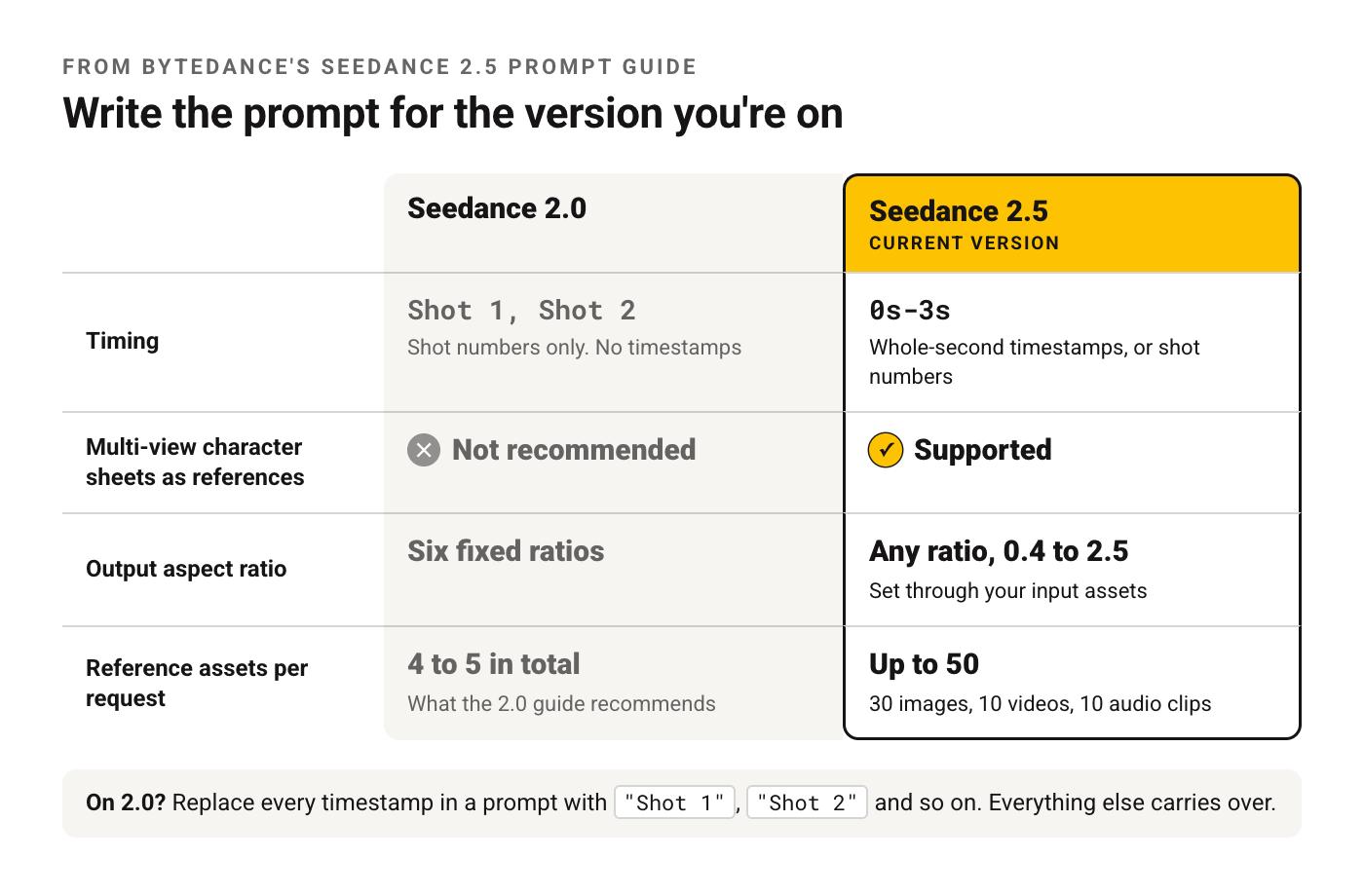
Version matters for prompting, because 2.5 reads timing differently from 2.0. These differences come straight from ByteDance's Seedance 2.5 prompt guide:
| Seedance 2.0 | Seedance 2.5 | |
|---|---|---|
| Timing | Shot numbers only ("Shot 1, Shot 2") | Whole-second timestamps ("0s-3s") or shot numbers |
| Multi-view character sheets as references | Not recommended | Supported |
| Output aspect ratio | Six fixed ratios | Any ratio between 0.4 and 2.5, set through your input assets |
| Reference assets per request | The 2.0 guide recommends 4 to 5 in total | Up to 50 (30 images, 10 videos, 10 audio clips) |
If you're on 2.0, replace every timestamp in the prompts below with "Shot 1", "Shot 2" and so on. Everything else carries over.
How ByteDance Lays Out a Seedance Prompt
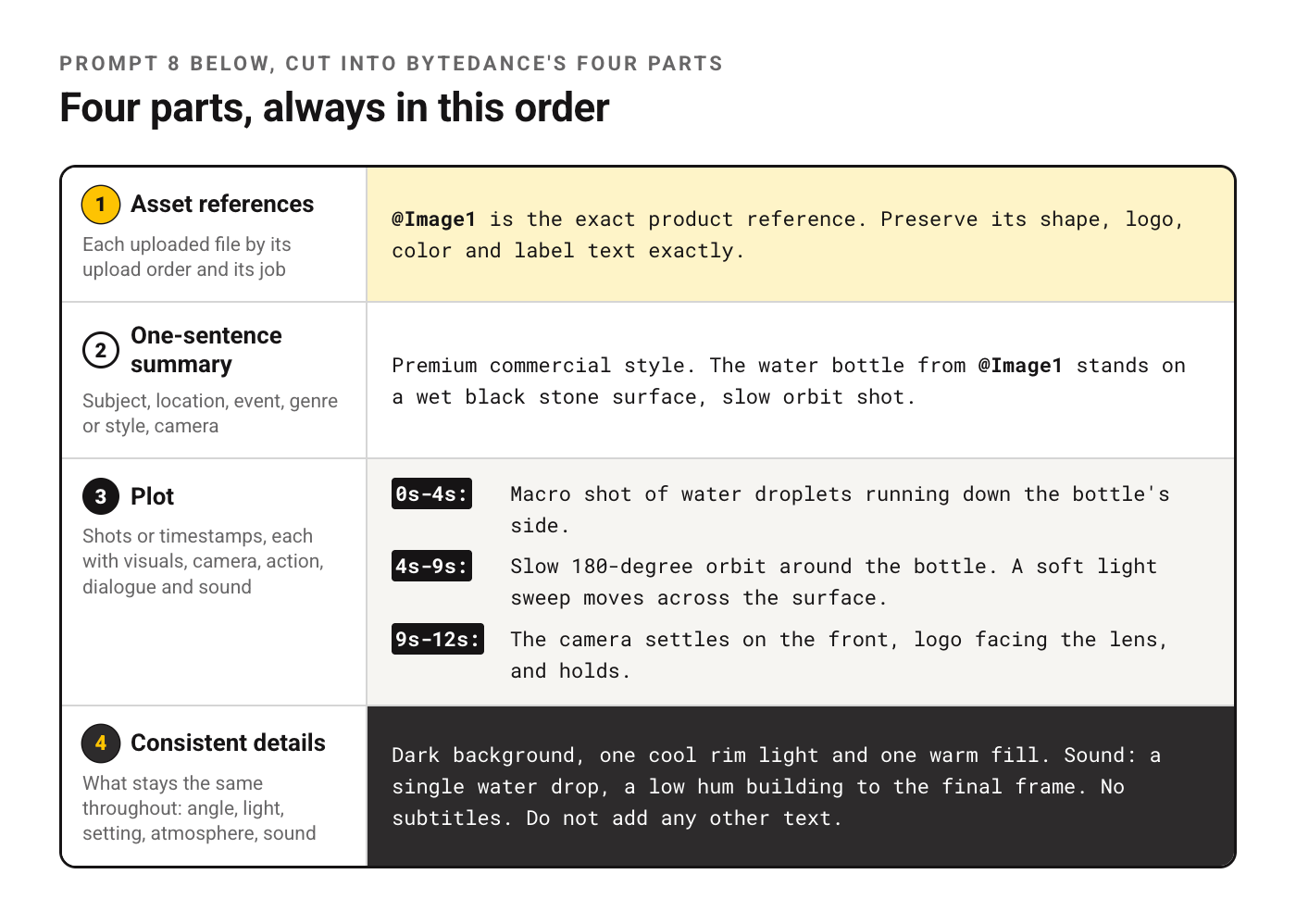
The official Seedance prompt guide for 2.5 describes a prompt in four parts, written in this order.
| Part | What goes in it | Example |
|---|---|---|
| Asset references | Each uploaded file by its upload order and its job | "@Image1 is the main character, @Video1 is the camera reference" |
| One-sentence summary | Subject, location, event, genre or style, camera | "Nature documentary, a red fox hunting in fresh snow, low tracking shot" |
| Plot | Shots or timestamps, each with visuals, camera, action, dialogue and sound | "0s-4s: ... 4s-9s: ..." |
| Consistent details | What stays the same throughout: angle, light, setting, atmosphere, sound | "Natural light, no music, ambient wind only" |
A few rules from the same guide shape every prompt here.
Timestamps are whole seconds and continuous. "0s-3s, 3s-7s" works. A gap like "0s-3s, 5s-6s" leaves the model guessing, and packing too much into one interval causes extra cuts or skipped beats. Don't use timestamps for rapid repeated motion like "shakes head three times per second."
Camera language goes in plainly. Shot sizes and camera moves work as written ("medium close-up, slow push-in, low angle"). For anything obscure, write the term and then describe what it does. The Seedance 2.0 guide adds one more: a single camera move per shot, because stacking several moves in one shot makes the image unstable.
Describe what you want, not what you don't. The 2.5 guide asks for positive descriptions wherever possible and names subtitles and audio as the places where negatives work, such as "No subtitles" or "No BGM; generate only environmental sounds and action sounds."
Show feelings as body movement. The 2.0 guide's example: instead of "very sad," write a lowered head, slightly trembling shoulders, eyes reddening. It also favors slow, continuous movements over sprints and big jumps.
For how this compares with prompting image models, see how prompting changes for image and video models.
Text-to-Video Prompts (1 to 6)
No uploads needed. Each one is written for 2.5 with timestamps.
1. Nature documentary moment
A single animal, one continuous action and natural sound. The quickest way to see how the model handles motion.
Realistic nature documentary style. On a still winter morning in a birch forest, a red fox hunts in fresh snow, filmed with a low tracking shot.

0s-4s: The fox walks slowly across untouched snow, head tilted, ears turning toward a sound under the surface. The camera tracks alongside at snow level.
4s-7s: The fox freezes, crouches, and its back legs tense. The camera holds still.
7s-10s: The fox leaps up in an arc and dives nose-first into the snow. Powder sprays outward and settles slowly.

Soft overcast light, cool blue-white palette, shallow depth of field with the background birches blurred. Ambient sound only: wind, crunching snow, the muffled thump of the landing. No BGM. No subtitles.
2. Rainy city establishing shot
An opening shot for a story. The one camera move does the work.
Cinematic neo-noir style. A narrow street in a dense city at night during steady rain, slow crane-down establishing shot.

0s-5s: The camera starts high above glowing shop signs and descends slowly through the rain toward the street.
5s-10s: The camera settles at eye level on wet pavement reflecting red and teal neon. A lone delivery scooter passes through the frame from left to right, its headlight cutting through the rain.

Cool shadows with saturated neon highlights, visible raindrops in the light, film grain. Sound: heavy rain, distant traffic, a scooter engine fading out. No music. No subtitles.
3. Coffee pour product shot
A macro shot built to show one physical process clearly.
Premium commercial style. A glass of iced coffee on a dark walnut counter, macro shot with a slow orbit.

0s-4s: Macro close-up of ice cubes in an empty glass, condensation forming on the outside. The camera begins a slow clockwise orbit.
4s-9s: Cold brew pours in from the top of the frame, swirling around the ice. Light passes through the coffee, showing amber tones.
9s-12s: Milk is poured in and blooms slowly into the coffee in soft clouds. The orbit ends with the glass centered.

Warm side light from the left, dark background, high detail on glass and liquid. Sound: ice clinking, the pour, a soft fizz. No BGM. Do not generate text or a logo.
4. Kitchen sizzle with real sound
Food scenes live on sound, so this prompt spends half its words on audio.
Close-up cooking video, realistic. In a home kitchen at dinner time, garlic and chili hit a hot pan of oil, filmed from a fixed overhead angle.

0s-3s: An empty black steel pan, oil shimmering. Fixed overhead camera.
3s-8s: Sliced garlic and red chili drop into the pan and immediately sizzle, bubbles forming around each slice, edges turning golden.
8s-12s: A wooden spatula stirs once in a slow circle. Steam rises toward the camera and thins out.

Warm tungsten light, rich texture on the oil and garlic. Sound: loud sizzle that peaks at 3 seconds, the scrape of the spatula, a quiet kitchen fan. No BGM. No subtitles.
5. One-shot sci-fi corridor
A long take. The 2.5 guide accepts terms like "one-shot" and "long take" as written.
Science fiction film style. Inside an abandoned space station, one continuous long take moving forward down a corridor.

0s-5s: The camera glides forward through a dim corridor. Emergency lights pulse orange along the floor, loose cables hang from the ceiling.
5s-10s: The camera passes a cracked window showing a slowly rotating planet outside. Frost on the glass catches the light.
10s-15s: The corridor ends at a heavy door that slides open slowly, revealing a dark control room lit only by one flickering screen.

Single continuous shot, steady forward dolly, no cuts. Cold blue-gray palette with orange accents. Sound: low ventilation hum, a metallic creak, the door's hydraulic hiss. No BGM.
6. Dolly-zoom reveal
For niche techniques, the guide says to name the term and then explain it, as done here.
Psychological thriller style. In an empty school hallway at dusk, a dolly zoom on a single open locker.

0s-3s: Wide shot of the long hallway, one locker door hanging open in the center.
3s-8s: Dolly zoom: the camera moves backward while zooming in, so the open locker stays the same size while the hallway behind it stretches and warps.
8s-10s: The camera stops. A sheet of paper slides slowly out of the locker and drops to the floor.

Dim fluorescent light with one flickering tube, desaturated green-gray palette. Sound: fluorescent buzz rising during the zoom, then silence, then the paper landing. No music. No subtitles.
Prompts With Reference Images and Video (7 to 12)
Here the uploads carry identity, look or motion, and the text does the rest. Name each asset by upload order and say what it's for.
7. Same character, new scene
The 2.0 guide's fix for faces that drift: one tight headshot plus one full-body photo, both labeled. On 2.5, multi-view sheets also work.
@Image1 is the face reference for the main character (headshot). @Image2 is the full-body reference for her outfit.

Realistic street documentary style. The woman from @Image1 and @Image2 walks through a busy morning flower market, filmed with a handheld follow shot.

0s-5s: Medium shot from behind as she walks between stalls, then she slows down at a stall of white peonies.
5s-10s: The camera moves to her side. She picks up one stem, smells it, and smiles slightly.

Her face, hair and outfit stay consistent with @Image1 and @Image2 throughout. Soft morning light. Sound: market chatter, wrapping paper rustling. No BGM. No subtitles.
8. Product ad with the exact product
Lock the product with a photo, then describe only what the camera and light do to it.
@Image1 is the exact product reference. Preserve its shape, logo, color and label text exactly.

Premium commercial style. The water bottle from @Image1 stands on a wet black stone surface, slow orbit shot.

0s-4s: Macro shot of water droplets running down the bottle's side.
4s-9s: Slow 180-degree orbit around the bottle. A soft light sweep moves across the surface.
9s-12s: The camera settles on the front, logo facing the lens, and holds.

Dark background, one cool rim light and one warm fill. Sound: a single water drop, a low hum building to the final frame. No subtitles. Do not add any other text.
9. Borrow a look from a still
A reference doesn't have to be the subject. This one only lends light and color.
Refer to @Image1 for lighting and color grading only. Do not copy its subject or composition.

Quiet drama style. An empty diner at closing time, slow push-in from the doorway.

0s-6s: The camera pushes in slowly past empty booths toward the counter. A coffee pot steams on the hot plate.
6s-10s: A ceiling fan turns slowly, its shadow sliding across the counter.

Match the palette, contrast and light direction of @Image1. Sound: the fan, a refrigerator hum, rain outside. No BGM.
10. First and last frame
Give the start and the end, and describe the motion that connects them.
@Image1 is the first frame. @Image2 is the last frame.

Stop-motion style. A paper boat on a puddle drifts from the left edge to the center, and the camera pulls back to reveal a rainy courtyard.

0s-4s: The paper boat drifts slowly across the puddle, rain rings spreading around it.
4s-8s: The camera pulls back steadily until the full courtyard is visible, matching @Image2.

Keep the boat's folds and color identical between frames. Sound: light rain, a gutter dripping. No BGM.
11. Keyframes in a fixed order
When the video must hit specific frames, the 2.5 guide says to state it in the first sentence.
Use Images 1 to 4 in order as keyframes.

Animated watercolor style. A lighthouse on a cliff goes from calm afternoon (Image 1) to an incoming storm (Image 2), to lightning over the sea (Image 3), to clear night with the lamp turning (Image 4).

Move smoothly between keyframes with a slow push toward the lighthouse. Keep the lighthouse shape and colors consistent. Sound: waves growing louder, one thunder crack, then calm surf. No subtitles.
12. Copy motion from a video
If a reference video already shows the move, the guide advises against re-describing it.
Strictly refer to the actions and camera movements in @Video1, and keep the sequence consistent with the video. Replace the subject with the robot from @Image1.

Bright toy-commercial style. The small white robot from @Image1 performs the same dance on a pastel stage.

Keep the robot's design exactly as in @Image1. Soft studio light. Use the music from @Video1. No subtitles.
Dialogue and Sound Prompts (13 to 15)
Seedance generates audio with the picture. The 2.5 guide gives one format for spoken lines, and following it reduces stray subtitles.
13. Two-person dialogue
Use the "Character's line (emotion): content" format and don't repeat the words of a line anywhere else in the prompt.
Realistic drama style. A small bakery kitchen before dawn, two bakers at a floured table, medium shots that cut between them.

0s-5s: The older baker shapes dough without looking up. Older baker's line (dry, amused): "You're late again."
5s-10s: The younger baker ties an apron, out of breath. Younger baker's line (embarrassed): "The bus never came."
10s-14s: The older baker slides a tray of dough toward her and almost smiles.

Warm oven light, flour dust in the air. Sound: oven fan, dough slapping the table. No BGM. No subtitles.
14. Ambience only
A loop-friendly scene where sound is the point. The guide supports fine-grained audio negatives like this one.
Calm ambient video, realistic. A cabin window during a snowstorm at night, fixed camera.

0s-15s: Snow falls steadily past the window. Inside, a candle on the sill flickers. Frost slowly creeps in from the corners of the glass.

Fixed camera, no movement. Warm candlelight against blue night outside. No BGM and no dialogue. Generate only environmental sounds: wind against the cabin, the soft hiss of snow, a crackle from a stove out of frame.
15. A line in another language
Seedance 2.5 generates speech natively in more than ten languages. The 2.0 guide asks you to name the language for anything other than Chinese or English.
Warm street-life style. A fruit stall in a sunny plaza at noon, medium close-up on the vendor, slow push-in.

0s-4s: The vendor arranges mangoes in a pyramid, then looks up at a customer out of frame.
4s-8s: Vendor's line (cheerful, says in Spanish): "¡Están dulcísimos hoy!"
8s-10s: She holds one mango up toward the camera.

Bright midday light, saturated colors. Sound: plaza chatter, a distant guitar. No subtitles.
Prompts to Edit or Extend a Clip (16 to 18)
These start from a video you already have. For edits, the 2.5 guide asks for the change as "from A to B", limited by time, with everything else left alone.
16. Change one thing for a few seconds
Name the time range, the old action and the new one.
Edit @Video1. From 3s to 6s, change the woman's action from typing on her laptop to writing in a paper notebook. Leave the rest of the video unchanged, including the camera, lighting and audio.17. Remove subtitles from your own clip
Removing subtitles and watermarks is listed among 2.5's editing tasks. Use it on footage you own.
Edit @Video1. Remove the burned-in subtitles at the bottom of the frame and restore the background behind them. Keep everything else exactly as it is.18. Extend a clip backward
Extension needs one of the trigger phrases the guide lists, such as "extend backward" or "continue".
Extend @Video1 backward by 8 seconds. Before the existing clip starts, show the same kayaker paddling into the cove from the open sea, filmed with the same drone angle and the same late-afternoon light. Match the color and the sound of water so the join is seamless.Ad and Social Prompts (19 and 20)
Short formats where every second has a job. If you write scripts first, the video ad script collection in our library pairs well with these.
19. 15-second vertical hook
For a phone-first feed: the problem lands in the first three seconds and the product holds the final frame.
@Image1 is the exact product reference (a desk lamp). Preserve its shape and color.

Vertical 9:16, 15 seconds, casual handheld style. A cluttered desk at night, lit only by a laptop screen.

0s-3s: Close-up of tired eyes squinting at the laptop screen in the dark. Handheld, slight shake.
3s-9s: A hand switches on the lamp from @Image1. Warm light floods the desk, papers and keyboard suddenly clear.
9s-15s: Slow push-in on the lamp standing on the tidy desk, light glowing.

Sound: keyboard tapping, the click of the switch, a soft rising tone. No subtitles. Do not add text or logos beyond those on the product.
20. 30-second three-part story
Uses the full 2.5 length. Note the continuous intervals: each one starts where the last ended.
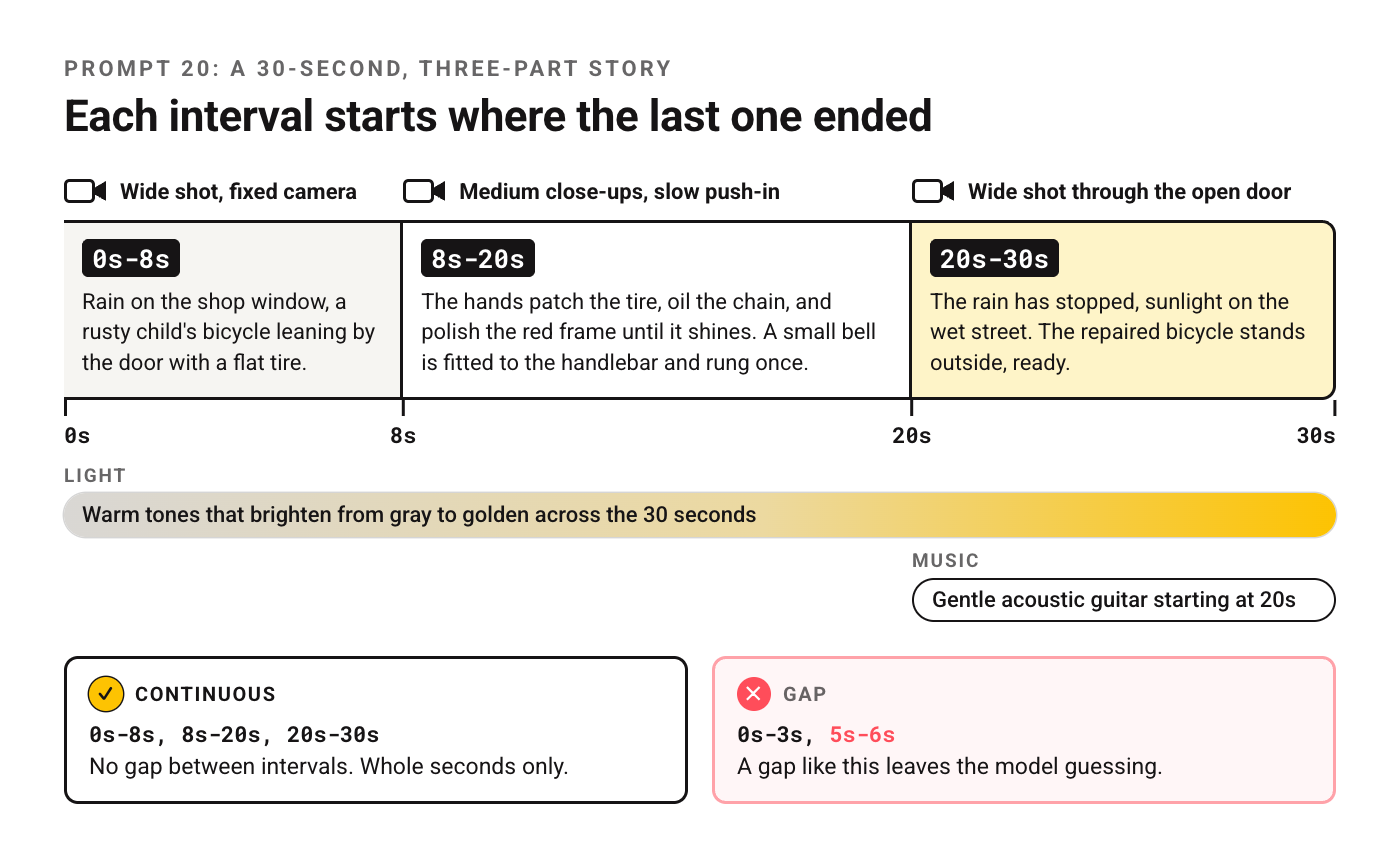
Heartwarming short film style. An old bicycle repair shop on a quiet street, from rainy morning to sunny afternoon.

0s-8s: Wide shot, fixed camera. Rain on the shop window, a rusty child's bicycle leaning by the door with a flat tire. A shopkeeper's hands roll it inside.
8s-20s: Medium close-ups, slow push-in. The hands patch the tire, oil the chain, and polish the red frame until it shines. A small bell is fitted to the handlebar and rung once.
20s-30s: Wide shot through the open door. The rain has stopped, sunlight on the wet street. The repaired bicycle stands outside, ready, as the shop sign turns to "OPEN".

Warm tones that brighten from gray to golden across the 30 seconds. Sound: rain, tools clinking, the bell, birds as the sun comes out. Gentle acoustic guitar starting at 20s. No subtitles.
When a Generation Goes Wrong
ByteDance's guides list these failure cases and fixes. Change one thing at a time so you can tell which change worked.
| You see this | Add or change this | Source |
|---|---|---|
| Subtitles you didn't ask for | "No subtitles"; don't repeat a line's words elsewhere; use a reference video without subtitles. On 2.0, landscape format lowers the chance | 2.5 and 2.0 guides |
| Eyes glowing during an emotional scene | "Normal human eyes; no glowing eyes" as the top constraint; swap "fanatical" or "extremely shocked" for calmer words like "amazed" | 2.5 guide |
| Misspelled text on a sign or package | Spell the word letter by letter and ask for the letters to appear in sequence, or upload the exact text as an image | 2.5 guide |
| Characters swapped with each other's references | Upload references in the order the characters first appear, and number them to match | 2.5 guide |
| A face that changes partway through | One clean headshot plus one full-body photo, labeled separately; place important assets first | 2.0 guide |
| Style drifts toward live action | Name the style outright, like "2D Japanese anime style" | 2.0 guide |
| Messy results from a complex request | Split it: a reference pass first, then an edit pass on the result | 2.5 guide |
The last row is worth remembering. A prompt that asks for a new character, a camera copy and an edit at once is three jobs, and the guide's fix is to run them as separate passes.
Frequently Asked Questions
Is there a Seedance prompts PDF?
There's no official PDF that we found. ByteDance's two prompt guides are web pages on BytePlus docs with a Copy Page button, which is the easiest way to keep a local copy.
Does Seedance follow timestamps?
On 2.5, yes, in whole seconds. On 2.0, no. Use "Shot 1", "Shot 2" instead.
How long can a Seedance video be?
Up to 30 seconds per generation on 2.5, and ByteDance says a clip can be extended twice. For a story longer than that, plan it as segments and use prompt 18's extension pattern for each join.
Can Seedance generate dialogue and sound?
Yes. It generates audio and video together, including speech, sound effects and music. Write spoken lines in the "Character's line (emotion): content" format from prompt 13, describe sounds in the consistent-details part, and say "No BGM" when you want ambience only.
Is there an official tool to improve Seedance prompts?
ByteDance offers a Seedance 2.5 Skill, installed with one npx command from the 2.5 guide, that you call in an AI chat to rewrite a prompt. If you'd rather not install anything, our prompt generator can draft a first version you then shape into the four-part structure.
Your Move
Start with prompt 1 or 3. Run it unchanged, then change exactly one part, the camera line or the timeline, and run it again. Two generations will teach you more about how Seedance reads a prompt than another list.
Comparing models? Here's how Veo 3 reads a prompt, the Sora 2 set, and a beginner's walkthrough of making AI video if this is your first video model.
Put this into practice: browse the Higgsfield collection and the video ad script collection in the God of Prompt library. Copy, paste, run.
New to video models and the rest of the AI tools that keep shipping? The AI Starter Pack explains every major model in plain steps, with cheatsheets to keep open while you work.
Prompts for this topic
Put this article to work with ready-to-use prompts from the God of Prompt library.
Keep reading
15 AI Website Building Templates That Convert 300% Better Than Traditional Designs
Explore how AI-powered website templates can enhance engagement and boost conversions by up to 300%, revolutionizing online business success.


Best Veo 3 Prompts That Generated Millions of Views (+ Exact Templates)
Get 20+ battle-tested Veo 3 prompts that generated millions of views. Copy-paste templates for viral videos, cinematic content, and social media. Includes exact formulas used by top creators.

10 ChatGPT Prompts for Business-Ready Visual Content
Need fast, professional visuals for your brand? Use these 10 ChatGPT prompts to create polished graphics, banners, and presentations that look sharp and on-brand—no design skills needed.

The best of the blog, in your inbox
One email when notable prompts, tools, and model updates land. No spam, unsubscribe anytime.
Join 100,000+ subscribers. One email a week, real prompts, tools, and model updates. Unsubscribe anytime.