
On this page
Zoom's cloud recordings can come with a separate M4A file, so Zoom users often get off lightly. The catch is that the option, 'Record an audio only file', has to be switched on before the meeting starts. Teams added an audio-only recording mode for privacy reasons, but it still saves an MP4.
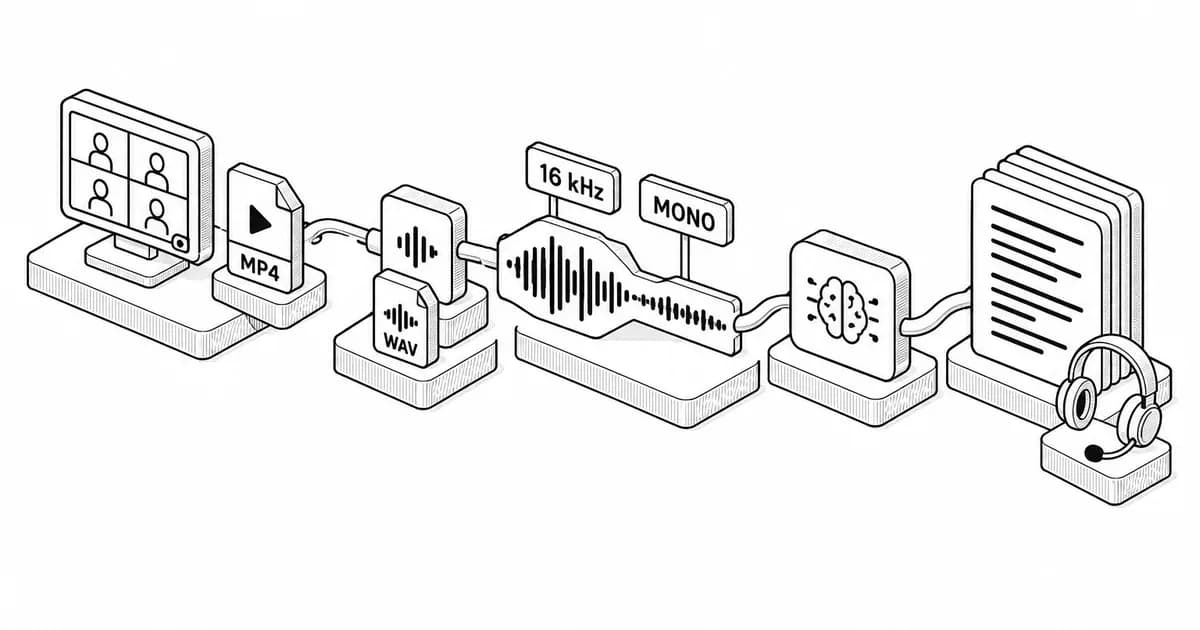
Convertio's mp4 to wav converter takes file of up to 1 GB and writes PCM WAV at any rate from its own list, which runs from 1,000 Hz to 96,000 Hz. That's 16,000 Hz and mono for a speech model, set once next to the file.
The rate every corpus settled on
The model—which brings every file down to 16,000 Hz first and, if necessary, mixes it to one channel—was trained on 680,000 hours of audio. In the Python build the conversion happens on its own, although the C++ build leaves it to you, pending a line you have to pass yourself. Similar defaults are also built into dozens of other speech tools.
TIMIT, shipped on CD-ROM in 1988, seems to go the furthest, carrying as it does a number of labels no later corpus kept—notably eight dialect regions, one of them called "Army Brat", and ten sentences per speaker drawn from a set of 2,342. That last step works by bringing the recordings down to 16 kHz not at the microphone but afterwards, in software: TIMIT was recorded at 20 kHz.
The tools require that the file arrive at 16 kHz, which makes for a smaller upload. Some people, however, rather like keeping the original. A case in point is LibriSpeech, which has kept the same 16 kHz across roughly 1,000 hours of audiobooks read by LibriVox volunteers, well before Whisper had been trained on anything at all.
Contents
The rate every corpus settled on
What the phone network fixed in 1972
Which settings to touch before uploading
What the phone network fixed in 1972
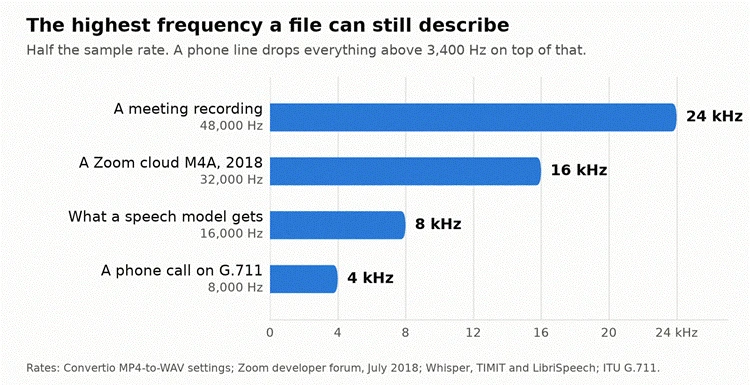
"I needed to know the sample rate in hertz of the audio recordings retrieved from /v2/users/me/recordings," wrote a developer posting as Aloe Engineering on Zoom's own forum in July 2018. "I figured it out using external software, the answer is 32.0 kHz."
G.711 dates from 1972 and measures the sound 8,000 times a second, and wideband calling only works when both ends agree.
The world's first commercial HD Voice network opened at Orange Moldova on 9 September 2009, and by the end of 2015 there were still only 117 of them in 76 countries. Today's models still can't recover what the narrow band threw away, such as the top of a consonant, or hear anything that a 16 kHz file never carried above 8 kHz.
Which settings to touch before uploading
That's why the current speech tools ask for 16 kHz and not 48, and only for one channel, not two.
Convertio puts both of these in Advanced Settings:
• Frequency, where 16000 Hz sits in the list between 12000 Hz and 22050 Hz
• Audio Channels, where Mono (1.0) is the first entry after Auto
Auto is what both start on, which means file goes through at whatever rate it already had if we do not touch them.
When a developer asked Zoom's own forum what the sample rate of an M4A cloud recording was, a staff member replied by asking whether the question was about the rate limit of the cloud recording API. That left the developer to measure file himself.
"I have asked Zoom support this a million times, every time they tell me to do this or that and it never works," wrote a user called williamtona in August 2022. "Zoom used to record at 48K, but now it's at 32K. I'm on the PRO account, on a Mac Monterey 12.3.1. Anyone have any success changing the sample rate to 48K?"
Codec list on the same page is worth a look. Next to PCM_S16LE, PCM_S24LE and PCM_S32LE it offers PCM A-Law and PCM µ-Law, and both are marked G.711—the same 1972 telephone codec we discussed above. Picking it gives us a file that sounds like a phone call, which is the one thing a speech model does not need. Work is done on server, video track is discarded, and what comes back is audio only.
Setting | What it does | My take |
Frequency 16000 Hz | matches what the model resamples to anyway | the one I would always set |
Audio Channels Mono | halves the file, costs nothing for speech | worth it unless you need the room |
Codec PCM A-Law (G.711) | gives you a file that sounds like a phone call | I would leave this one alone |
In short, anyone with a meeting recording can get a usable transcript out of it, and in most cases the file has to be brought down to 16 kHz and one channel first.
Prompts for this topic
Put this article to work with ready-to-use prompts from the God of Prompt library.
Keep reading
How to Implement AI Process Automation in Enterprise Workflows: Step-by-Step Guide by Altamira
88% of large companies run AI, yet only 39% see profit from it. A step-by-step guide to picking the right workflow, building the automation, and getting it past the pilot stage.

5 Signs Your Business Has Outgrown Its Current Customer Messaging Setup (And What to Use Instead)
The free WhatsApp Business app caps broadcasts at 256 contacts, supports five devices, and integrates with nothing. Here are five signs your messaging setup is costing you revenue, and what to move to instead.
Top 5 AI Prompts for Remote Onboarding Tasks
Five AI prompts to automate remote onboarding: 30-60-90 plans, first-day agendas, welcome emails, communication guides, and checklists.

The best of the blog, in your inbox
One email when notable prompts, tools, and model updates land. No spam, unsubscribe anytime.
Join 100,000+ subscribers. One email a week, real prompts, tools, and model updates. Unsubscribe anytime.