How To Turn Your ChatGPT Into A Midjourney Prompt Generator
Create mind-blowing images with this one prompt for Midjourney.

On this page
- How To Turn Your ChatGPT Into A Midjourney Prompt Generator
- Guided process to make the most of the prompts with Midjourney:
- 1. Log In To Discord
- 2. Subscribe to a Midjourney Plan
- 3. Join the Midjourney Server on Discord
- 4. Access #General or #Newbie Channel
- 5. Use the /imagine Command
- 6. Select a Prompt:
- 7. Review the Prompt:
- 8. Accept the Terms Of Service
- 9. Image Generation Process
- 10. Upscale or Create Variations
- 11. Enhance or Modify Your Image
- 12. Save Your Image
- Introducing the Text-to-Image ChatGPT to Midjourney Prompt Generator
- Why This Prompt Works
- Take Your Visual Content to the Next Level
How To Turn Your ChatGPT Into A Midjourney Prompt Generator
1. Define Your Goal: Clearly state what kind of visual output you want from Midjourney to guide ChatGPT in creating relevant prompts.
2. Use Descriptive Language: Incorporate vivid and detailed descriptions in your prompts to help generate more specific and accurate visual content.
3. Incorporate Keywords: Include relevant keywords and phrases that are essential for the type of images you want to create.
4. Iterate and Refine: Experiment with different prompts and refine them based on the results to improve the quality of the generated images.
5. Provide Examples: Use examples of desired outcomes to help ChatGPT understand the style and type of images you are aiming for.
The AI art creation is growing fast, with platforms like Midjourney offering amazing artistic possibilities.
But to make the most of these tools, you need to create the perfect prompt – which can be challenging.
Imagine struggling to describe the amazing creature you envision or the stunning landscape you want to see.
Don’t worry, creative minds!
This guide will show you how to turn ChatGPT into your own Midjourney prompt generator.
By guiding ChatGPT carefully, you can get it to create imaginative prompts that match your artistic vision.
Get ready to unlock your creativity and make ChatGPT your go-to tool for generating prompts!
ALSO READ: Best Midjourney Prompts for Commercial Photography (Ultimate Guide for 2026)
Guided process to make the most of the prompts with Midjourney:
1. Log In To Discord
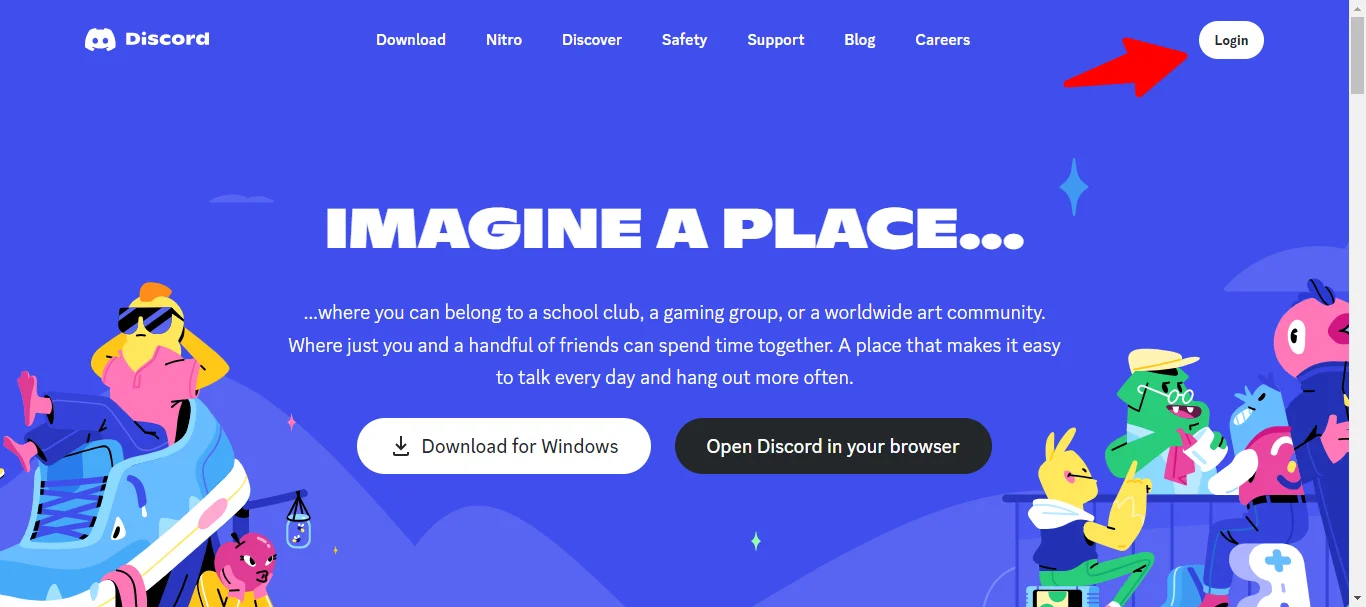
Access the Midjourney Bot via Discord’s platforms.
Ensure a verified Discord account to join the Midjourney server.
Refer to provided guides for account creation or verification.
2. Subscribe to a Midjourney Plan
Visit Midjourney.com/account and sign in using Discord.
Choose a subscription plan fitting your needs.
Check Subscription Plans for detailed pricing and features.
3. Join the Midjourney Server on Discord
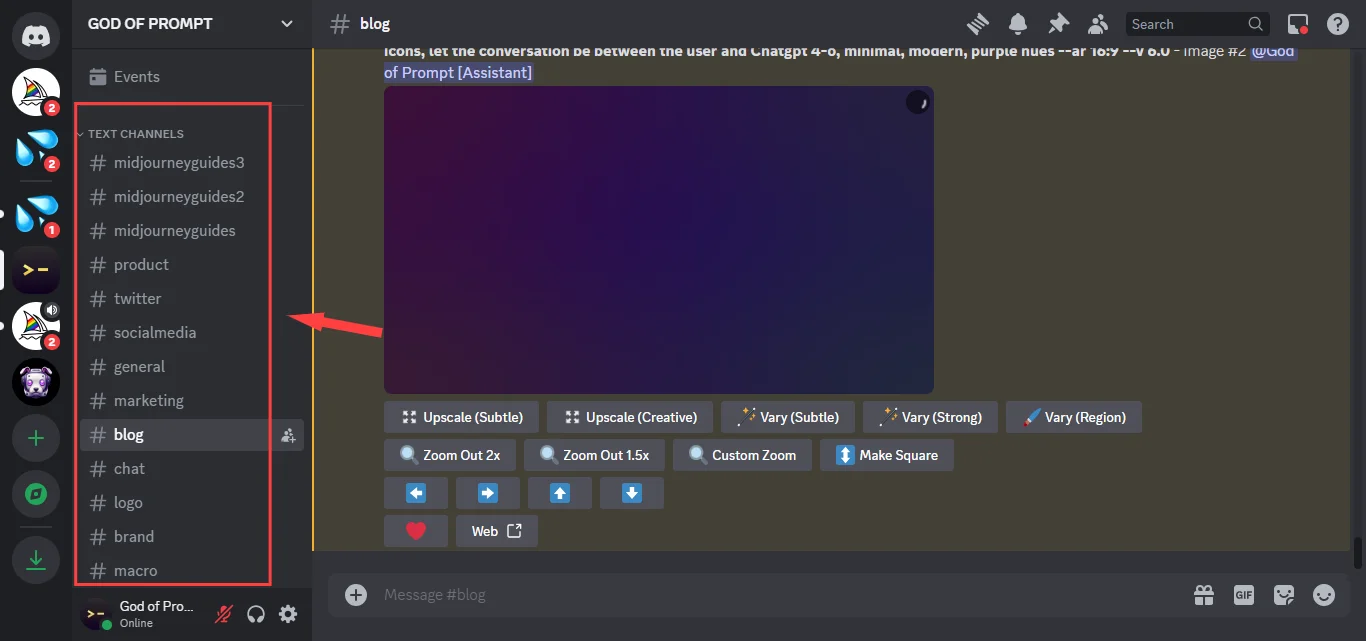
Open Discord, press the + button, and choose “Join a Server.”
Enter the URL: http://discord.gg/midjourney to join.
More details can be found in the provided Discord guide.
4. Access #General or #Newbie Channel
Locate channels labeled general-# or newbie-# after joining.
Only these channels allow Midjourney bot interactions.
Midjourney Bot can be used on other servers if invited.
5. Use the /imagine Command
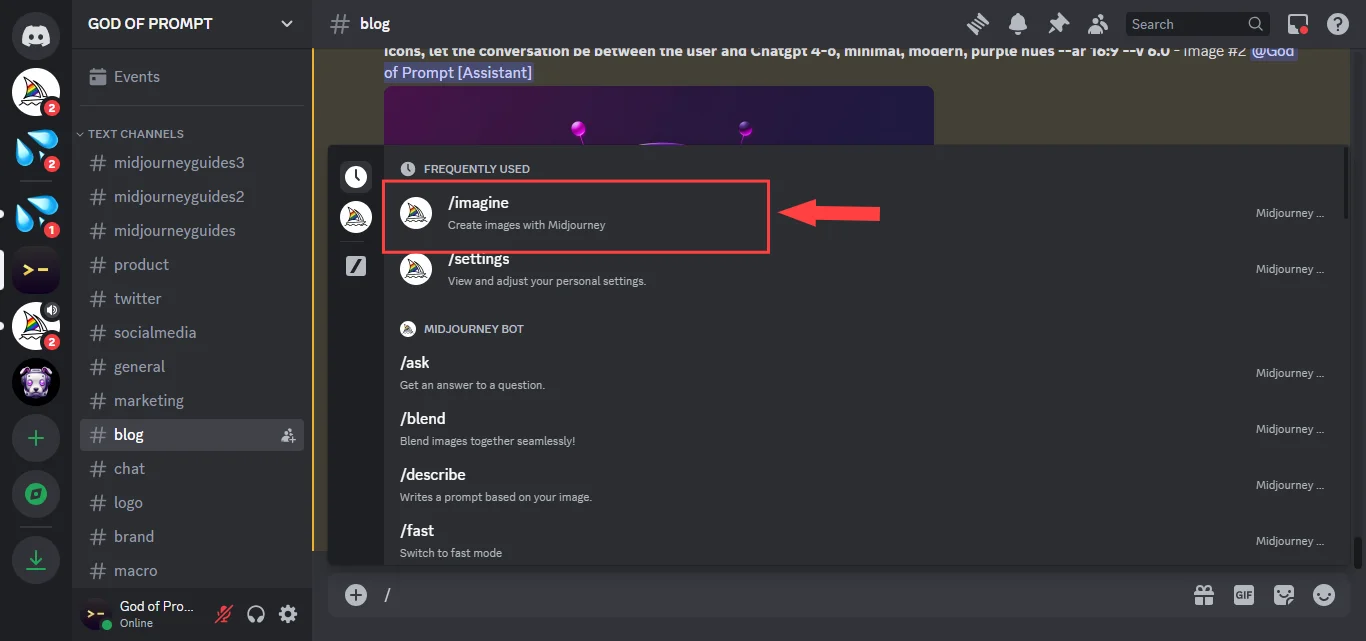
Type ‘/imagine prompt:’ in Discord and describe the image.
The Bot will generate images based on the text.
Community guidelines are applicable everywhere.
6. Select a Prompt:
Explore our extensive list of prompts in the God Mode AI Image Collection and choose the one that suits your needs.
7. Review the Prompt:
Take a moment to understand the prompt’s context and meaning. If you encounter a placeholder (usually in this format [variable]), replace it with a relevant bit of information when you copy the prompt into Midjourney.
8. Accept the Terms Of Service
Before any image generation, accept the Terms of Service.
It’s mandatory for proceeding with the bot.
Look for the MJ_TOS prompt.
9. Image Generation Process
Submit a text prompt after /imagine for the bot to process.
Four unique images are generated within minutes.
Monitor GPU time with the /info command.
10. Upscale or Create Variations
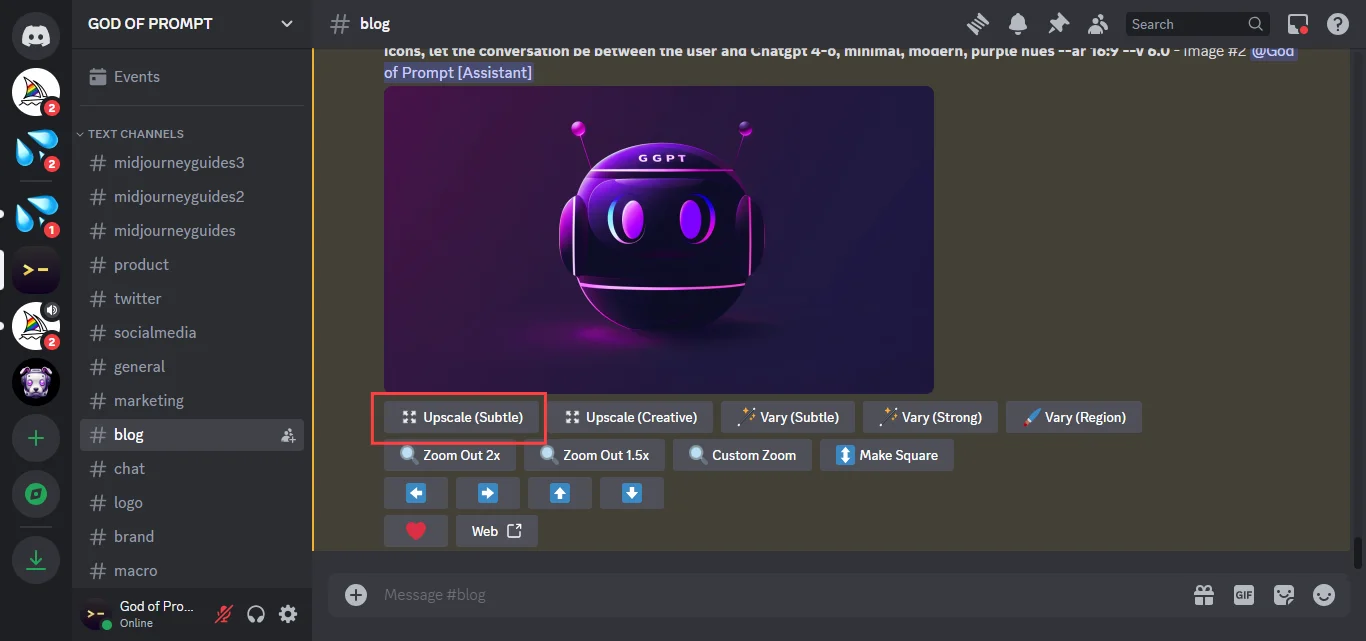
U buttons single out images from the grid.
🔄 button re-runs the original prompt.
‘V’ buttons generate image variations.
11. Enhance or Modify Your Image
Options like 🪄 Vary produce image variations.
🔍 Zoom and directional buttons adjust image canvas.
12. Save Your Image
- Click to open full-size and save it.
- On mobile, long-tap and choose the download icon.
- All images can also be viewed on midjourney.com/app.
Introducing the Text-to-Image ChatGPT to Midjourney Prompt Generator
For those venturing into the world of AI image generation, crafting the perfect AI prompt can be a daunting task.
But fret not; we’ve got you covered!
After meticulous research and testing, we present to you a proven, effective prompt to guide your AI image generator to create the perfect visuals for any social media platform:
I need to create an image for [Social Media Platform], and for that, I will be using the AI image generator called [AI Image Generator Name]. I will give you the [Social Media Platform] caption I am going to use and a brief description of the image I want. You will provide me with five prompts. Each prompt should include three descriptive keywords: the time of day, type of camera, type of lens, and post-processing techniques. Your responses should only include my brief description followed by the keywords, separated by commas. Do you understand these instructions, and are you ready to proceed?
To follow up with specifics for your content with the second prompt:
Caption: [Your Caption Here]
Image: [Your Image Description Here]
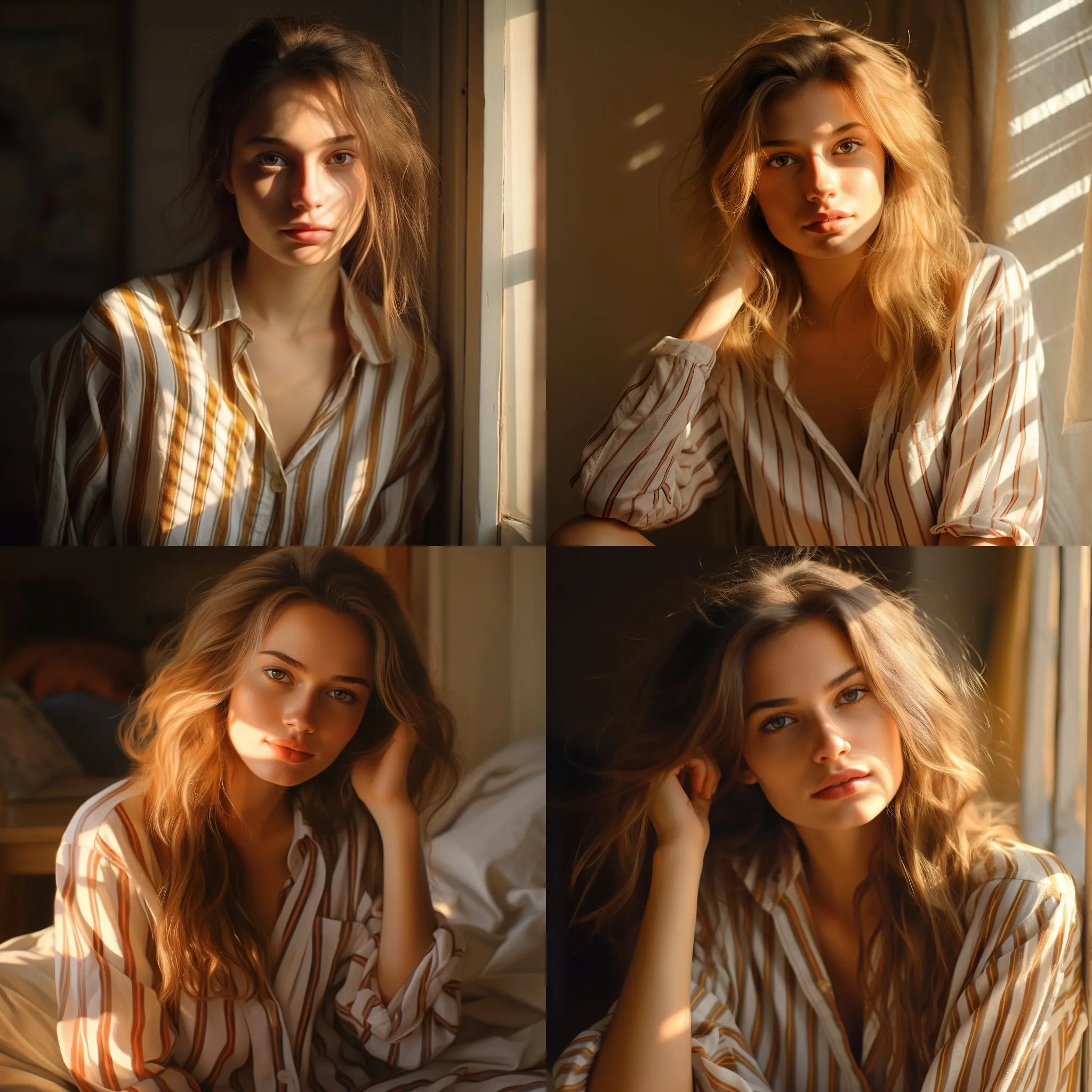
Here is my result for a pretty blond woman at home:
Why This Prompt Works
1. Precision & Clarity: This prompt lays out clear instructions for the AI, ensuring the generated visuals are aligned with your vision.
2. Flexibility: It’s adaptable to any social media platform and any AI image generator. Just fill in the brackets with your specifics!
3. Tailored Outputs: With provisions for specific camera types, lenses, and post-processing techniques, you can guide the AI to generate images that match your brand’s aesthetic.
Take Your Visual Content to the Next Level
In the age of visual-first social media platforms, standing out is paramount.
With our expertly crafted text-to-image ChatGPT prompt or the Midjourney prompt, not only can you save time and resources, but you can also ensure that your visuals resonate with your target audience. Dive into the future of content creation, and let AI-powered tools, guided by the perfect prompts, transform your digital presence.
Save time and money with our 50,000+ AI Image Prompt Collection By Clicking Here!
Imagine a tool that can craft visuals just by understanding your words.
While there are many such tools out there, our solution is truly exceptional.
Powered by special instructions of advanced AI prompts, our system creates impeccable images tailored to your needs.
It’s a game-changer for professionals, especially those in marketing or business.
With our tool, creating impactful visuals becomes both intuitive and efficient.
Put this into practice: browse AI design prompts and Midjourney prompts in the God of Prompt library — copy, paste, and run.
Prompts for this topic
Put this article to work with ready-to-use prompts from the God of Prompt library.
Keep reading
Best DALL-E and Midjourney Prompt Resources Combined
Master prompt engineering for DALL‑E 3 and Midjourney: compare features, learn techniques, and use prompt libraries to generate consistent, professional AI images.

Best Midjourney Prompt Collections for Business Graphics
A decisive comparison shows that large, organized prompt libraries deliver faster, more consistent business graphics than small, vague collections.
ChatGPT Images Update: Complete Guide to GPT Image 1.5
GPT Image 1.5: 4x faster image generation, precise editing that preserves details, professional text rendering. Complete guide with 10 prompts to try now.


The best of the blog, in your inbox
One email when notable prompts, tools, and model updates land. No spam, unsubscribe anytime.
Join 100,000+ subscribers. One email a week, real prompts, tools, and model updates. Unsubscribe anytime.