
On this page
- Start With the Official Pages (30 seconds)
- Four Local Checks, In Order
- What the Common Errors Actually Mean
- What a Real Outage Looks Like
- If It Really Is Down
- Knowing When It's Back
- Frequently Asked Questions
- Is Gemini down right now?
- Why isn't Gemini responding to my prompts?
- Why does Gemini work on my phone but not my computer?
- Has Google acknowledged an outage?
- Is it down for everyone or just me?
- Does this apply to ChatGPT and Claude too?
- The One-Minute Version
Check Google's Workspace Status Dashboard and Google Cloud status. If both are green, it's almost certainly not an outage, and the four checks further down are where to look next.
Here's the annoying part. An expired session, a blocked extension and a genuine server failure all look identical from where you're sitting: the page loads, the interface is fine, and nothing comes back. Same symptom, three different causes, and only one of them is Google's problem.
This page sorts them out in about ninety seconds.
Start With the Official Pages (30 seconds)
Third-party outage trackers count complaints. They spike when a service is merely slow, when a big account posts about it, and sometimes when nothing at all is wrong. Google's own dashboards report confirmed incidents. Start there, cross-check later.
Where | What it covers | Use it when |
Workspace Status Dashboard | Gemini inside Gmail, Docs, Drive | You reach Gemini through Google Workspace at work |
Google Cloud Status | Gemini on Vertex AI, the developer platform | You're calling it through an API |
AI Studio and the free developer tier | You build or test prompts in AI Studio | |
Downdetector | Volume of user reports, not confirmed incidents | Only as a cross-check, after the above |
Red on an official page? Stop. Nothing you do locally will help while an incident is open, and the note attached to it usually carries a rough estimate of when things come back. All green means it's yours to fix, so keep reading.
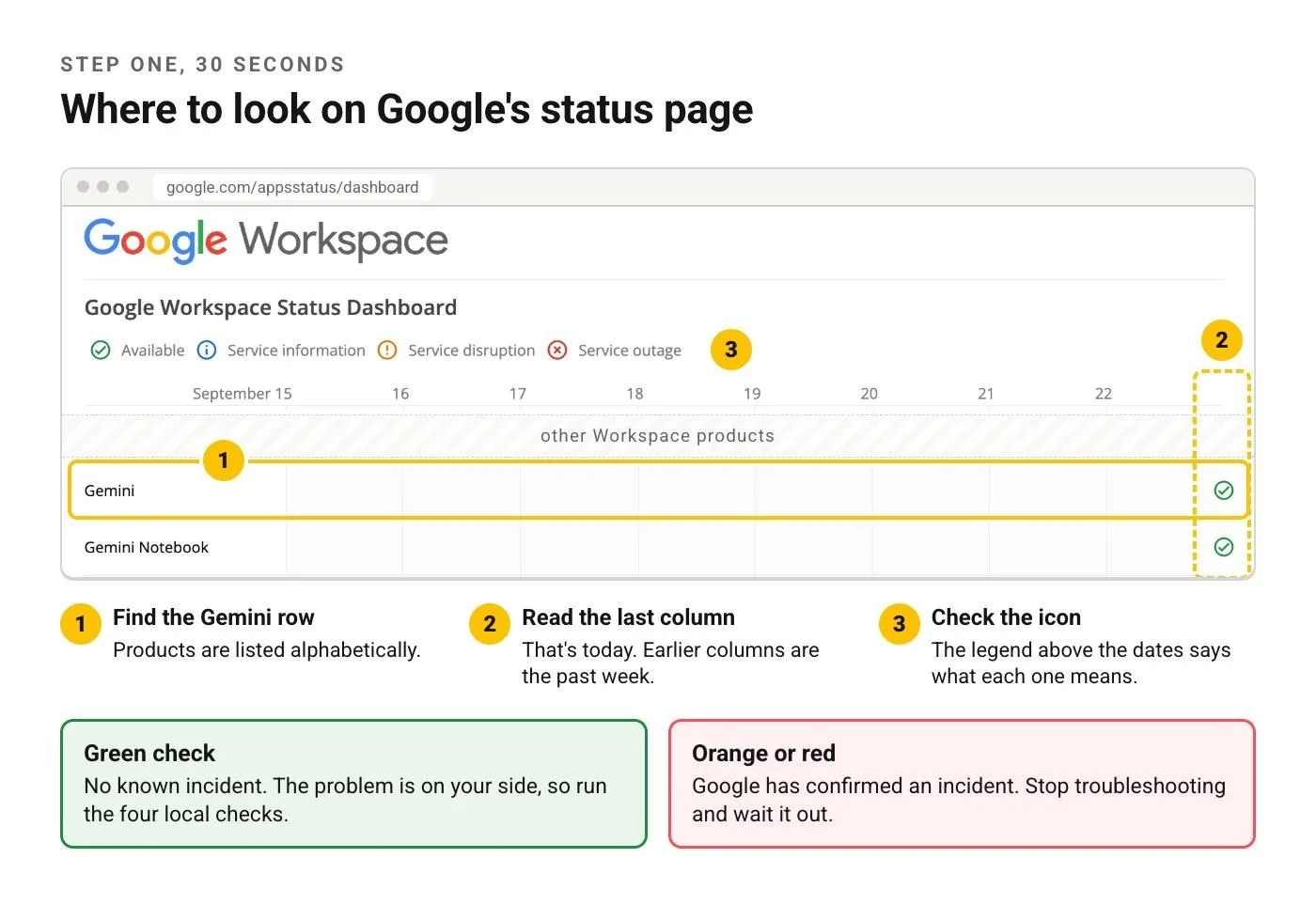
Google's Workspace Status Dashboard. Gemini row, last column, one icon: that's the whole check.
Four Local Checks, In Order
These are the usual suspects when Gemini looks broken but the dashboards are green. The whole sequence takes about a minute.
Sign out, sign back in. Gemini sessions expire quietly and the symptom is distinctive: interface loads perfectly, every prompt hangs or returns something vague. Signing out clears it immediately. This gets likelier the more Google accounts you keep open in one browser, because Gemini can end up authenticating against a different account than the one you're looking at.
Incognito window, extensions off. Works there but not in your normal window? Then it's local. Ad blockers, privacy extensions and corporate security plugins interrupt the streaming connection Gemini uses to deliver text token by token, and a broken stream looks exactly like a request that never came back.
Account type and region. Three cases produce errors that read as outages. A Workspace account where the admin never enabled Gemini: interface loads, answers don't, and no amount of troubleshooting on your side changes that, so the fix is a message to whoever administers your Google Workspace. A newer feature that hasn't rolled out in your country yet. An age-restricted account with limited capabilities. If it works on your phone but not the work laptop, this is usually why.
Rate limit, not failure. Heavy use in a short window triggers throttling, and the message is rarely explicit. You get something vague, or the model stops mid-sentence. The tell is timing: it starts after a burst and clears by itself, often within the hour. Free tiers hit it sooner, and image generation or long documents get you there faster than you'd think.
What the Common Errors Actually Mean
What you see | Most likely cause | What to do |
Blank response, no error | Streaming connection blocked | Incognito, extensions off |
"Something went wrong" | Expired session, or a real incident | Sign out and in, then check status |
Stops mid-sentence | Rate limit or timeout on long output | Wait, then ask for less at once |
Feature missing from the menu | Account type or region | Try another account or device |
Fine on phone, broken on desktop | Browser or network | Incognito, then a different network |
Slow but working | Load, not outage | Nothing to fix |
What a Real Outage Looks Like
Before you switch tools, make sure it really is an outage. The shape of one is different from what a local problem looks like.
A genuine incident hits everyone at once and it hits every surface: the web app, the mobile app, Gemini inside Docs, the API. It shows up on the official dashboard within minutes. Complaint volume on the trackers jumps almost straight up. And the errors are consistent, so everybody reports the same message.
A local problem looks nothing like that. It's one device or one account. Nothing on the dashboard. Trackers show their usual background noise. And your phone works fine while the laptop doesn't.
There's a third pattern worth naming, because it confuses people most: partial degradation. Text answers come back fine, image generation times out. Or short prompts work and long ones die. Nothing gets marked as an outage because the service is technically up, and this is the one where people spend an hour troubleshooting something that isn't theirs to fix. The tell is that the failure follows the task, not the device. If the same long prompt fails on your phone too, stop debugging your browser.
If It Really Is Down
Outages usually aren't long. Deadlines don't care. What matters is picking a substitute built for the same kind of work. Grab whichever chatbot happens to be open in the next tab and you can end up doing document analysis in a tool with no file upload.
Long-document analysis needs a model with a big context window and file upload. Image work belongs in a dedicated image tool. Research with citations needs something search-grounded, or you'll spend the saved time checking claims. Coding help wants repository context. For quick drafting and rewriting, honestly, almost anything will do, because that's where the quality gap between models is narrowest. Our AI tools directory has the current alternatives sorted by job if you'd rather not guess.
One practical note. If you've got a prompt that took real effort to get right, paste it into the substitute. Don't retype it from memory. Prompts tuned for one model usually survive the move; prompts reconstructed from memory usually don't, and you end up blaming the new tool for something you broke yourself.
Knowing When It's Back
Refreshing over and over tells you almost nothing, because a half-recovered service answers some requests and drops others. Two better signals.
The official status page flips to resolved. Lags the real fix by a few minutes. Still definitive.
Or: send something trivial. A one-sentence question. If it returns instantly, you're back. What you shouldn't do is re-send the long complex request that failed, because during recovery those are exactly the ones most likely to time out, and you'll conclude it's still broken when it isn't.
Frequently Asked Questions
Is Gemini down right now?
Not something this page can tell you live. Check Google's Workspace Status Dashboard and Google Cloud status. Both green means the problem is on your side.
Why isn't Gemini responding to my prompts?
If the interface loads but prompts hang, three causes cover most of it: an expired session, a browser extension blocking the stream, and a rate limit after heavy use. Sign out and back in first, then try an incognito window. Both take seconds and need no waiting, which is why they come first. If short prompts come back but long ones hang, ask for less at once before you blame your setup.
Why does Gemini work on my phone but not my computer?
Something local to the computer, almost always. Could be an extension, a cached session, a corporate network policy, or simply a different Google account signed in than the one you assume you're using. Incognito on the same machine will tell you which half of that list to look at, because if the private window behaves, you're chasing a browser problem rather than an account problem.
Has Google acknowledged an outage?
Confirmed incidents show up on the status dashboards with a timestamp and a description of what's affected. Nothing listed means Google hasn't acknowledged one. That isn't quite the same as nothing being wrong, but it does mean whatever you're hitting isn't widespread.
Is it down for everyone or just me?
Fastest test: open Gemini in an incognito window on a different network, your phone on mobile data for instance. Working there and not on your main setup means it isn't an outage.
Does this apply to ChatGPT and Claude too?
The logic transfers, the status pages don't. Each runs its own, and the local checks differ slightly. We've got the same walkthrough for ChatGPT and for Claude.
The One-Minute Version
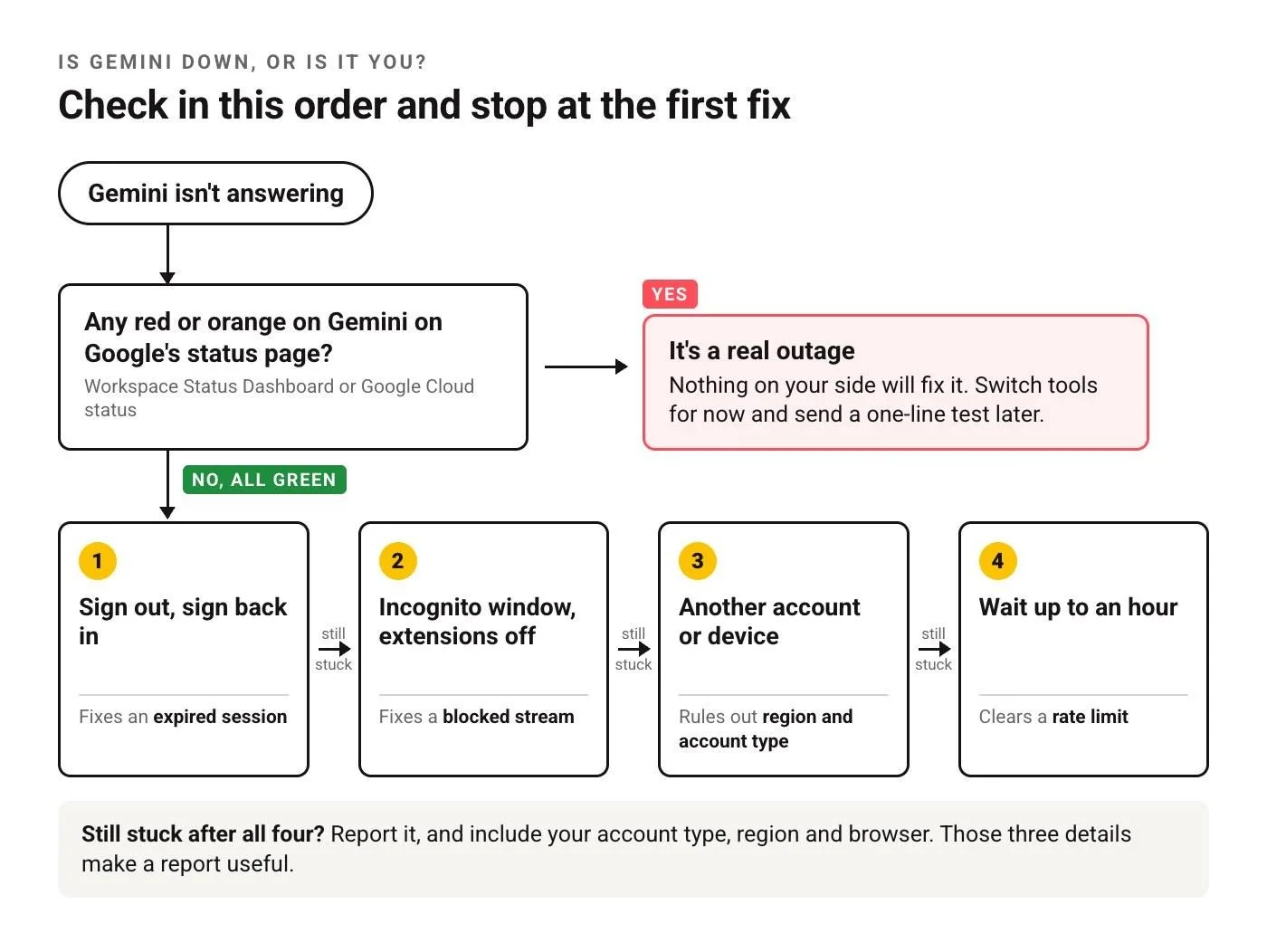
The whole page on one screen. Worth saving for the next time Gemini goes quiet.
1. Official status pages. Green or red?
2. Red: stop, wait, substitute.
3. Green: sign out, sign back in.
4. Still stuck: incognito, extensions off.
5. Still stuck: different account or device, to rule out region and account type.
6. Still stuck: wait out a possible rate limit. They usually clear within the hour.
Every check clean and it still won't answer? Now the problem is narrow enough to be worth reporting, and worth including your account type, region and browser, because those three details are what make a report actionable.
Put this into practice: while you wait, browse Gemini prompts and productivity prompts in the God of Prompt library. Copy, paste, run when it's back.
New to Gemini and not sure what it's even good for? The AI Starter Pack covers the basics without the forty-tab research phase.
Prompts for this topic
Put this article to work with ready-to-use prompts from the God of Prompt library.
Keep reading

Google Gemini Gems vs ChatGPT Projects (Step-by-Step Comparison for Beginners)
Gemini Gems vs ChatGPT Projects: a step-by-step beginner’s guide to their differences, use cases, and which AI tool is right for you.


Gemini Nano Banana Alternatives (Best AI Image Editors in 2026)
Discover the best Gemini Nano Banana alternatives in 2026. Explore top AI image editors with powerful features, creative tools, and smarter workflows for designers and creators.

The Great AI Face-Off: ChatGPT 5 vs Gemini 2.5 Pro (And Why Most Reviews Are Getting It Wrong)
Explore The Great AI Face-Off: ChatGPT 5 vs Gemini 2.5 Pro. We cut through the hype, debunk misleading reviews, and reveal which AI truly leads.

The best of the blog, in your inbox
One email when notable prompts, tools, and model updates land. No spam, unsubscribe anytime.
Join 100,000+ subscribers. One email a week, real prompts, tools, and model updates. Unsubscribe anytime.