ChatGPT Prompts Cheat Sheet: Formula, Fixes, 30 Prompts
A ChatGPT prompts cheat sheet you can keep open: the one-line formula, word tables for tone and format, 30 short prompts and 12 follow-up fixes.

On this page
- The One-Line ChatGPT Prompt Formula
- Words That Change the Answer
- Task verbs
- Formats
- Tone and reader
- Limits
- 30 Short ChatGPT Prompts by Task
- Writing and email (1 to 5)
- Work and meetings (6 to 10)
- Study and learning (11 to 15)
- Research and analysis (16 to 20)
- Career (21 to 25)
- Everyday life (26 to 30)
- Follow-Ups When the Answer Misses
- Old Habits to Drop
- Keep It Open While You Work
- Frequently Asked Questions
- Is there a ChatGPT prompts cheat sheet PDF?
- What's a good ChatGPT cheat sheet for students?
- What is the best prompt formula for ChatGPT?
- Do these prompts work in Claude and Gemini?
- Your Move
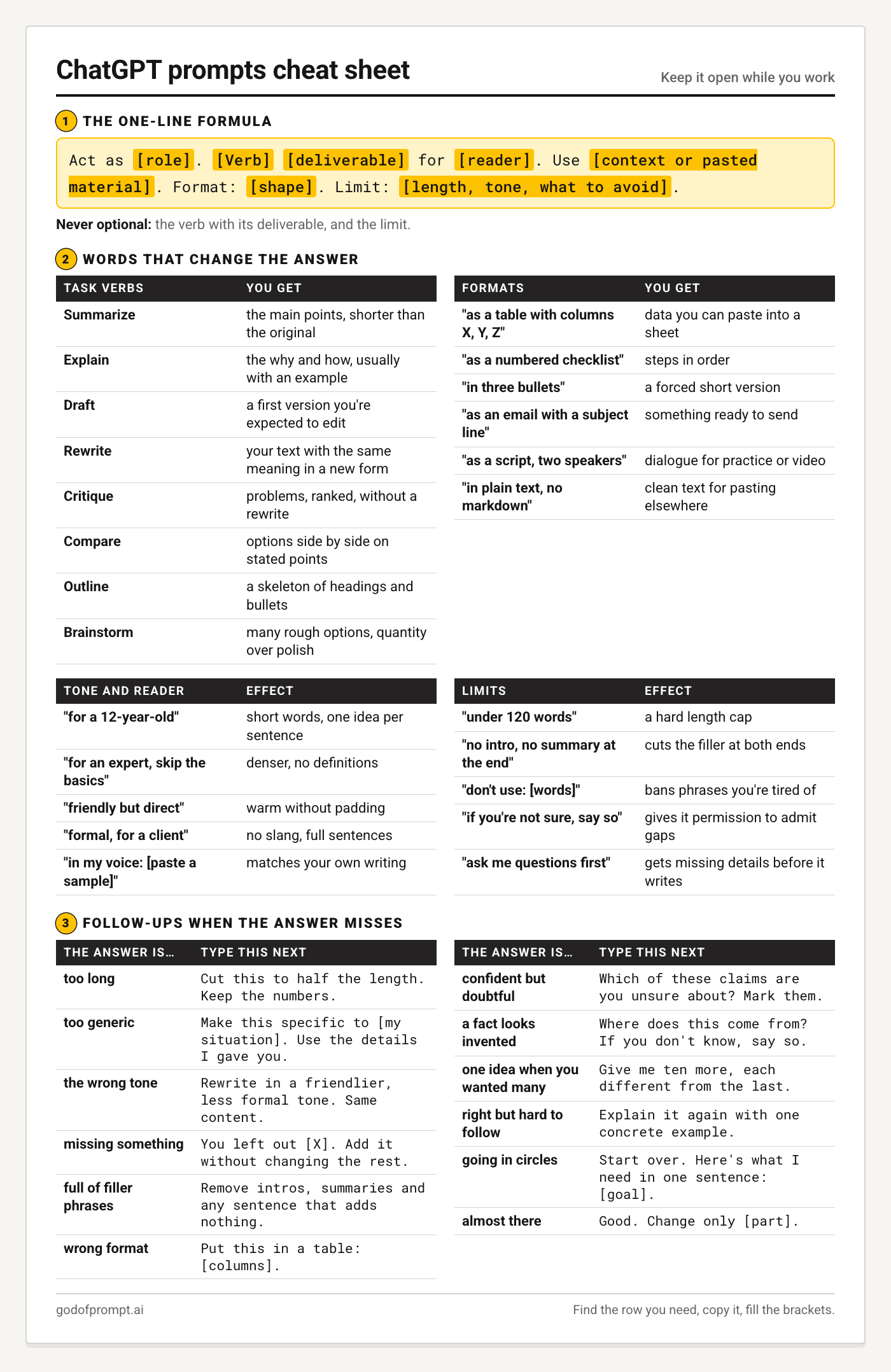
This ChatGPT prompts cheat sheet is built to stay open in a second tab. It has four parts: a one-line formula, tables of the words that change an answer, 30 short prompts sorted by task, and 12 follow-up lines for when the first answer misses.
Nothing here needs reading top to bottom. Find the row you need, copy it, fill the brackets.
The One-Line ChatGPT Prompt Formula
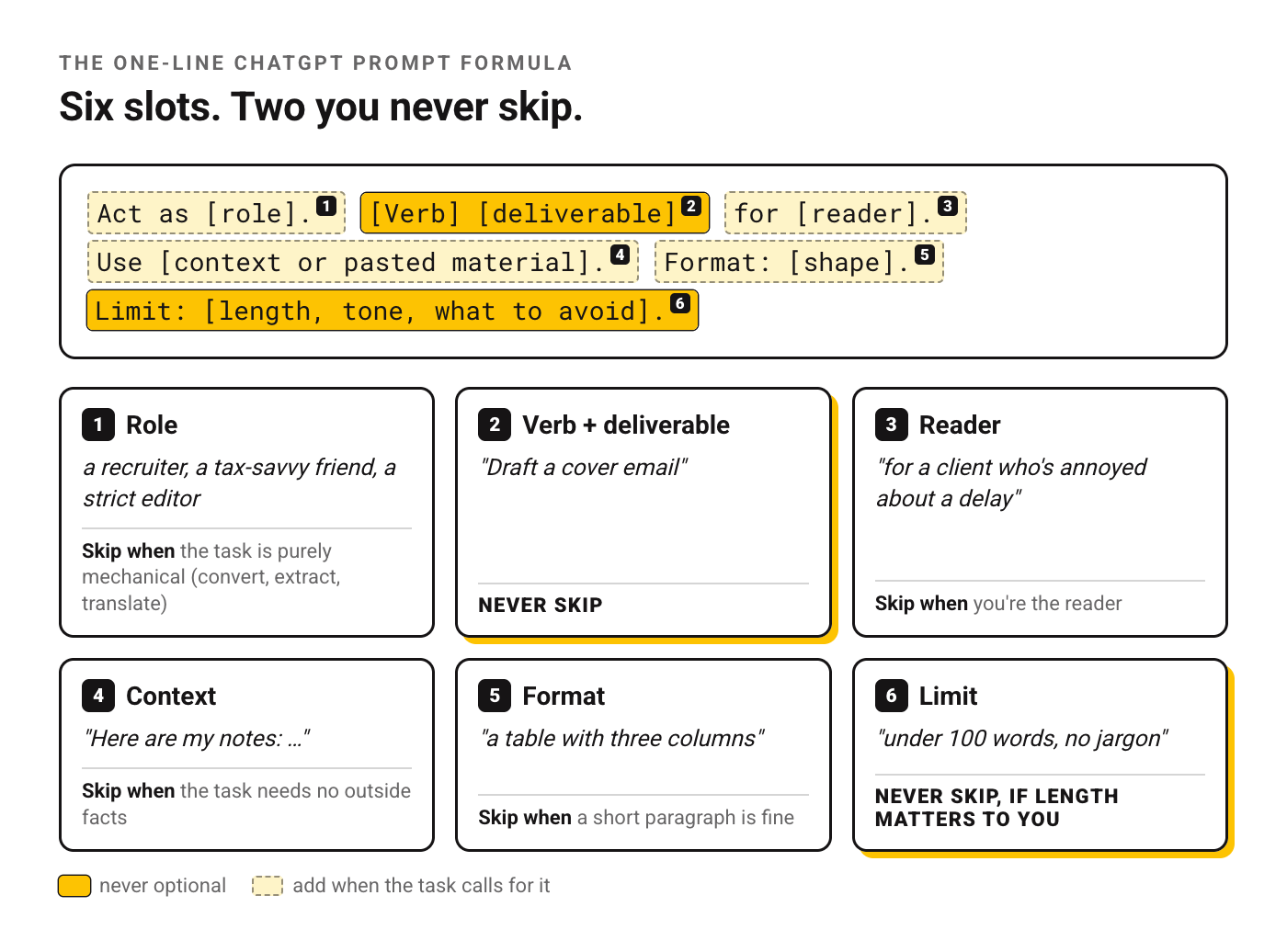
Act as [role]. [Verb] [deliverable] for [reader]. Use [context or pasted material]. Format: [shape]. Limit: [length, tone, what to avoid].| Slot | Example | Skip it when |
|---|---|---|
| Role | a recruiter, a tax-savvy friend, a strict editor | the task is purely mechanical (convert, extract, translate) |
| Verb + deliverable | "Draft a cover email" | never |
| Reader | "for a client who's annoyed about a delay" | you're the reader |
| Context | "Here are my notes: …" | the task needs no outside facts |
| Format | "a table with three columns" | a short paragraph is fine |
| Limit | "under 100 words, no jargon" | never, if length matters to you |
Two slots are never optional: the verb with its deliverable, and the limit. Leave out the limit and you've handed the length and the formality over to ChatGPT.
Words That Change the Answer
This is the ChatGPT prompting cheat sheet part: swap one word and the output changes shape. Each table is short on purpose.
Task verbs
The verb sets the job.
| Type this | You get |
|---|---|
| Summarize | the main points, shorter than the original |
| Explain | the why and how, usually with an example |
| Draft | a first version you're expected to edit |
| Rewrite | your text with the same meaning in a new form |
| Critique | problems, ranked, without a rewrite |
| Compare | options side by side on stated points |
| Outline | a skeleton of headings and bullets |
| Brainstorm | many rough options, quantity over polish |
Formats
Add one of these to the end of any prompt and the same content comes back in a shape you can use straight away.
| Type this | You get |
|---|---|
| "as a table with columns X, Y, Z" | data you can paste into a sheet |
| "as a numbered checklist" | steps in order |
| "in three bullets" | a forced short version |
| "as an email with a subject line" | something ready to send |
| "as a script, two speakers" | dialogue for practice or video |
| "in plain text, no markdown" | clean text for pasting elsewhere |
Tone and reader
Naming the reader changes the vocabulary and how much gets explained.
| Type this | Effect |
|---|---|
| "for a 12-year-old" | short words, one idea per sentence |
| "for an expert, skip the basics" | denser, no definitions |
| "friendly but direct" | warm without padding |
| "formal, for a client" | no slang, full sentences |
| "in my voice: [paste a sample]" | matches your own writing |
Limits
Limits are the cheapest way to cut filler.
| Type this | Effect |
|---|---|
| "under 120 words" | a hard length cap |
| "no intro, no summary at the end" | cuts the filler at both ends |
| "don't use: [words]" | bans phrases you're tired of |
| "if you're not sure, say so" | gives it permission to admit gaps |
| "ask me questions first" | gets missing details before it writes |
30 Short ChatGPT Prompts by Task
Short on purpose. Each one is a complete request you can paste and send, and each takes the formula in a different direction.
Writing and email (1 to 5)
Paste your own text where the brackets are. Prompt 5 is the one to reach for when you want your style left alone.
1. Tighten a draft
Cut this text by a third without losing any facts. Keep my wording where you can. [paste]2. Reply when you're annoyed and shouldn't sound it
Draft a calm, firm reply to this email. I want [outcome]. Under 120 words, one apology at most. [paste email]3. Subject lines
Write ten subject lines for this email, under 45 characters each, no clickbait. [paste email]4. Turn messy notes into something your manager will read
Turn these notes into a short update for my manager: what's done, what's blocked, what I need from them. [paste notes]5. Proofread only
Proofread this. Fix spelling, grammar and punctuation only. Don't change my style. List every change you made. [paste]Work and meetings (6 to 10)
These turn raw notes and lists into something a team can act on.
6. Agenda
Create a 30-minute meeting agenda for [goal] with [attendees]. Time per item, and the decision we need by the end.7. Meeting notes into action items with owners and dates
From these meeting notes, list every action item as a table: task, owner, due date. Write "unassigned" where no owner was named. [paste]8. Prioritize the week
Here's my task list. Sort it into: do today, do this week, delegate, drop. One line of reasoning per task. [paste list]9. Explain a policy or document to a team that won't read it
Explain this document to a team that won't read it. Five bullets, plain language, and the one thing they must do differently. [paste]10. Spreadsheet formula
Write a [Excel / Google Sheets] formula that [what it should do]. My data is in columns [A to D], header in row 1. Explain it in one sentence.Study and learning (11 to 15)
Prompt 12 works best when you answer honestly instead of looking things up between questions, because the follow-ups are built around your mistakes.
11. Explain like a tutor
Explain [topic] as a patient tutor would. Start with a one-sentence version, then a worked example, then one common mistake.12. Quiz me before the exam, one question at a time
Quiz me on [topic], one question at a time. Wait for my answer, tell me if I'm right and why, then ask the next. Ten questions, getting harder.13. Flashcards
Turn these notes into 15 flashcards, question on one line, answer on the next. [paste notes]14. Find the gaps in my essay argument
Read my essay outline and point out the weakest claim, the missing counterargument and any step that doesn't follow. Don't rewrite it. [paste]15. Study plan
Make a study plan for [exam] on [date]. I have [hours] a day. Mix review and practice questions, and leave the last two days for revision only.Research and analysis (16 to 20)
Treat every answer here as a lead to check.
16. First look at a topic
Give me an overview of [topic]: the key terms, the main debates, and three questions I should research next. Flag anything you're unsure about.17. Pros and cons, scored against what you care about
Compare [option A] and [option B] for [my situation] in a table: cost, effort, risk, payoff. Then say which you'd pick and why.18. Read a long document for me
From this document, pull out every date, number and commitment, with the sentence each came from. [paste]19. Survey or feedback themes
Group these customer comments into themes. For each theme: a name, how many comments fit, and one typical quote. [paste]20. Sanity-check a claim before you repeat it
I read this claim: "[claim]". What would I need to check to know if it's true? List the sources that could settle it. Don't guess the answer.Career (21 to 25)
Keep every claim true: these prompts reshape what you've done, and an invented achievement is the fastest way to lose an interview.
21. Tailor a resume line
Rewrite this resume bullet to match the job description below. Keep it true, start with a verb, include a number if my text has one. Bullet: [paste]. Job: [paste]22. Practice interview with follow-up questions
Act as the hiring manager for [role]. Interview me with one question at a time, and after each answer give me one specific improvement.23. LinkedIn headline
Write five LinkedIn headlines for a [role] who [what you do best], under 120 characters each, no buzzwords.24. Ask for a raise with your results in hand
Help me prepare a raise conversation. My role: [role]. What I've delivered this year: [list]. Draft my opening two sentences and answers to the three objections I'm likely to hear.25. Networking message
Write a short message to [person/role] asking for a 15-minute call about [topic]. Mention [shared connection or reason]. Under 80 words.Everyday life (26 to 30)
Small jobs, each done in a single message, so you can get back to whatever you were doing.
26. Meal plan
Plan five dinners for two people, under 30 minutes each, using [ingredients I have]. Add one shopping list for everything missing.27. Trip outline for a short break with a fixed budget
Outline a [number]-day trip to [place] for [who's going] on a budget of [amount]. One plan per day, morning and afternoon, with one rainy-day backup.28. Hard conversation
I need to tell [person] that [news]. Give me three ways to open the conversation, from gentlest to most direct.29. Decode a bill or letter
Explain this letter in plain English: what it's asking me to do, by when, and what happens if I don't. [paste]30. Gift ideas
Suggest ten gift ideas for [person] who likes [interests], budget [amount]. Mix things and experiences. One line on why each fits.If you need more than thirty, the full catalog of 500+ goes deeper on each of these areas.
Follow-Ups When the Answer Misses
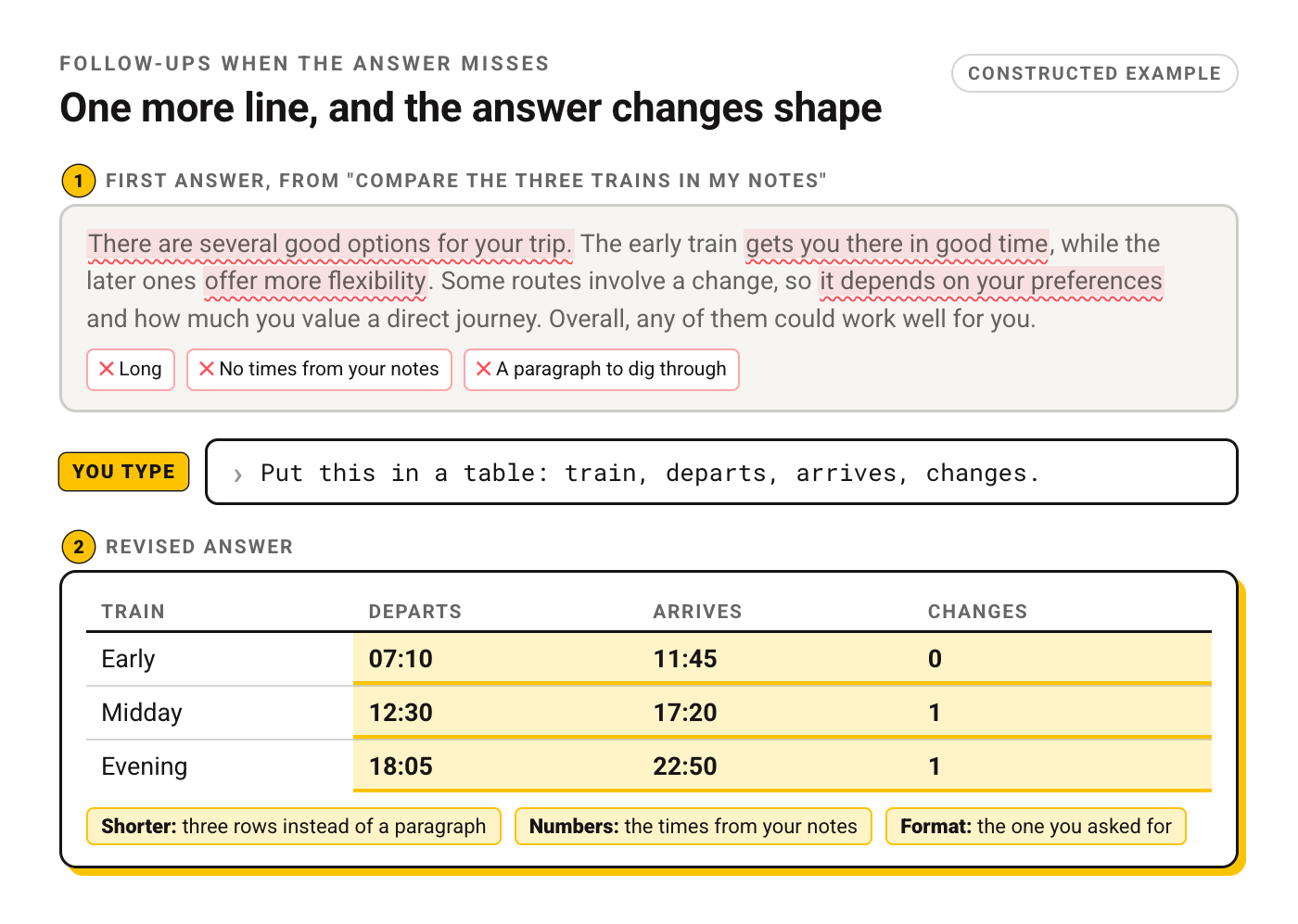
You don't need a new prompt when the first answer is off. Type one more line in the same chat. Each row below pairs a common miss with the line that fixes it.
| The answer is… | Type this next | Why it helps |
|---|---|---|
| too long | "Cut this to half the length. Keep the numbers." | a target beats "shorter" |
| too generic | "Make this specific to [my situation]. Use the details I gave you." | points it back at your context |
| the wrong tone | "Rewrite in a friendlier, less formal tone. Same content." | changes voice, keeps substance |
| missing something | "You left out [X]. Add it without changing the rest." | protects the parts that worked |
| full of filler phrases | "Remove intros, summaries and any sentence that adds nothing." | strips padding at both ends |
| wrong format | "Put this in a table: [columns]." | format commands are cheap to fix |
| confident but doubtful | "Which of these claims are you unsure about? Mark them." | surfaces guesses |
| a fact looks invented | "Where does this come from? If you don't know, say so." | invites "I don't know" |
| one idea when you wanted many | "Give me ten more, each different from the last." | forces range |
| right but hard to follow | "Explain it again with one concrete example." | examples beat definitions |
| going in circles | "Start over. Here's what I need in one sentence: [goal]." | clears the earlier drift |
| almost there | "Good. Change only [part]." | stops it rewriting what you liked |
The "invented fact" row deserves more than one line, and there are nine methods for fewer made-up answers if it keeps happening.
Old Habits to Drop
Some prompt habits come from older models and hang around in cheat sheets long after they stopped helping.
"Think step by step" on a reasoning model. OpenAI's guidance for its reasoning models says that instruction may not improve results and can sometimes hurt them, and recommends keeping prompts simple and direct. That guidance is written for reasoning models, so on a regular chat model you can leave the line in. On a model that already reasons, drop it.
Puffed-up roles. Our rule of thumb: a role earns its place by being specific. "You are the world's greatest marketing genius" says how good, which the model can't act on. "Act as a marketer who writes for small local shops" says what kind of judgment you want.
Pasting the same background every time. If you open each chat with the same paragraph about your job, put it in your custom instructions once and let every new chat start from it.
Keep It Open While You Work
The quickest way to use this page: keep it pinned, start from the formula, and jump to the follow-up table the moment an answer disappoints. Before long, the verbs and formats you use daily will come without looking.
The prompts above are short by design. When you want longer, fully built prompts sorted by task, the library has them.
Frequently Asked Questions
Is there a ChatGPT prompts cheat sheet PDF?
There's no separate file for this page, but you can save it as a PDF from your browser's print dialog. If you'd rather have ready-made reference sheets for several models, see the cheatsheet collection linked at the end of this page.
What's a good ChatGPT cheat sheet for students?
Prompts 11 to 15 above are written for studying. For longer ones, there are ten longer prompts written for students.
What is the best prompt formula for ChatGPT?
Role, verb plus deliverable, reader, context, format, limit, in that order. It's a starting point, and the two parts that matter on almost every request are the deliverable and the limit. The rest you add when the task calls for it: a role when you want a particular kind of judgment, context when the answer depends on facts ChatGPT doesn't have, a format when you'll paste the result somewhere specific.
Do these prompts work in Claude and Gemini?
They should. Nothing in them depends on a ChatGPT-only feature, so paste them into Claude or Gemini as they are.
Your Move
Pick one prompt from the task you'll do next. Send it as written, then use one line from the follow-up table to adjust it.
That's the whole method: start short, then steer.
Put this into practice: browse the ChatGPT section of the library and productivity prompts in the God of Prompt library. Copy, paste, run.
Want this kind of reference for every model you use? The AI Cheatsheets Collection has quick-reference sheets for ChatGPT, Claude, Gemini and more, delivered to a Notion page you can keep open next to the chat.
Prompts for this topic
Put this article to work with ready-to-use prompts from the God of Prompt library.
Keep reading

ChatGPT Errors In 2026: Reasons and Fixes
ChatGPT not working? Learn how to fix common ChatGPT errors in 2026, including network issues, login problems, and server failures. Quick troubleshooting tips to get ChatGPT running again.


Is ChatGPT Down? Try These Fixes!
Is ChatGPT down? Learn how to check its status, fix common issues, and find alternatives when it’s not working. Get troubleshooting tips and real-time updates here

Voice Prompts: How to Prompt ChatGPT Voice, Gemini Live and AI Voice Generators
Voice prompts come in two kinds: what you say to a voice assistant so it answers well, and what you write for a text-to-speech tool so the voice sounds right. This guide covers both, with prompts for each.

The best of the blog, in your inbox
One email when notable prompts, tools, and model updates land. No spam, unsubscribe anytime.
Join 100,000+ subscribers. One email a week, real prompts, tools, and model updates. Unsubscribe anytime.