15 ChatGPT Prompts for Cheap Flights That Do the Legwork
15 ChatGPT prompts for cheap flights: flexible dates, nearby airports, split tickets and fee checks, plus how to pair ChatGPT with Google Flights alerts.


On this page
- What ChatGPT Can and Can't See
- Plan the Search (Prompts 1 to 5)
- 1. The search plan
- 2. Nearby airports
- 3. Airlines on the route
- 4. Open-jaw and multi-city
- 5. The year at a glance
- Compare the Real Price (Prompts 6 to 10)
- 6. Every charge on one fare
- 7. Two options, real totals
- 8. Split tickets
- 9. Layovers and transit rules
- 10. Points or cash
- Set Up Alerts With Google Flights
- 11. The tracking list
- After You Book (Prompts 12 to 15)
- 12. The price dropped
- 13. The airline changed the flight
- 14. A message to the airline
- 15. The week before
- Beyond Flights: Travel Planning Prompts
- Frequently Asked Questions
- What are some good prompts for finding cheap flights?
- What is the trick to getting cheap flights?
- How to find a random cheap flight?
- Do these prompts work for international flights?
- Your Move
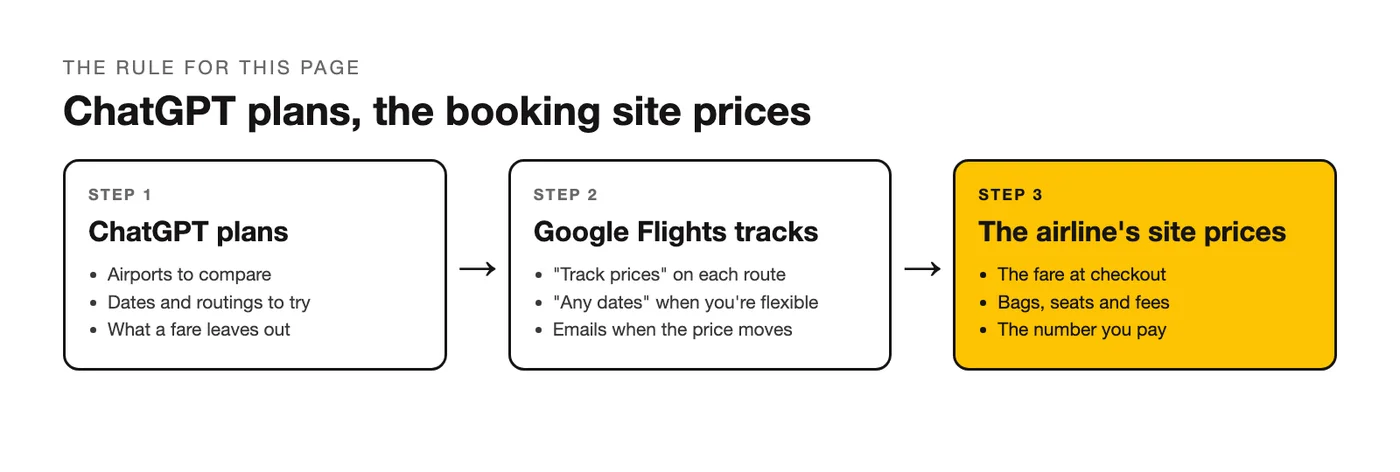
ChatGPT prompts for cheap flights pay off when they hand ChatGPT the right job. It can't tell you what a seat costs this minute, but it can do the legwork around the search: which airports to compare, which dates to try, what a fare leaves out, which routes to track. One rule runs through this page: ChatGPT plans, the booking site prices. The 15 prompts follow a trip in order, from the first search to the week you fly, and every one of them ends by sending you to a page where the number is real.
What ChatGPT Can and Can't See
Without web search, ChatGPT answers from what it learned in training. That covers how air travel is organized: which airports sit near each other, which airlines fly which regions, what a basic fare tends to leave out. It doesn't cover today's fares or how many seats are left, so a ticket price in a plain chat answer is a guess.
With search switched on, ChatGPT can read fare pages. OpenAI's announcement of apps in ChatGPT also named Booking.com and Expedia among the first partners, in markets where those services are offered. A price quoted in a chat is still a snapshot. The one that counts is on the airline's or the agency's checkout page at the moment you pay, so every prompt below asks ChatGPT to say what to verify.
Plan the Search (Prompts 1 to 5)
These AI prompts to find cheap flights widen the search before you price anything: more dates, more airports, more ways to route the trip.
1. The search plan
Start here. It turns a loose idea into a list of searches.
I want to fly from [city] to [city] sometime in [month], for [number] nights. I'm flexible by up to [number] days either way. List the airports within 2 hours of both cities that could work, which airlines usually fly each pair, and which days of the week I should check first. Don't quote prices; tell me exactly what to search on Google Flights.2. Nearby airports
Getting to a farther airport has a cost too, so the prompt asks for it.
My home airport is [airport]. List every other airport I could reach within [2 hours] by car or train, with the rough travel time and what the trip to each would involve. For a flight to [destination], tell me which of them are worth comparing as departure points and why. Mark anything you're unsure of so I can check it.If you fly from the same place every time, saving your home airport in custom instructions means you stop retyping it.
3. Airlines on the route
A list of carriers to search, with their own sites.
Which airlines fly between [city or region] and [city or region], including low-cost and regional carriers? List each one with its main hubs and its website, and tell me whether any of them have to be searched on their own site. Don't guess at prices, and say so where you aren't sure a route still runs.4. Open-jaw and multi-city
Three shapes for a two-city trip, side by side.
I want to visit [city A] and [city B] on one trip from [home city], about [number] days in total. Compare three shapes: a round trip to A with a side trip to B, a round trip to B with a side trip to A, and an open-jaw ticket that flies into one city and home from the other. For each, list the flights and ground legs I'd need to price, and what could make it cost more than it looks.5. The year at a glance
For trips where the dates are wide open.
I can travel to [destination] any time in the next [12] months. Lay out the year month by month: weather, school holidays and large local events that fill flights, and the quieter weeks on either side of them. Tell me which windows to price first and why. Treat this as background for me to check, and don't quote fares.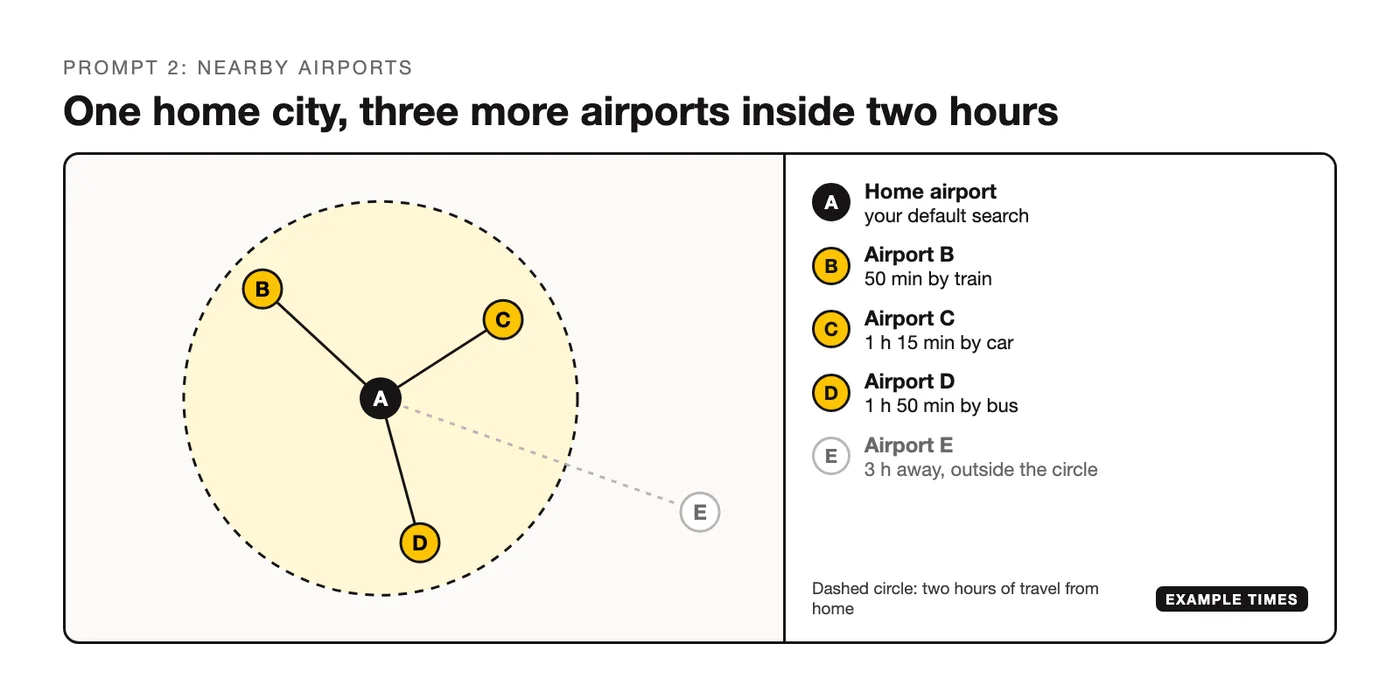
Compare the Real Price (Prompts 6 to 10)
The fare on the results page and the amount you pay can be two different numbers. Google's help page on finding plane tickets says the price shown covers the air transport itself and that additional fees may apply, with baggage and credit cards as its examples. These ChatGPT flight prompts work on fares you've already found and pasted in.
6. Every charge on one fare
A table with blanks you fill in from the airline's site.
Here's a fare I found: [paste the fare details]. I'm traveling with [one carry-on and one checked bag] and I want [to choose my seat]. List every charge that could be added before I pay and at the airport: bags, seats, payment fees, check-in fees. Build a table with one line for each, and leave the amount blank wherever you don't know it so I can fill it in from the airline's site.7. Two options, real totals
The comparison that the results page doesn't do for you.
Here are two flight options I found: [paste option A details] and [paste option B details]. Work out the real total for each one: base fare, checked bag, carry-on, seat selection and any airport transfer. Show the math in a table, flag anything I should double-check on the airline's own site, and tell me which is cheaper overall.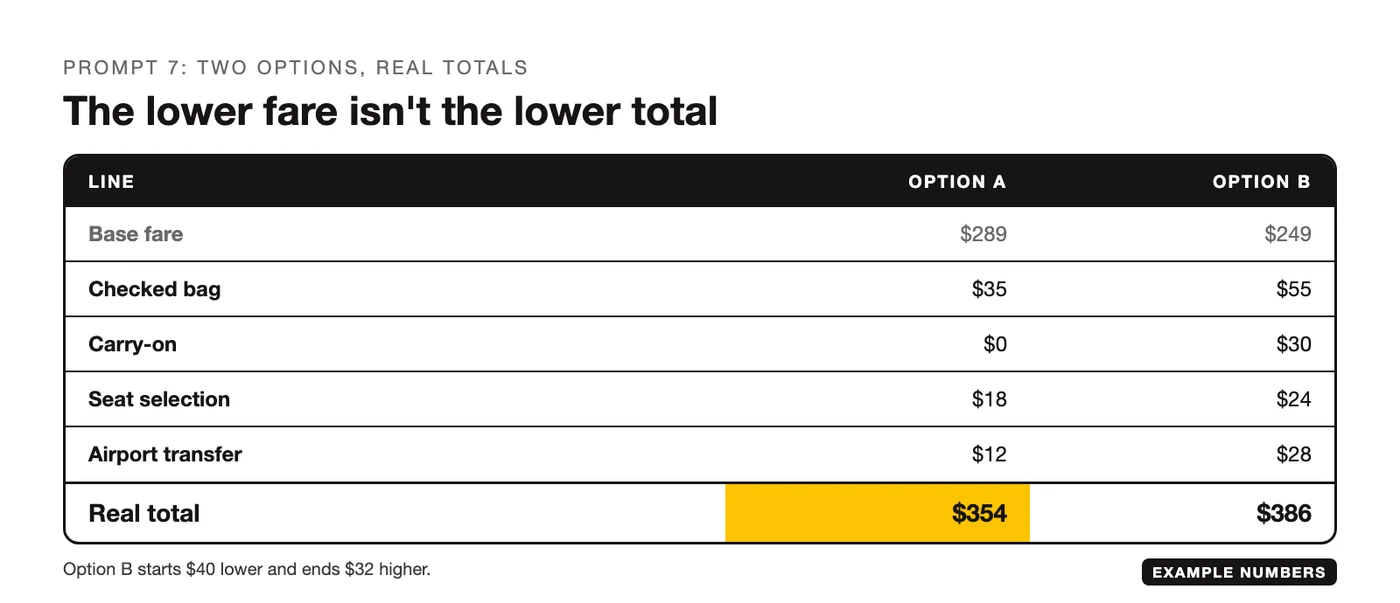
8. Split tickets
Two separate bookings can cost less. This prompt lists what you take on in exchange.
I'm thinking of booking [city A] to [city B] and [city B] to [city C] as two separate tickets. Explain what I take on by doing that: a missed connection, collecting and rechecking bags, changing terminals or airports, and who rebooks me if the first flight is late. Tell me what to ask each airline before I book, and what gap between the two flights I should think about for [airport].9. Layovers and transit rules
Entry and transit rules change, so the prompt sends you to the official pages.
My itinerary has a layover in [city, country] for [number] hours, and I hold a [country] passport. List what I need to check before I book: whether I need a transit visa, whether I have to collect and recheck my bags, and whether the layover is long enough to change terminals. Point me to the official government and airport pages where each answer should be confirmed, and don't treat your own answer as final.10. Points or cash
A way to compare, with the lookups left to you.
I have [number] points in [program] and a [card name] card. For a flight from [city] to [city], explain my options in plain words: paying cash, using points, or a mix of both. Tell me what I'd need to look up to compare them, including taxes and fees on an award ticket, and how to work out what one point is worth on this booking. Don't assume current award prices.Set Up Alerts With Google Flights
A plan tells you what to search. A tracker tells you when the price moves. Google's help page on tracking flights and prices describes the steps:
- Open Google Flights and set the number of stops, the cabin class and the number of tickets.
- Choose your departure airport and your destination.
- Turn on "Track prices." You can track the dates you searched, or pick "Any dates" if your travel is flexible.
- To follow one flight, select it and turn on "Track prices" for that flight.
With "Any dates," Google says you get an email when the lowest price on the route drops significantly over a month. It also sends an email when prices on a tracked route are likely to rise.
Two more tools from Google's help pages fit the plan from prompt 1. The price graph shows fare trends by month or week when your dates are flexible, and the Airports option shows fares for alternative airports, which is where the list from prompt 2 goes.
11. The tracking list
Turn the plan from prompts 1 to 5 into routes to track.
Based on the plan we've built, give me a tracking list for Google Flights: each route written as departure airport to arrival airport, whether to track specific dates or any dates, and the order to set them up in. Keep it to [five] routes at most, and put the one most worth watching first.After You Book (Prompts 12 to 15)
Four prompts for the weeks between paying and boarding.
12. The price dropped
Paste the fare rules from your confirmation email.
I booked [flight details] on [date], and the price has dropped since. Here's the fare rule text from my confirmation: [paste]. Explain what it says about changes and refunds, what I could ask the airline for, and whether asking is worth it once any change fee is counted.13. The airline changed the flight
A plain summary of the notice and your options.
The airline changed my flight. Here's the notice: [paste]. Summarize what changed, then list my options as the notice and my fare rules describe them: accept, rebook or refund. Tell me which passenger rights rules could apply to a flight from [country] to [country], and where the official text is so I can read it myself.14. A message to the airline
Short, factual and dated.
Write a short, polite message to [airline] asking for [a refund / a free change / compensation] for booking [reference]. The facts: [what happened, with dates and flight numbers]. Put the request in the first sentence, give the facts in order, name the rule or policy I'm relying on if I gave you one, and ask for a reply by a specific date. Keep it under 150 words.15. The week before
A checklist in time order.
I'm flying [route] on [date] with [airline], carrying [bags]. Build a checklist for the week before and the day of travel: when check-in opens, the bag size and weight to confirm on the airline's site, documents, seat, the trip to the airport, and what to screenshot in case the app fails. Put it in order by time.Beyond Flights: Travel Planning Prompts
The flight is one line in the trip budget, and the same three requests work for the rest of it: a plan, a table and a list of things to verify. Two travel prompts to carry on with:
- "Build a day-by-day plan for [number] days in [city] for [who's traveling], with one fixed booking per day at most and the walking time between stops."
- "Turn this trip into a budget table: flights, beds, local transport, food and a buffer. Leave blanks where I need to look up a price."
For the money side, the library has budgeting prompts and personal finance prompts, and the decision-making prompts help when two itineraries are close. There are also 500 more prompts for everyday tasks.
Frequently Asked Questions
What are some good prompts for finding cheap flights?
The ones that ask for a search plan and leave the price to a booking site. Prompt 1 turns a rough idea into airports, airlines and dates to search. Prompt 2 adds departure airports you hadn't counted. Prompt 7 puts two fares on equal terms by adding bags, seats and transfers. Each asks ChatGPT to mark what you should verify.
What is the trick to getting cheap flights?
There isn't one that holds for every route. What you control is how many options you compare, meaning dates, airports and routings, and whether you compare full costs. Prompts 1 to 5 widen the options, prompts 6 and 7 make the comparison fair, and price tracking tells you when one of the options moves.
How to find a random cheap flight?
Fix the dates and the budget, and leave the destination open. Ask ChatGPT: "I can leave from [airport] on [dates] and I'm open on where. Suggest ten destinations in different regions that suit that time of year, and say what each is like then. No prices." Then price the shortlist yourself. Google's help page for Flights notes you can also find destinations from a popular destinations list or a world map.
Do these prompts work for international flights?
Yes, with more to check. Add your passport country to the prompt, ask for airports on both ends, and run prompt 9 on every layover, since transit and entry rules depend on your nationality and the countries you pass through. Confirm each answer on the official government page before you book.
Your Move
Run prompt 1 for the next trip you have in mind, do the searches it lists, and set up tracking on the two routes that look best. When you've found real fares, paste two of them into prompt 7. ChatGPT plans, the booking site prices.
Put this into practice: browse the budgeting prompts in the God of Prompt library. New to working with AI models? The AI Starter Pack explains every major model in plain steps, with cheatsheets to keep open while you work.
Prompts for this topic
Put this article to work with ready-to-use prompts from the God of Prompt library.
Keep reading

ChatGPT Cover Letter Prompts That Don't Sound Like AI
A five-step prompt chain that turns your real experience into a cover letter worth reading, plus the exact phrases that give an AI-written one away.


10 ChatGPT Prompts That Help Small Businesses Decide Which Equipment to Buy
Artificial intelligence, particularly ChatGPT, offers tailored insights by analyzing specific business needs, budget constraints, and market trends. This article explores 10 practical ChatGPT prompts designed to help small businesses decide which equipment to buy, ensuring smarter investments and optimized operations.

Prompt Security: How to Protect Prompts, Data and Users in AI Apps
Prompt security covers three things people confuse: keeping your prompts private, keeping injected text from hijacking the model, and keeping user data out of places it should not go. Here is what each one needs.

The best of the blog, in your inbox
One email when notable prompts, tools, and model updates land. No spam, unsubscribe anytime.
Join 100,000+ subscribers. One email a week, real prompts, tools, and model updates. Unsubscribe anytime.