Want your photos to stand out? Use the right prompt.
These ChatGPT image prompts turn basic pics into eye-catching, scroll-stopping visuals in seconds — organized by style, use case, and subject so you can copy and use them immediately.
Just drop in your image, paste the prompt, and watch the magic happen.
Note: If you want to generate AI videos in seconds, check out this AI tool.
ALSO READ: What ChatGPT Model Is Worth Using

What Makes an AI Image Prompt Go Viral?
Not all AI image prompts perform equally. High-performing prompts share a few traits:
- Specificity over vagueness — “neon-lit cyberpunk portrait with rain reflections” beats “cool city photo”
- Named style references — citing a visual genre (cinematic, anime, watercolor, 3D render) gives the AI model a clear target
- Lighting and mood cues — words like “softbox lighting,” “golden hour,” or “high contrast noir” dramatically change the output
- Subject + style + finish — the strongest prompt-to-image formula combines all three
Trending viral AI image formats in 2026 include Studio Ghibli remixes, action-figure packaging edits, retro pixel art portraits, and minimalist product photography. The prompts below cover these and more.
Viral ChatGPT Image Prompts by Style
1. Cyberpunk Glow-Up
Turn your photo into a neon-lit, sci-fi scene.
Prompt:
“Transform this image into a cyberpunk aesthetic — neon lights, dark city backdrop, glowing signs, misty rain, and futuristic accessories. Add moody shadows and light reflections on metal surfaces.”
Best for: Portraits, night shots, city vibes
Style vibe: Futuristic, dramatic, glowing
Works best on: GPT Image (ChatGPT), Midjourney
2. Cartoonify Me
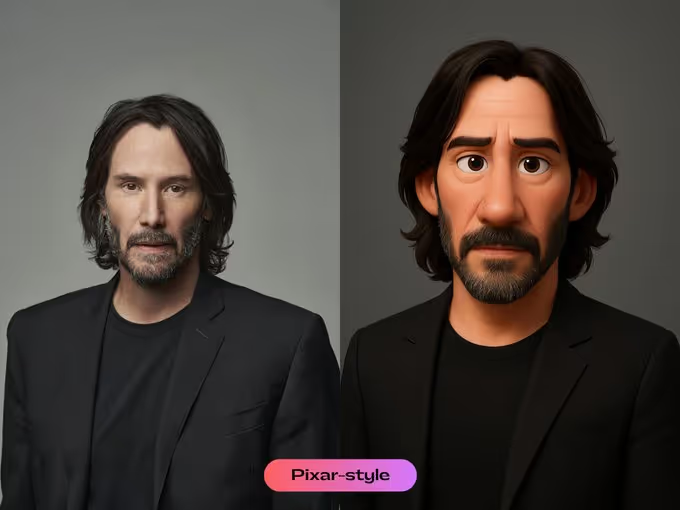
Make it look like a Pixar movie still.
Prompt:
“Convert this image of [your subject here] into a 3D Pixar-style cartoon — clean lines, soft lighting, expressive features, and a polished render that feels cinematic.”
Best for: Selfies, pets, profile pics
Style vibe: Cute, polished, animated
Works best on: GPT Image (ChatGPT), DALL·E 3
3. Ghibli Makeover
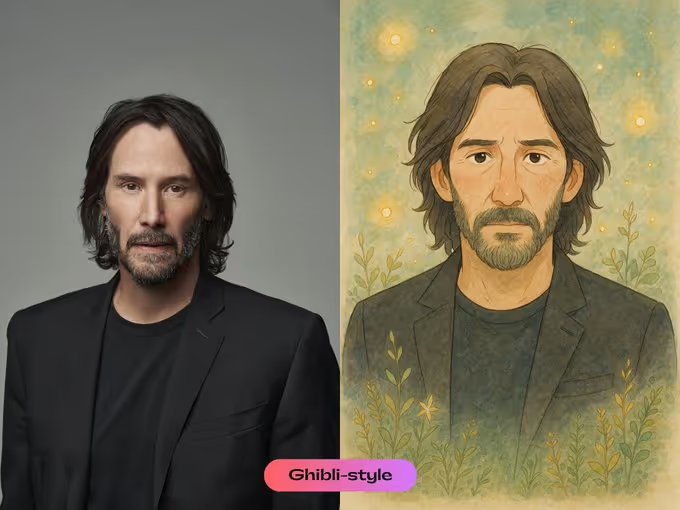
Add cozy, magical, fairytale vibes.
Prompt:
“Remix this photo into a Studio Ghibli-style illustration — soft watercolor palette, delicate linework, cozy atmosphere, and fantasy elements like floating lights or magical plants.”
Best for: Nature pics, kids, warm moments
Style vibe: Dreamy, soft, storybook
Works best on: GPT Image (ChatGPT), Adobe Firefly
4. Oil Painting Filter
Make it look hand-painted and timeless.
Prompt:
“Apply an oil painting effect to this image — visible brush strokes, textured canvas feel, rich color layers, and Rembrandt-inspired lighting.”
Best for: Portraits, moody shots, vintage looks
Style vibe: Classic, textured, artistic
5. Magazine Cover Edit
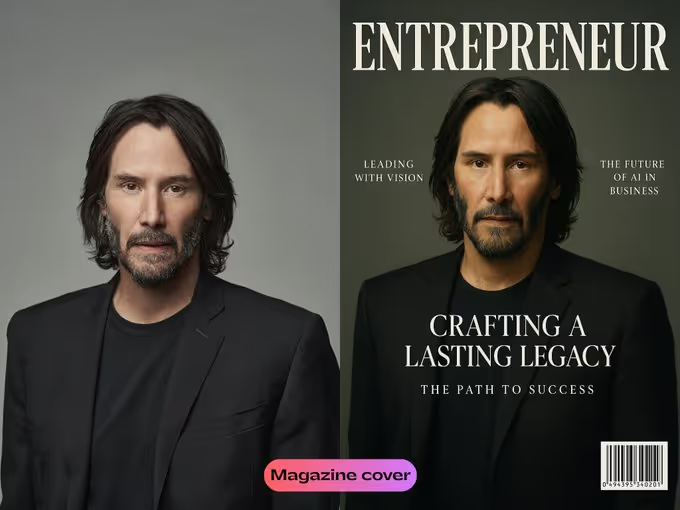
Give your photo the high-end magazine treatment.
Prompt:
“Design a luxury magazine cover using this image of [your subject here]. Include elegant typography, barcode, cover lines, and white space margin layout inspired by Vogue or Forbes.”
Best for: Profile pics, personal branding
Style vibe: Stylish, clean, professional
6. Surreal Dream Filter
Bend reality with soft, dreamy chaos.
Prompt:
“Remix this into a surreal dreamscape — soft haze, levitating objects, bending background, and unnatural light sources. Keep a pastel-toned atmosphere.”
Best for: Creative edits, abstract shots
Style vibe: Whimsical, weird, pastel
7. Anime Scene Overlay
Turn your image into an anime still frame.
Prompt:
“Stylize this image like an anime still — bold linework, cel shading, speed lines in the background, and optional Japanese text or subtitle at the bottom.”
Best for: Action shots, cosplay, character design
Style vibe: Dynamic, bold, animated
Works best on: GPT Image (ChatGPT), Midjourney
8. Noir Lighting Treatment
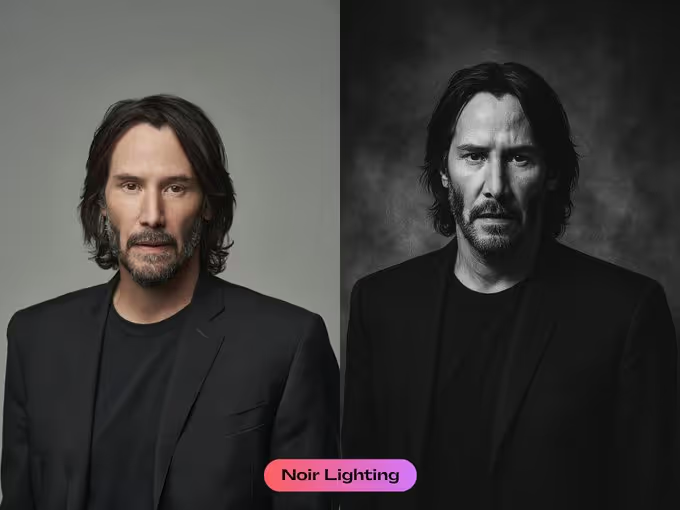
Add dark, moody, vintage drama.
Prompt:
“Transform this into a classic noir scene — high-contrast black and white, sharp shadows, foggy ambiance, and vintage film grain.”
Best for: Black-and-white portraits, dramatic edits
Style vibe: Vintage, moody, cinematic
9. 3D Sculpted Look
Make it look like a marble statue.
Prompt:
“Make this image look like a marble sculpture — grayscale tone, chiseled features, and museum-style spotlighting. Optional: pedestal base.”
Best for: Close-ups, profile shots
Style vibe: Statue-like, grayscale, powerful
10. High-Fashion Editorial
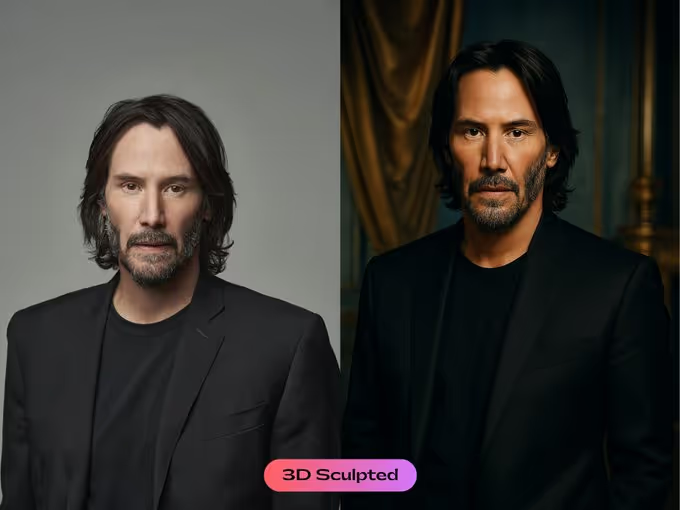
Give your image luxury photo shoot energy.
Prompt:
“Elevate this image to a high-fashion editorial spread — glossy texture, cinematic color grading, luxury setting, and softbox-style lighting.”
Best for: Styled portraits, glam shots
Style vibe: Glossy, elegant, cinematic
Bonus: Golden Hour Filter
Fake the perfect sunset.
Prompt:
“Apply golden hour tones to this image — warm sunlight, soft highlights, long shadows, and dreamy golden hues.”
Best for: Outdoor photos, couples, travel shots
Style vibe: Warm, glowy, romantic
ChatGPT Image Prompts by Use Case
Need a prompt for a specific job? Here are quick-copy templates organized by what you’re actually making.
Social Media Post
“Redesign this image as a bold, eye-catching social media post — vibrant colors, centered subject, clean background, and room for a text overlay at the top.”
YouTube Thumbnail
“Turn this image into a high-energy YouTube thumbnail — exaggerated expression, bold color contrast, dramatic lighting, and space for large white text on the left side.”
Product Photography
“Reframe this product image as a premium studio shot — white or gradient background, soft shadow, sharp detail, and professional product photography lighting.”
Avatar / Profile Picture
“Stylize this portrait as a polished avatar — clean circular crop, illustrated style, strong color contrast, and a minimal background that pops on a social profile.”
Retro / Pixel Art
“Convert this image into 16-bit pixel art — retro color palette, chunky pixels, and classic arcade-game style character design.”
Minimalist Illustration
“Simplify this image into a minimalist line illustration — flat colors, minimal detail, white background, and clean geometric shapes.”
For hundreds more free prompts organized by category, browse the ChatGPT prompts library.
Which Prompts Work Best on Which AI Image Model?
Different AI image models respond differently to the same prompt. Here’s a quick guide:
| Prompt Style | GPT Image (ChatGPT) | Midjourney | Gemini / Imagen |
|---|---|---|---|
| Cinematic / Editorial | Excellent | Excellent | Good |
| Anime / Cartoon | Very Good | Excellent | Good |
| Watercolor / Illustration | Very Good | Very Good | Very Good |
| 3D Render / Sculpt | Very Good | Excellent | Good |
| Product Photography | Excellent | Good | Very Good |
| Pixel Art / Retro | Good | Excellent | Good |
GPT Image inside ChatGPT is the most accessible starting point — especially for prompt-to-image workflows where you’re iterating conversationally and want to regenerate with tweaks mid-session.
How to Adapt Any Prompt Template
Every prompt above is a template. Swap these variables to make it yours:
- [Subject] — replace with “a woman in a red dress,” “a bottle of hot sauce,” “my dog,” etc.
- [Style] — swap “cyberpunk” for “cottagecore,” “brutalist,” or “Art Deco”
- [Lighting] — change “softbox” to “candlelight,” “neon,” or “overcast natural light”
- [Finish] — add “ultra-detailed 8K render,” “painterly texture,” or “flat vector” at the end
Example remix: Take the Cyberpunk prompt, swap the style to “retro 1980s synthwave” and the lighting to “pink and purple gradient,” and you have a completely different output from the same base structure.
If you’re working on brand or marketing AI prompts, the same remix approach applies — just anchor the subject to your product and the style to your brand aesthetic.
How to Use These Prompts with ChatGPT
No advanced skills required.
Here’s how to do it:
1. Open ChatGPT (GPT-4o or any version with GPT Image tools enabled)
2. Upload your photo
3. Paste one of the prompts above
4. Review the output — if it’s not right, ask ChatGPT to regenerate with one adjustment
Optional tips:
- Adjust details in the prompt to fit your subject
- Combine styles (e.g. “Cartoon + Golden Hour”) for a remix
- Use Midjourney or Leonardo.ai for styles that need extra rendering detail
- Want to reverse-engineer a look? Describe the reference image in detail and ask the AI image model to match it — this is the image-to-prompt workflow
Tips to Make Your AI Images Go Viral
Great prompts get great images. Going viral takes one more step.
- Start with a strong subject — clear, centered, high quality
- Pick trending styles — anime, surreal, cyberpunk, and action-figure packaging are hot in 2026
- Use contrast — bold colors, dramatic lighting, unexpected angles
- Add text or captions — meme it, title it, or explain the vibe
- Post where it fits — Reels, TikTok, Pinterest, X — not just Instagram
- Use before/after formats — transformation posts consistently outperform single images
Want a shortcut to the full collection? The Complete AI Bundle includes curated prompt libraries for every use case, style, and platform — all in one place.
Frequently Asked Questions
How do I write a good ChatGPT image prompt?
Combine a clear subject, a named visual style, a lighting cue, and a finish descriptor. The more specific your language, the closer the output will be to what you picture.
Can ChatGPT generate images directly?
Yes. ChatGPT with GPT Image support generates images directly in the chat window. Upload a reference photo or describe your subject, paste a prompt, and the image generates in seconds.
What is the image-to-prompt workflow?
Instead of starting from scratch, you describe a reference image you like and ask the AI to generate something in that same style. This reverse-engineering approach — image to prompt — helps you replicate a visual aesthetic without guessing.
Are these prompts free to use?
Yes — all prompts on this page are free. Copy and use them as-is or remix them for your own projects.